8
Installation
Included in the box
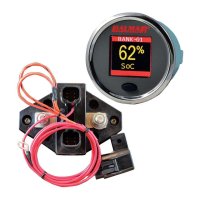
The following parts are included in the standard SG200 System Kit.
(1) SmartShunt, with 60” fused wire positive wire.
(1) Color Display
(1) Display mounting bracket and nut
(1) 10m SmartLink Cable
(1) SmartLink Deutsch-style connector kit, with a connector and
wedgelock.
(1) Fuse for positive wire
(1) This manual
Not Included in the box
1. Mounting fasteners for the SmartShunt. These should be #8 sized cap-
head bolts or screws, depending on the mounting surface.
2. Additional fuse assemblies for the Aux-1 and Aux-2 voltage leads. ABYC
rules specify that circuit protection (Fuses) should be located within 6” of
the power source.
The SmartShunt should be located as close to the battery as possible,
preferably within 12 inches.
The SmartShunt should be mounted to a rm surface in a dry location. All
cables need to be sized for the maximum current ow. Undersized cables can
present a re hazard and adversely affect the performance of the SmartShunt.
Tools needed:
• 9/16 wrench or socket and wrench.
• Any tools required for owner-supplied mounting fasteners.
• 2.0625’, or 53mm hole saw suitable for the mounting surface, if a
suitable a display hole does not already exist.
Installing the SmartShunt and Display
CAUTION: High currents may be carried by the battery cables attached
to the SmartShunt. If you are unsure of any part of the installation, refer
to a qualied installer for their assistance.


 To Next Page