Trouble Shooting
Reset means any of the following operations.
Turn o the power supply unit, and then turn it on after one minute.
Set the distance between the heads to 200mm or more and turn them on again after 1 minute.
Turn o the charge start signal, hold it for 2 seconds or more, and then turn it on again. (normal open typ)
In the case of normal close type, turn o the charge stop signal, hold it for 2 seconds or more, and then turn it o again.
A summary of the phenomenon is shown below for your reference.
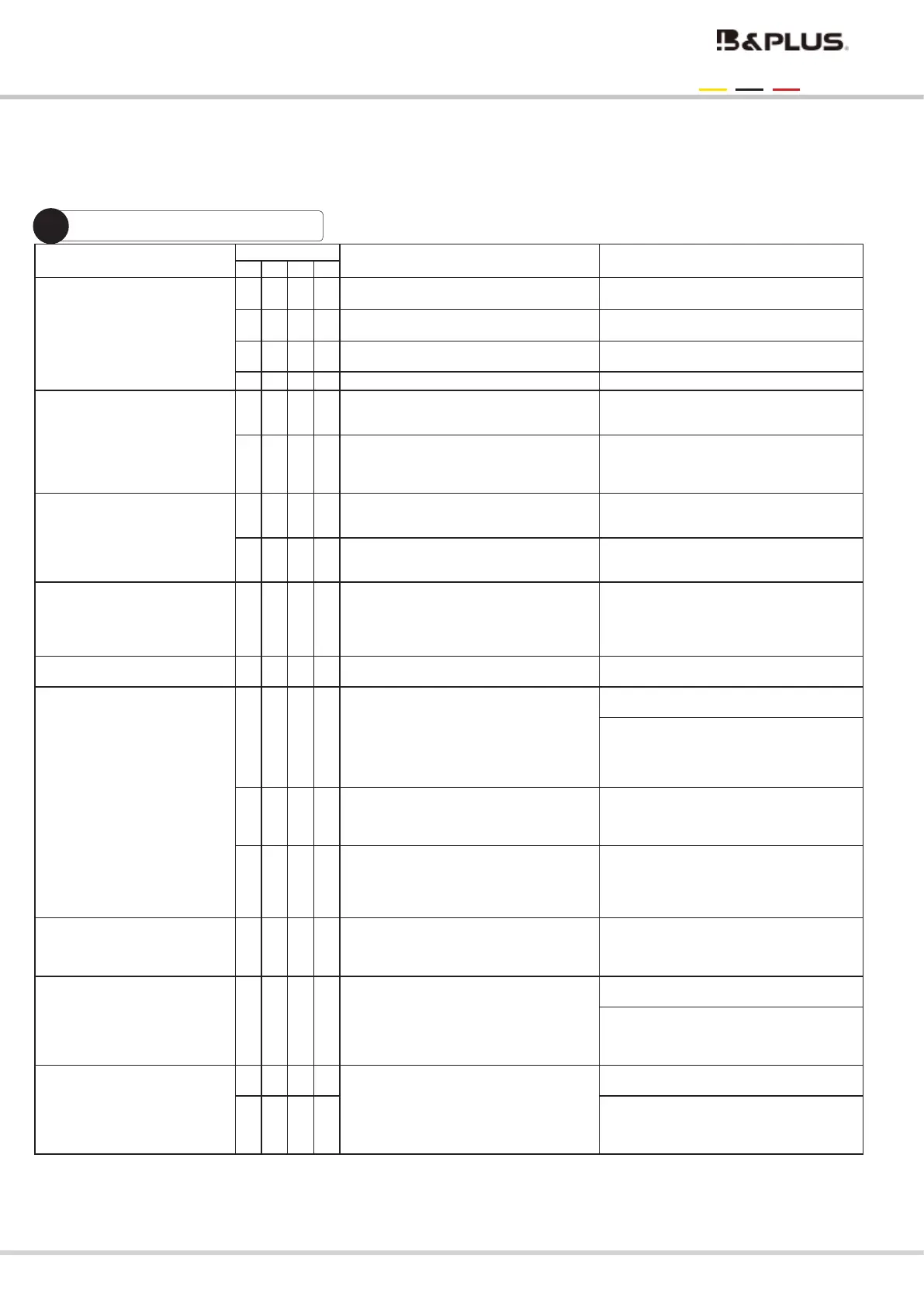
Phenomenon
LED
Possible factors Possible factors and remedies, etc.
E1 E2 E3
Error
The device does not operate when the
power switch is pressed.
Main power (power side) outlet is disconnect-
ed.
Please take measures in various places.
The breaker on the main power supply
side is tripped.
Please take measures in various places.
The power cord of the high-frequency
power supply is disconnected.
Please take measures in various places.
The cord is broken.
Please take measures in various places.
Not charging
(Error occurs)
〇 〇
Use dierent types of batteries, such as
those with dierent voltage ratings.
Check the situation described on the left, and
take measures such as measuring and replac
-
ing the battery voltage.
〇 〇
The battery voltage may be out of the
setting range.
Check the battery charging voltage and cur-
rent settings. (The set values vary depending
on the battery used, so make sure they match
the battery used.)
Charging starts, but is com-
pleted in a short time and
charging does not continue.
If more than one battery is connected,
one of the batteries may have failed or
be at the end of its life.
Check the voltage of each battery one by one.
It is possible that the battery itself is
faulty or has reached the end of its life.
Make sure the battery is ready for use. Re-
place the battery. Please replace the battery
and try to check the charge again.
Charging takes longer than
expected. It takes longer than
expected.
If the charging cable is several meters
long, the charging voltage may be lower
than the set voltage due to voltage eect,
and the battery may not be fully charged
or it may take longer to fully charge.
Review the cable length and cable con-
ductor diameter.
Only power LED is lit The fuse may be blown or the internal circuit
may be broken.
Please contact to our sales.
The charging operation starts, but
after the Charge/End LED lights
repeatedly, Error lights up.
〇
Since the distance is not within the speci
-
cation, the power cannot be fully supplied and
the charging current may have dropped to
complete the charging. Basically, Charge/end
is repeated. Also, when the distance axis is o
When the distance axis deviates just before, it
may become Ready/Charge/End.
Please check communication distance/
center oset.
Remove abnomalies and reset.
〇
If the voltage drops immediately after charg
-
ing and the charging process is repeated,
the battery may be deteriorated.
Check the battery condition with a battery
tester. If the battery is badly deteriorated If
the battery is badly deteriorated, replace the
battery.
〇
The CV voltage and recharge voltage may be
close. After charging is complete, the battery
voltage will drop. If the recharge voltage set
-
ting is too high, the battery will immediately
reach the recharge voltage and recharge.
Reduce recharge voltage.
Ready/Charge/End LED lights
repeatedly, but no error occurs.
〇
When the communication state is unstable,
the interference to signal communication
increases as the charging current increases
after charging starts.
Check that the ferrite clamp of the com-
munication cable is securely attached.
Turn on the power switch. The LED
lights up. but the battery cannot
be charged.
An error has been detected or there is
an abnormality in the CPU operation.
Check the lit LED, and refer to the error
detection on page 28.
Check to make sure that no wires are
connected to other terminals than those
permitted. Check that the connectors of
each device are properly connected.
Immediately after charging starts,
a temperature error occurs in one
of the devices and it does not
operate.
〇 〇 〇
It may be out of the operating temperature
range.
Check the ambient temperature of the device.
(Low and high temperature)
〇 〇 〇 〇
Check the required space distance on page
12 and whether the equipment has accumu
-
lated any dust, oil, or other contaminants, and
consult with our sales.
- 29 -
Wireless charging system 600W specication
For 12V・24V・48V battery


 To Next Page
 Loading...