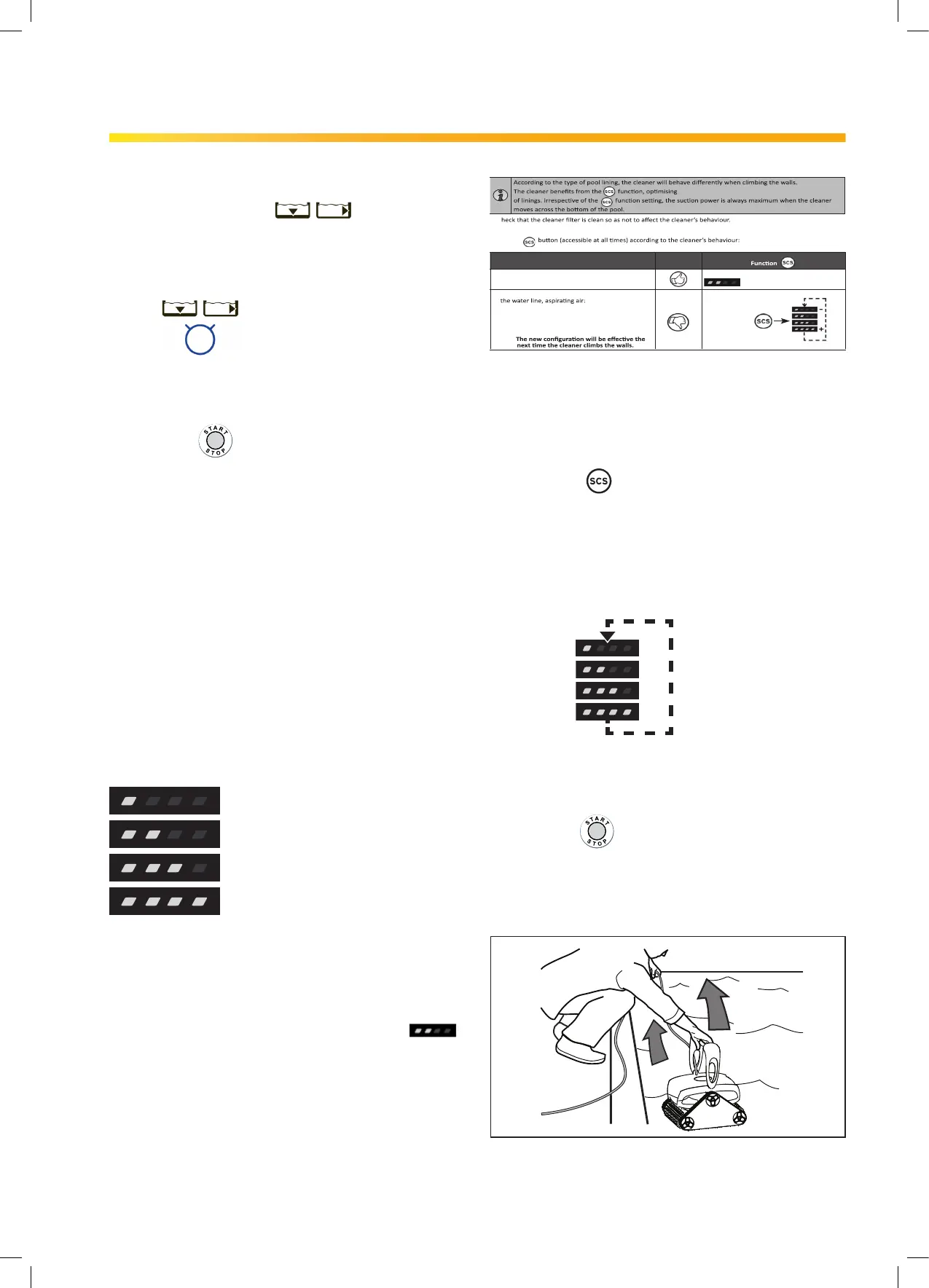
Adjust SCS Wall Climbing Setting:
You can change the wall climbing setting at any
time during cleaner operation with the SCS button.
The new setting will be active when the cleaner
climbs the next wall.
• Press to adjust the wall climbing setting
one level higher.
• One additional LED lights each time you press
the button to indicate stronger grip on the wall.
• To decrease setting, press button to cycle
through back to one LED (lowest setting).
+
_
4
2
1
3
3.4 Stopping the Cleaner
and Removing from the Pool
1. Press to interrupt operation.
2. When the cleaner is within arm's reach, use the
handle to lift it from the water (Figure 14).
Never lift the cleaner out of the pool by the
oating cable.
1
2
Figure 14. Lift Cleaner From Pool with Handle
3. Hold the cleaner vertically over the pool surface
to drain water before removing (Figure 15).
3.2 Starting the Cleaner
The rst time you use the cleaner, the cleaning surface
setting is Floor and Wall
After the rst time, the default is the last setting used.
Select Cleaning Surface:
• Use to change cleaning surface setting.
Begin Cleaning:
• After selecting the cleaning surface,
press
to begin operation.
• At the beginning of the cycle, the cleaner
remains in place for a few seconds to initialize
the microcontroller after the fan motor starts.
3.3 Wall Climbing
(Surface Control System)
The cleaner has the ability to clean the pool walls up to
the waterline. How much the cleaner needs to grip to
the wall depends upon the pool surface.
Grip Intensity Indicator:
Surface Control System (SCS) settings are as follows
for dierent pool surface types:
Check Wall Climbing Setting:
• Start the cleaner and watch as the cleaner
climbs each wall. If grip setting is correct, the
cleaner will easily climb the wall and clean up
to the waterline. The default setting is
:
NOTE: Wall climbing is programmed in a randomized
(SMOOTH) pattern. Cleaner may climb wall and not
reach waterline until third or fourth attempt in order
to thoroughly clean wall surface below the waterline
first.
Pebble Surface LOWEST
Concrete
Vinyl / Fiberglass
Smooth - HIGHEST
Section 3. Operation
wall cleaning and water line brushing on all types
• C
• Once the cleaning cycle has been launched, monitor the cleaner’s behaviour when climbing the walls and when
brushing the water line.
• Use the
See the table below.
Cleaner's behaviour to be observed Meaning
• The cleaner climbs the walls and brushes
the water line.
The 2 LEDs are lit by default
• The cleaner quickly climbs the walls and goes past
Reduce the number
of LEDs.
• The cleaner slowly climbs the walls and stops
below the water line: Increase the number of
LEDs.
��
Press:
Observe Cleaner Behaviour
H670900_REVA 9


 To Next Page