56-101-01501_01502 Revision D Page | 8
CHAPTER 4: OPERATION
1. OPERATING CONTROLS
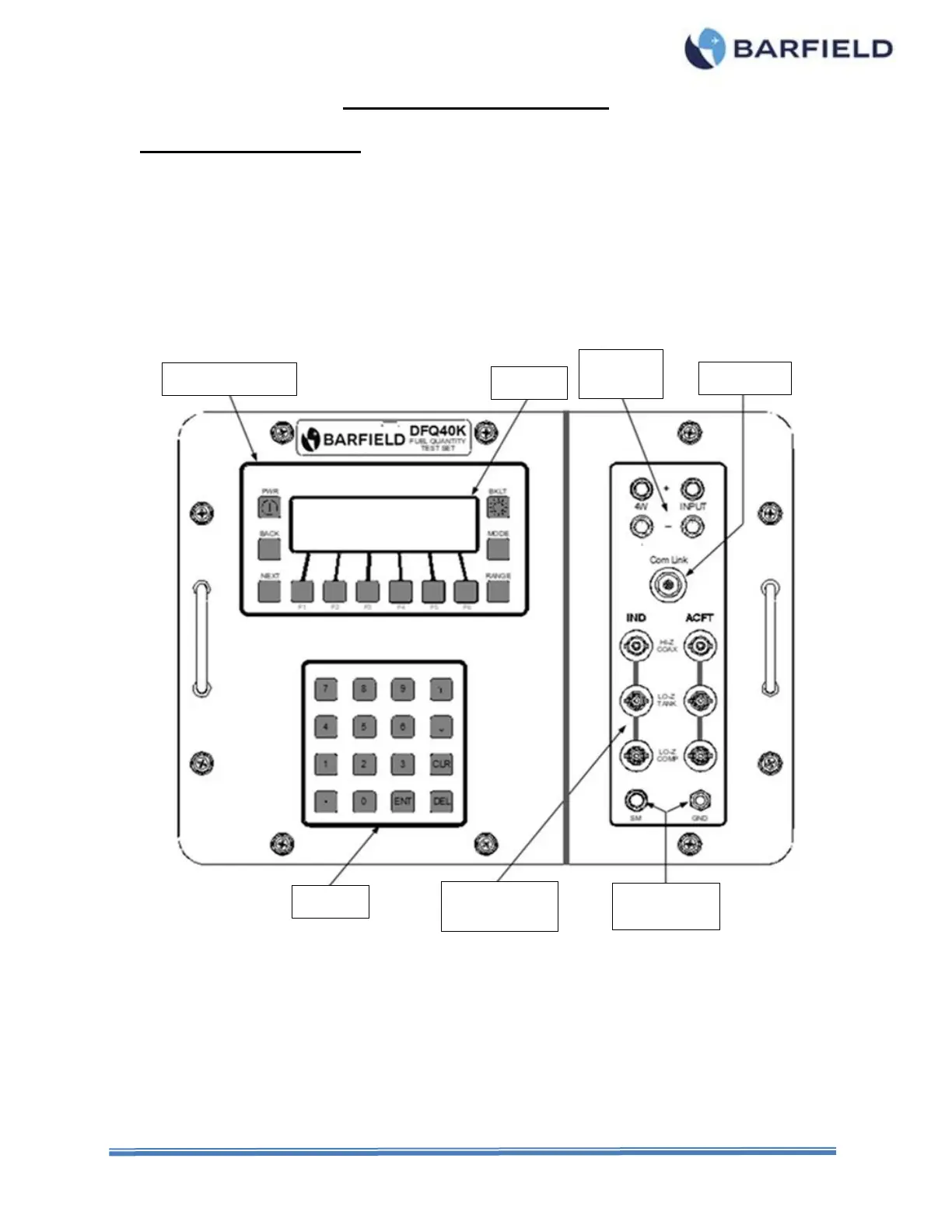
A. On the Display / User Entry Module – refer to Figure 7:
(1) The PWR (PoWeR) pushbutton is pressed and held to turn the DFQ40K on or off.
(2) The BACK pushbutton is pressed to return back to the previous display screen.
(3) The NEXT pushbutton is pressed to advance to the next set of options for the soft
key menu system.
(4) Pushbuttons F1 (Function 1) through F6 (Function 6) are pressed to select the
corresponding option displayed above them.
Figure 7 DFQ40K Front Panel and Function Switches
(5) The RANGE pushbutton is active for Resistance, Insulation Capacitance, and
Capacitance Simulator Measurements. It is pressed to select and lock the specific
range desired as an addition to the Auto Range option.
(6) The MODE pushbutton is pressed to select alternate modes of operation within a
given function. An example would be 2W or 4W when measuring resistance to
select the 2 wire or 4 wire modes of operation respectively.
(7) The BKLT (BacKLighT) pushbutton is used to toggle the display backlight on or off.



 To Next Page