56-101-01501_01502 Revision D Page | 27
13. BENCH TEST PROBE CAPACITANCE
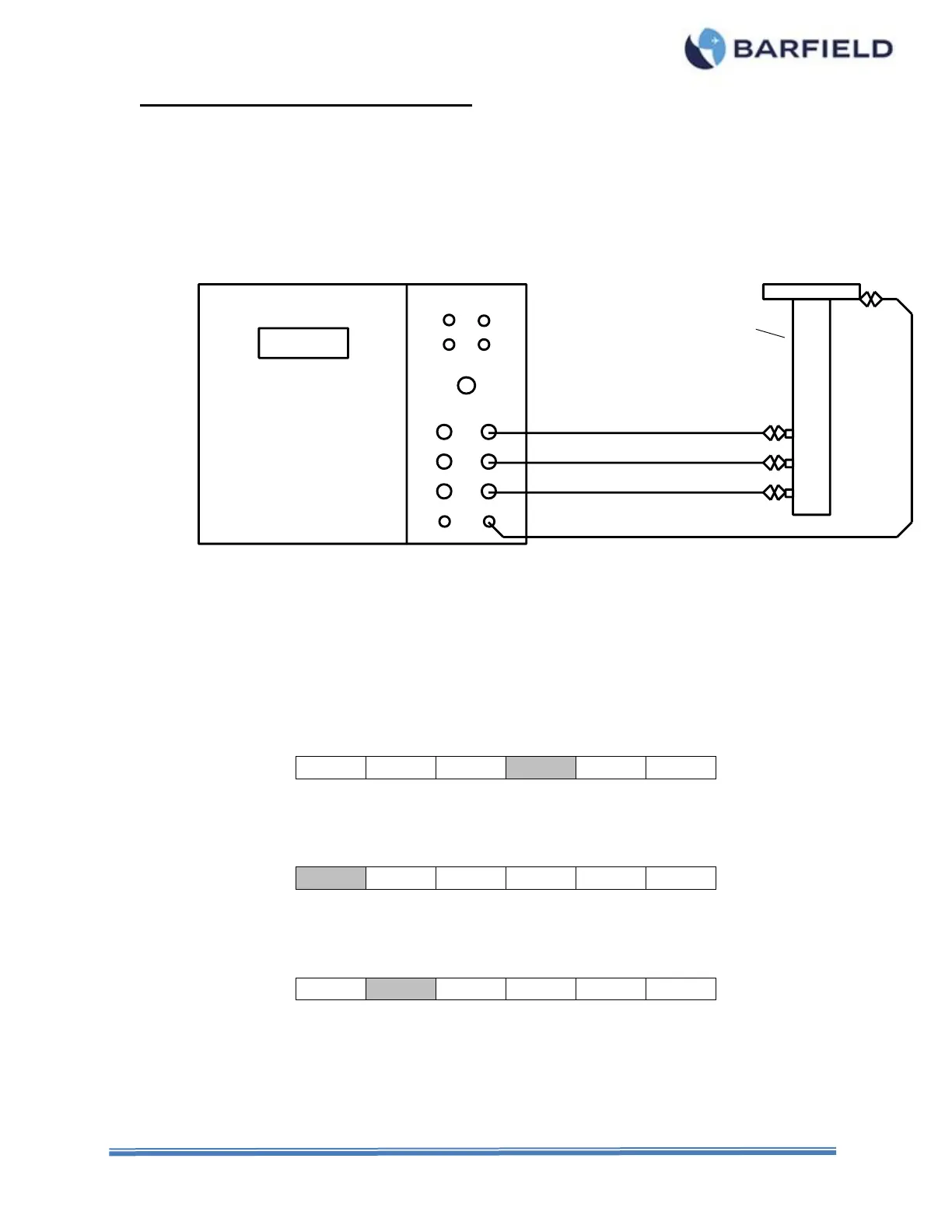
A. Connecting Test Set
(1) Position the proper equipment for the following procedures.
(2) Connect the BNC to mini alligator clip leads between the Test Set ACFT jacks and the
associated Probe terminals (refer to Figure 21).
(3) Connect the ground lead from the Test Set GND receptacle to the probe mounting flange
(refer to Figure 21).
Figure 21 Bench Capacitance Test Configuration
B. Test Procedure
Refer to the appropriate Maintenance Manuals for specific values.
(1) Press PWR to turn test set ON.
(2) Allow initialization to complete.
(3) Press ENT to accept last used frequency or key in new frequency, then press ENT.
(4) Press F4 to select CAPacitance Measure.
(5) Press RANGE to select AUTO ranging or 400 pF, 4,000 pF or 40,000 pF range.
(6) Press F1 to measure TANK capacitance, if not already highlighted.
(7) Observe the display reading and verify if the value is within specified tolerance.
(8) Press F2 to test the Compensator.



 To Next Page