56-101-01501_01502 Revision D Page | 32
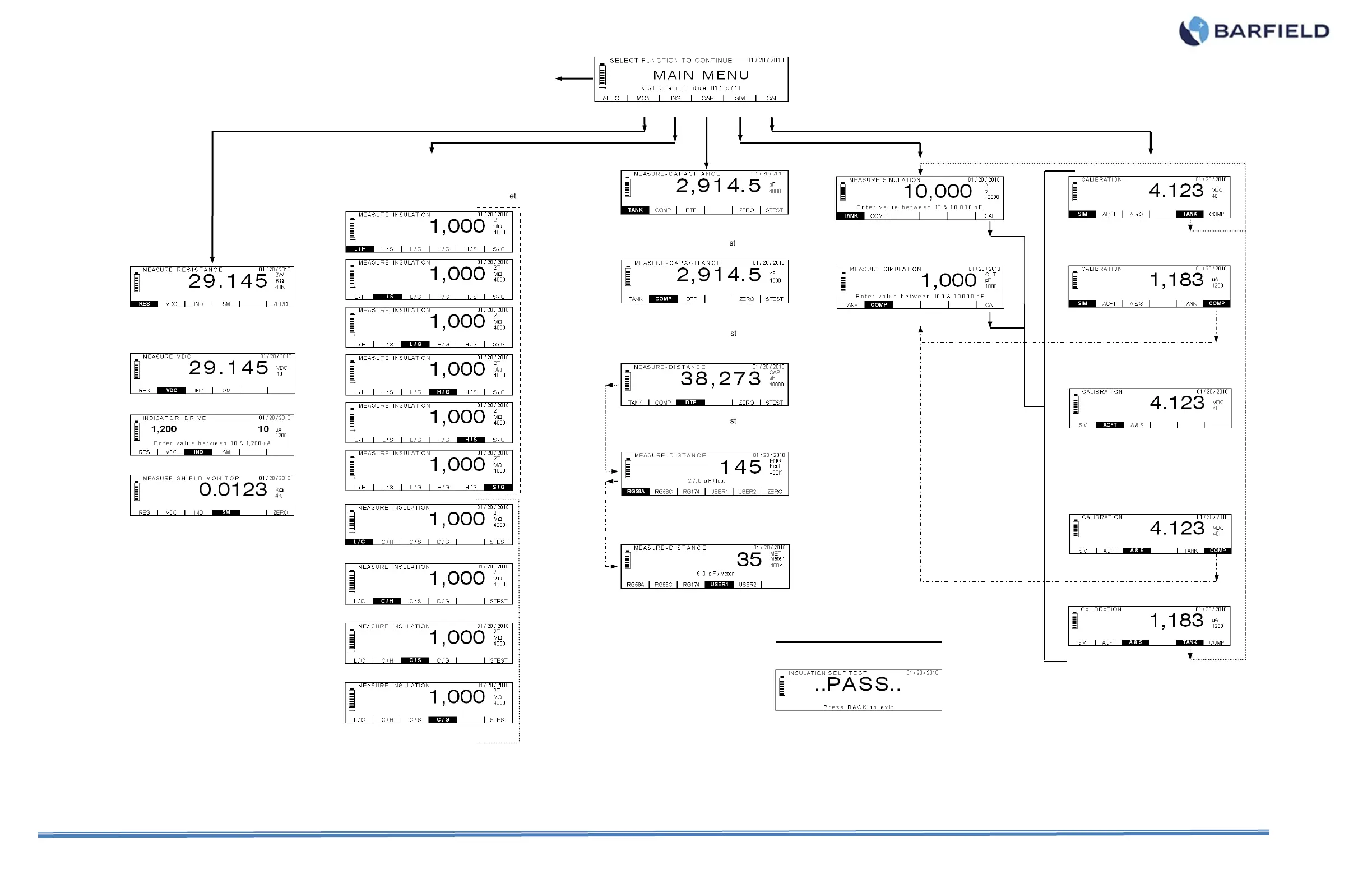
RANGE: Toggles 40 / 400 / 4000 / 40000 / AUTO ()
F6: Zeroes lead resistance (only for 2W mode)
RANGE: Toggles 4000 and 10000 pF
Figure A1 Display Navigation Guide
G
R
O
U
P
O
F
S
C
R
E
E
N
S
G
R
O
U
P
O
F
S
C
R
E
E
N
S
MODE: Toggles FT. / METER / Back to DTF Main Screen
F2 (RG58C) AND F3 (RG174): Display equivalent screens,
with their corresponding values
MODE: Toggles FT. / METER / Back to DTF Main Screen
USER2 is an equivalent screen. Both allow user to enter
and store customized values of Cap. / Length
F5: Zeroes adapter cable stray capacitance
F6: Starts Capacitance Self Test
RANGE: Toggles 400 / 4000 / 40000 / AUTO (pF)
F5: Zeroes adapter cable stray capacitance
F6: Starts Capacitance Self Test
RANGE: Toggles 400 / 4000 / 40000 / AUTO (pF)
F5: Zeroes adapter cable stray capacitance
F6: Starts Capacitance Self Test
For all ten “MEASURE INSULATION” displays:
MODE: Toggles 2T / 3T
RANGE: Toggles 40 / 400 / 4000 / 20000 / AUTO (M)
NEXT: Toggles 1
ST
and 2
ND
groups of screens
F6 (only for 2
ND
group): Starts Insulation Self Set
F6: Zeroes lead resistance
NOTE: Capacitance Self Test displays an
equivalent screen.
Press NEXT for USER SETTINGS
MENU (Refer to Fig. A2)
reverts the
display to
the last
Note: AUTO (F1) function is only applicable
for Smart Cable Use



 To Next Page