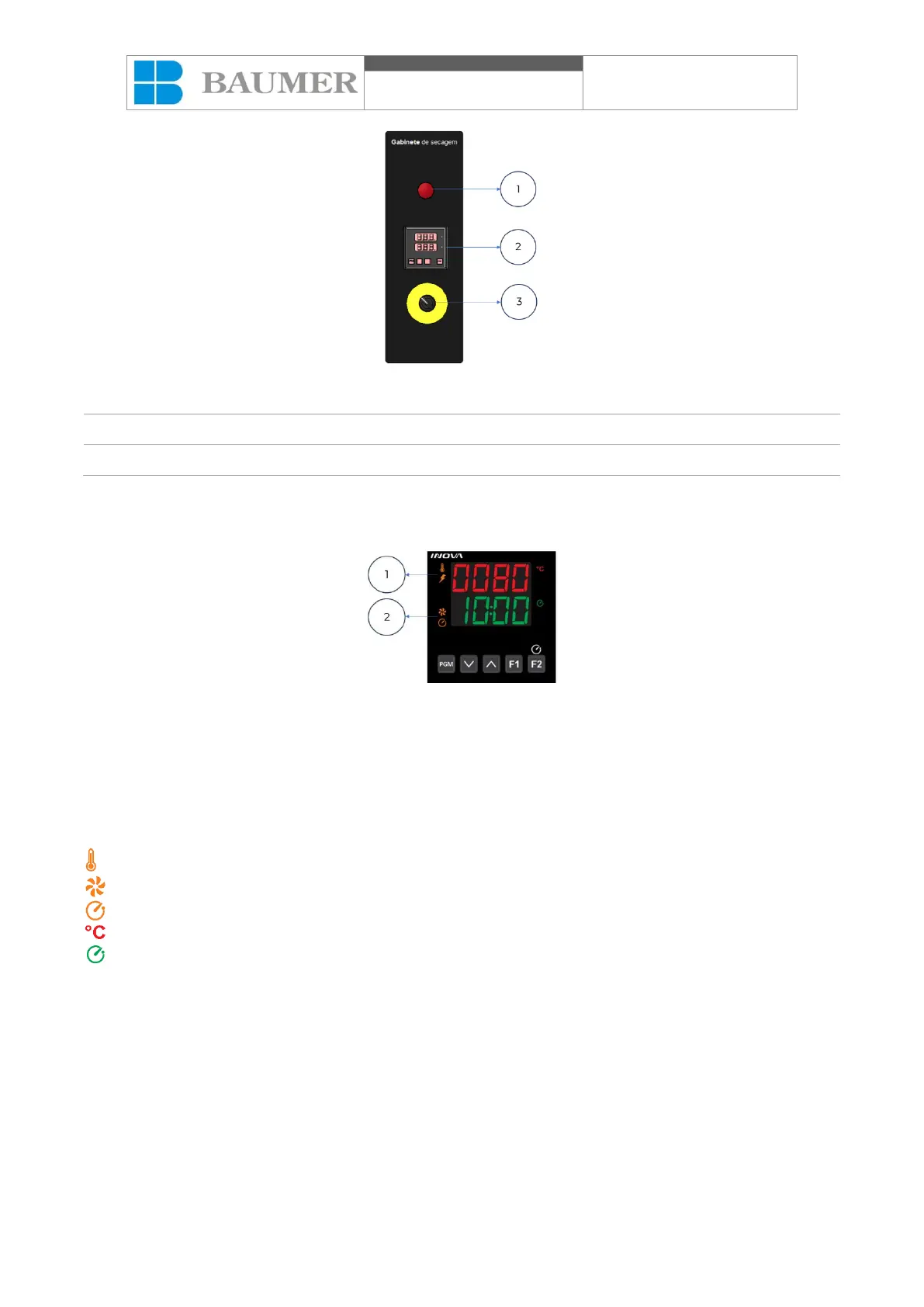
8.3. Operating the equipment
Controller presentation:
PGM – Access to programming;
F1 – Key without function;
F2 – Key enables/disables time counting;
˄ – Increases programmed value;
˅ – Decreases programmed value;
1 – Display indicating programmed temperature or parameter;
2 – Display indicating elapsed time or value of programmed parameters;
– Indication of activated heating;
– Indication of engine running;
– Left side timer alarm indication activated;
– Temperature display on the Celsius scale;
– Right side timer alarm indication activated.
Starting the cycle:
Press the PGM button. When accessing programming, the display will indicate “SEn” requesting the access
password. The factory default password is 1234. If the password is correct, the display will indicate “----“. By
pressing the ˄ key you can change the password, or by pressing PGM you can continue with programming.
Press the PGM key to access programming and the ˄ and ˅ keys to adjust the desired values.
After programming the cycle times and temperature, start the equipment cycle using the F2 key.
Cycle parameters:
“tot”- Drying time: 25 min;



 To Next Page