47
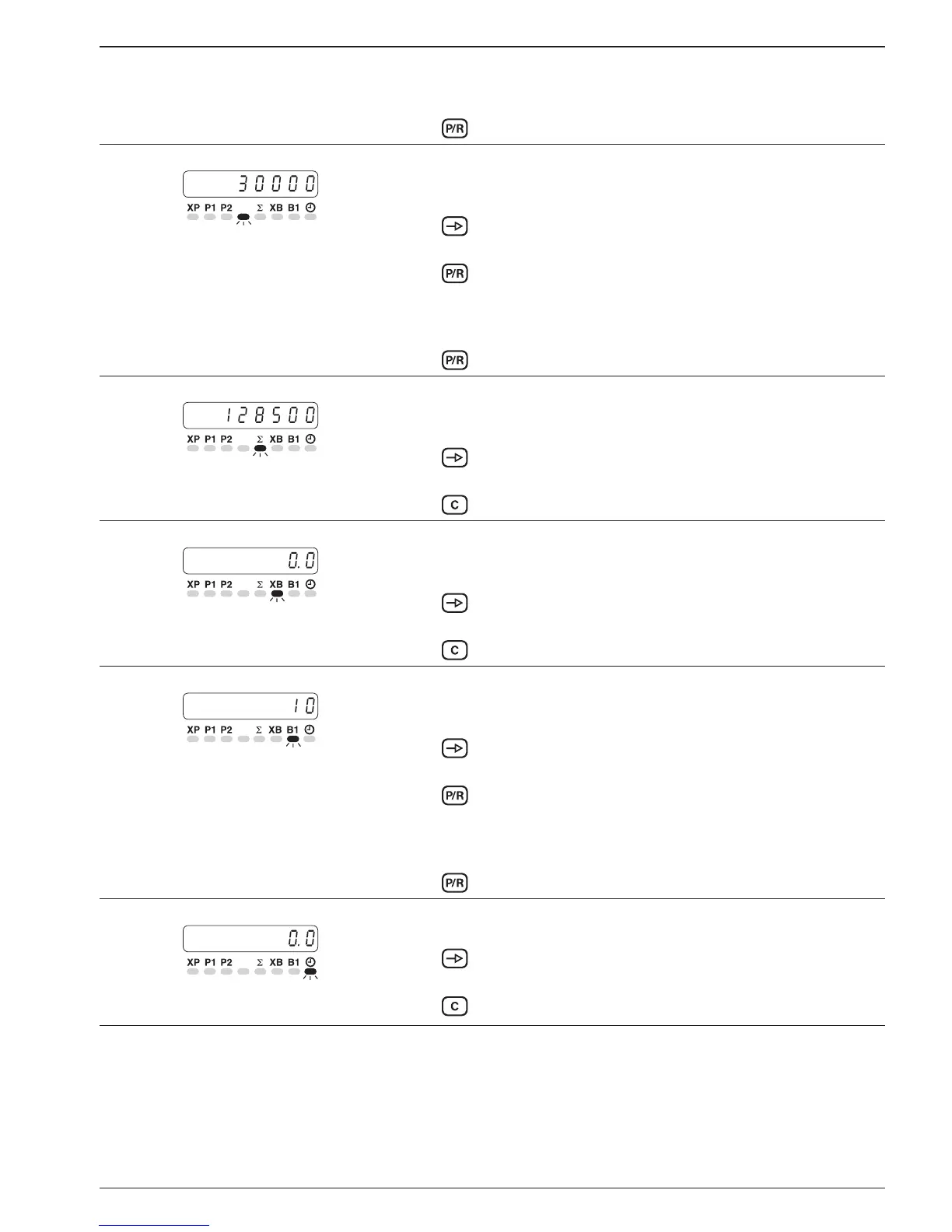
Change preset value 2 ● LED P2 flashes.
➜ Input the new preset value P2 via the numerical keypad; the old
value will be deleted.
➜ Press the
key
. The change is completed.
Main counter start count value
The start count value function must be enabled in the programming
mode (line 14).
➜ Press the key.
➜ Read the start count value.
Change
➜ Press the
key.
● LED SC flashes.
➜ Input the new start count value via the numerical keypad; the
old value will be deleted.
➜ Press the key. The change is completed.
Totalizing counter
The totalizing counter can be disabled in the programming mode
(line 15).
➜ Press the key.
➜ Read the totalizing counter.
Reset
➜ Press the
key.
Batch counter status
The batch counter status can be disabled in the programming mode
(line 16).
➜ Press the key.
➜ Read the batch counter.
Reset
➜ Press the
key.
Batch counter preset value
The batch counter preset value can be disabled in the programming
mode (line 17).
➜ Press the key.
➜ Read the batch preset value
Change
➜ Press the
key.
● LED B1 flashes.
➜ Input the new batch counter preset value via the numerical key-
pad; the old value will be deleted.
➜ Press the
key
. The change is completed.
Time meter
The time meter can be disabled in the programming mode (line 18).
➜ Press the key.
➜ Read the time meter.
Reset
➜ Press the
key.


 To Next Page