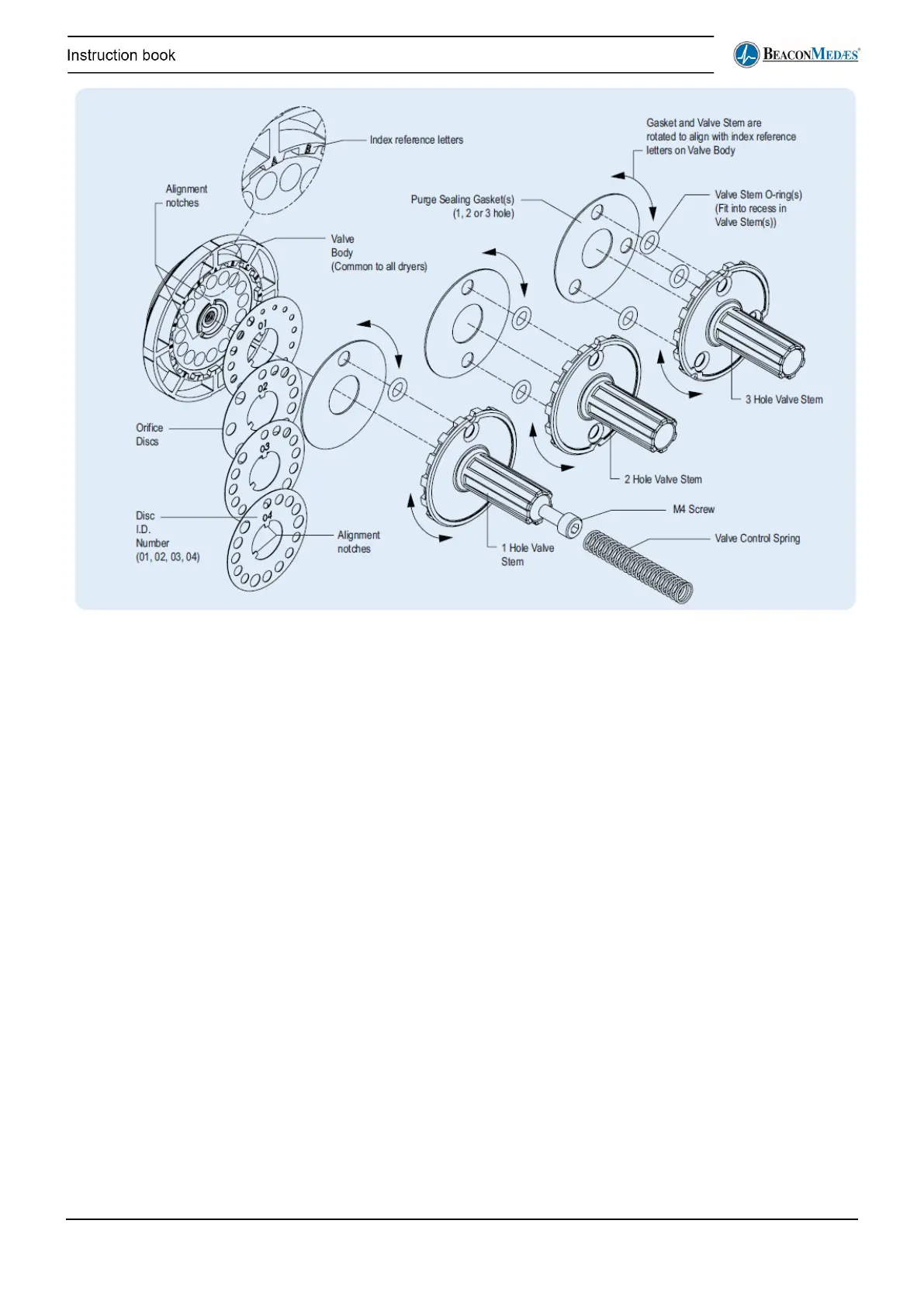
• Reference figure 4.13 and the Purge Plug Identification Table on Page 20.
• Once the correct purge body (1, 2 or 3 hole) and orifice disc (01, 02, 03 or 04) has been
selected per the instructions on Page 20, the purge valve may be assembled.
• The index letters located on the purge valve body correspond with the selected orifice sizes
per the Table on Page 20.
• Place the appropriate orifice disc onto the valve body, taking care to align the notches. The
disc will only fit in one position.
• Place the valve stem O-ring(s) into their corresponding recesses on the back of the valve
stem.
• Align the holes in the purge sealing gasket with the corresponding holes in the valve stem.
• Rotate the valve stem assembly so that the correct orifice letters align with the notches
corresponding to the holes (1, 2 or 3) in the valve stem.
• Press the assembly together and fasten with the M4 screw.
• Double check to make sure that the open orifice holes correspond with the correct orifice
selection as identified earlier


 To Next Page