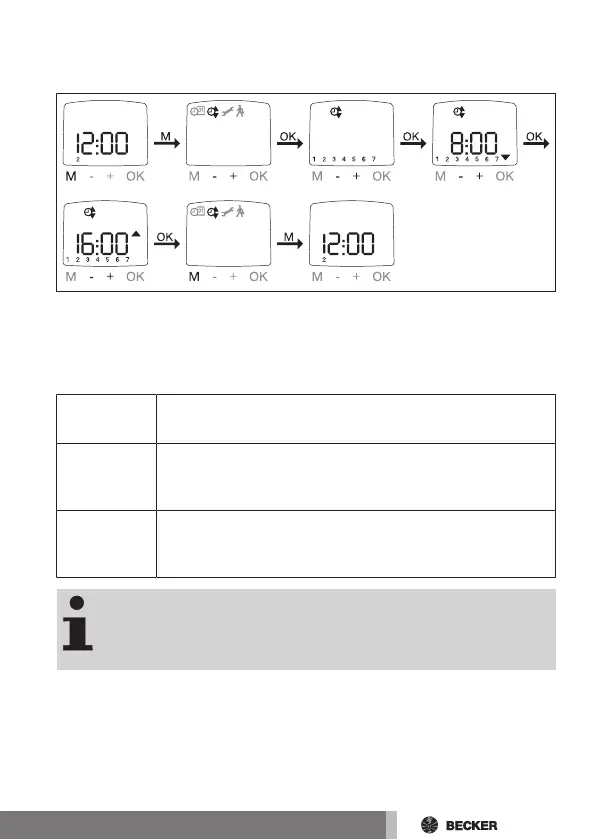
PROGRAM WEEK, BLOCK, INDIVIDUAL, shade time,
AUTO shade time
AUTO PROGRAM WEEK
SHADE TIME
SHADE TIME
PROGRAM AUTO
1. Press the MENU button.
2. To select the PROGRAM menu, press the + button until PROGRAM appears.
3. Confirm with OK.
4. Press the + button until WEEK appears.
5. Use the +/- buttons to select the required function:
Week
Press OK to go to the WEEK menu item (1-7). All further in-
puts will be applied to each day of the week
Block
Press OK to go to the BLOCK menu item (BLOCK (1-5),
BLOCK (6,7)). All further inputs will be applied to BLOCK
(1-5) and BLOCK (6,7).
Individual
Press OK to go to the INDIVIDUAL menu item (1,2,3,4,5,6,7).
All further inputs will be applied to each day of the week indi-
vidually
In the FUNCTION menu, you can choose between shade time
and AUTO shade time.
When --:-- is shown on the display (between 23:59 and
00:00), the shade time is not executed.
6. Confirm with OK. Shade time / AUTO shade time appears.
7. You can now set the shade time / AUTO shade time using the +/- buttons.
Confirm each setting with OK.
8. Press the MENU button to switch to Operating mode.
49-en



 To Next Page