SETTING: WIND MONITORING, TIME END POSITION,
TIME I-INTERMEDIATE POSITION, TIME II-
INTERMEDIATE POSITION
WIND MONITORING TIME END POSITION
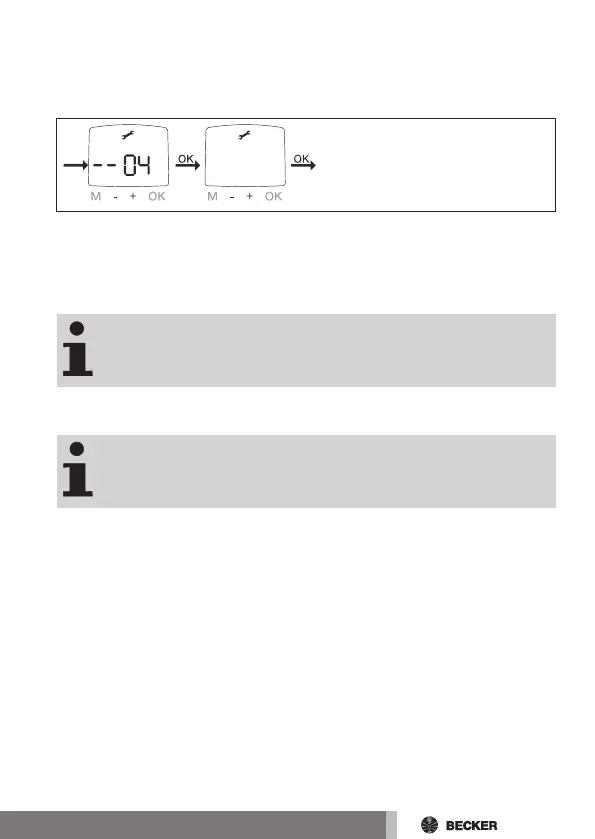
1. You have confirmed the menu item WINTER OFF/ON. WIND
MONITORING appears.
2. You can adjust the wind value using the +/- buttons. (The two left digits
on the display indicate the current wind value)
3. Confirm your setting with OK. TIME END POSITION appears.
The "TIME END POSITION" is only available if a shade time
has been previously programmed.
4. You can choose between TIME END POSITION, TIME I-INTERMEDIATE
POSITION, TIME II-INTERMEDIATE POSITION using the +/- buttons.
With this selection, you specify the position to which the sun
protection travels once the set shade time has been
reached.
5. Confirm your selection with OK.
6. The function is now set.
7. For details on further programming in the SETTING menu, please con-
tinue reading.
51-en



 To Next Page