SETTING: TEST MODE, ENGLISH, SUMMER/WINTER
(Language selection, automatic summer/winter time
changeover)
TEST MODE ENGLISH
SUMMER/WINTER
SETTING
AUTO
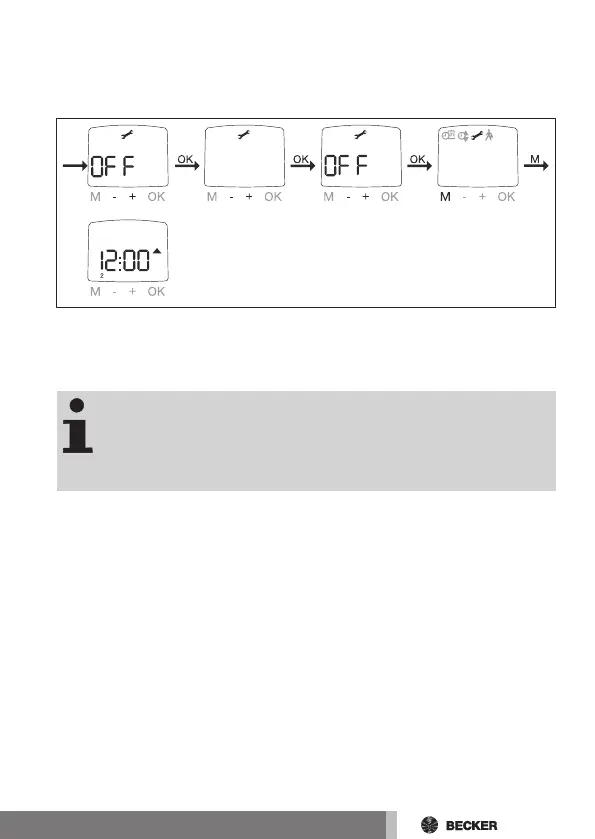
1. You have confirmed the menu item SUN END POSITION. Confirm with
OK. TEST MODE OFF appears.
2. You can activate/deactivate TEST mode (ON/OFF) using the +/- buttons.
3. Confirm your selection with OK. ENGLISH appears.
TEST MODE can also be activated when a light sensor is con-
nected, the slide switch is set to automatic and the OK but-
ton is pressed for a minimum of 5 seconds. TEST MODE is
automatically quit if the slide switch is changed (either auto-
matically or manually) or after 15 minutes.
4. You can select the required LANGUAGE using the +/- buttons.
5. Confirm your selection with OK.
6. You can turn SUMMER/WINTER on or off using the +/- buttons.
7. Confirm your selection with OK.
8. Press the MENU button to switch to Operating mode.
53-en



 To Next Page