FUNCTION
(only when the control panel is detached, for qualified technicians only)
AWNING/VENETIAN BLIND, DRIVE CONTROLLER/ GROUP CONTROLLER,
RUNNING TIME
(selection of the sun protection, selection as drive controller/group controller,
running time of awning/venetian blind)
AUTO FUNCTION AWNING DRIVE CONTROLLER
RUNNING TIME
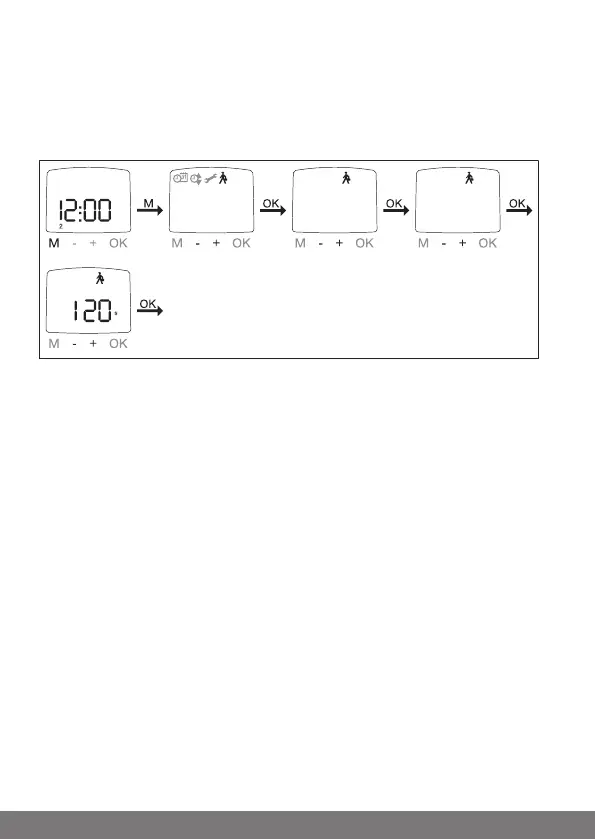
1. Press the MENU button.
2. To select the FUNCTION menu, press the + button until FUNCTION ap-
pears.
3. Confirm with OK. AWNING/VENETIAN BLIND appears.
4. You can choose between awning and venetian blind using the +/- but-
tons.
5. Confirm with OK. DRIVE CONTROLLER/GROUP CONTROLLER appears.
6. You can select the required setting using the +/- buttons (DRIVE
CONTROLLER/GROUP CONTROLLER).
7. Confirm with OK. RUNNING TIME appears.
8. You can set the necessary running time using the +/- buttons. (Preset-
ting: 120 seconds for awnings and 180 seconds for venetian blinds).
9. Confirm with OK.
10. The RUNNING TIME function is now set.
11. For details on further programming in the FUNCTION menu, please con-
tinue reading.
54-en



 To Next Page