EasyManua.ls Logo

Beltronics RX 65 - Programming Options Overview; Band Settings Management

Beltronics RX 65
33 pages
Print Icon
To Next Page IconTo Next Page
To Previous Page IconTo Previous Page
Loading...
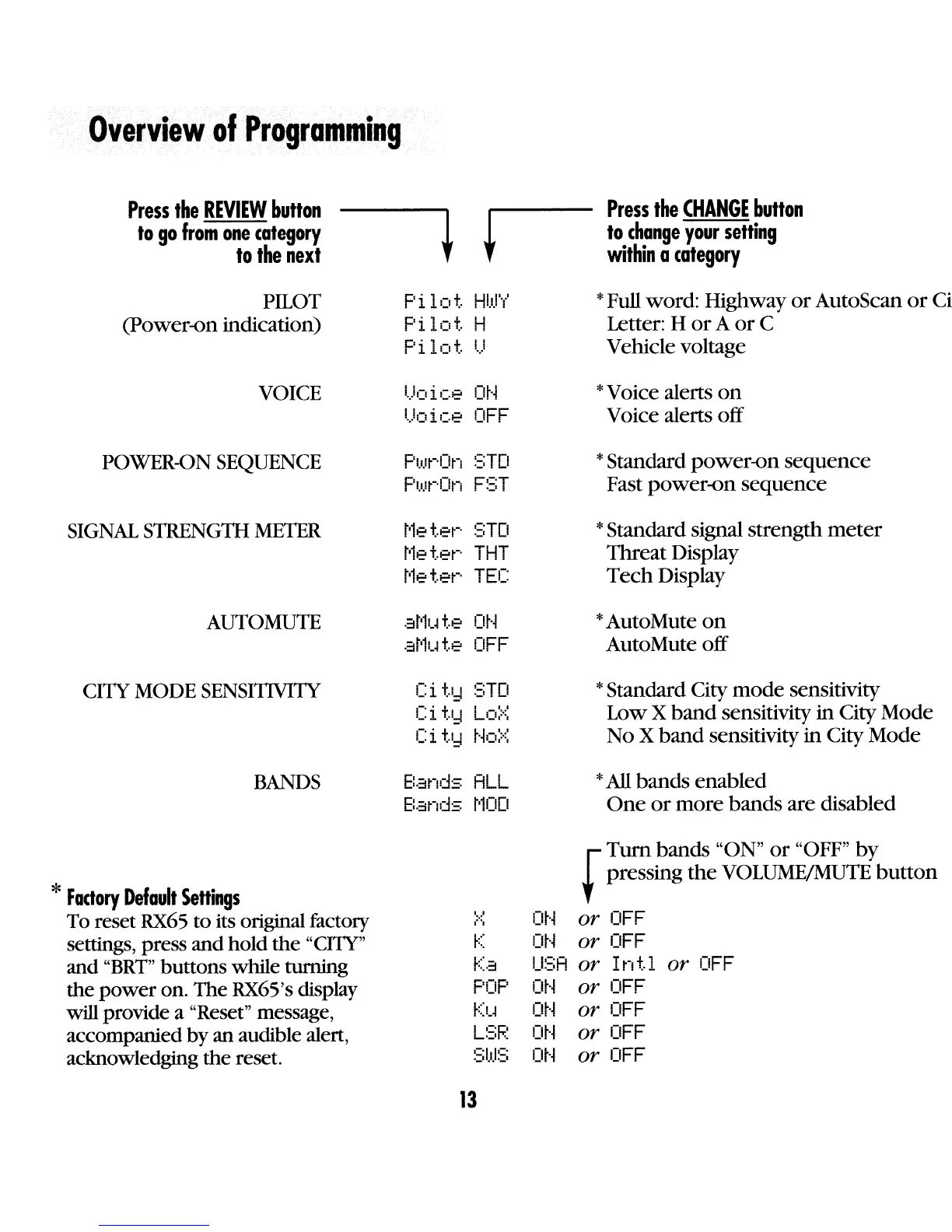
Overview
of
Programming
Press
the
REVIEW
button
to
go
from
one
category
to
the
next
+
Press
the
CHANGE
button
to
change
your
setting
within
a
category
PILOT
(power-on
indication)
VOICE
POWER-GN SEQUENCE
SIGNAL
STRENGTH
METER
AUTO
MUTE
CITY MODE
SENSITIVITY
BANDS
*
Fadory
Default
SeRings
To reset
RX65
to
its original factory
settings, press and hold
the
"ellY"
and
"BRT"
buttons while turning
the
power
on. The
RX65
's display
will provide a "Reset" message,
accompanied by
an
audible alert,
acknowledging the reset.
Pi
lot.
HIli""
..
I
Pi
lot.
H
Pi
lot.
II
'.'
I I
ot·~
•·
...
Olce
l..Joice
OFF
F'I,I.lt-·On
::;TD
p!.!Jt"·On
FST
I'le
t.et-·
STD
t'le
t.et-·
THT
t'le
t.et-·
TEe
at'1I.~
t.e
ot·~
at·1I.~
t.e
OFF
Ci
~.I::1
STD
-,'
t
L"
Ll,.I::1
0.:':,
.-,
.
ttl
"
'--
1..1::1
'10.:':,
E:.::inds
ALL
Bands
t'1CID
l,o'
r'
o
,
Ka
POP
Ku
LSF.:
13
*Full word: Highway
or
AutoScan
or
Ci
Letter: H
or
A
or
C
Vehicle voltage
*Voice alerts
on
Voice alerts
off
*Standard
power-on
sequence
Fast
power-on
sequence
*Standard signal
strength
meter
Threat
Display
Tech
Display
*AutoMute
on
AutoMute
off
*Standard City
mode
sensitivity
LowX
band
sensitivity
in
City
Mode
No X
band
sensitivity
in
City
Mode
*All
bands
enabled
One
or
more
bands
are disabled
Turn
bands
"ON"
or
"OFF"
by
fpressing the
VOLUME/MUTE
button
ot·~
or
OFF
ot·~
or
OFF
U::;A
or
In
t.l
or
OFF
ot·~
or
OFF
ot·~
or
OFF
ot·~
or
OFF
ot·~
or
OFF

Related product manuals