27
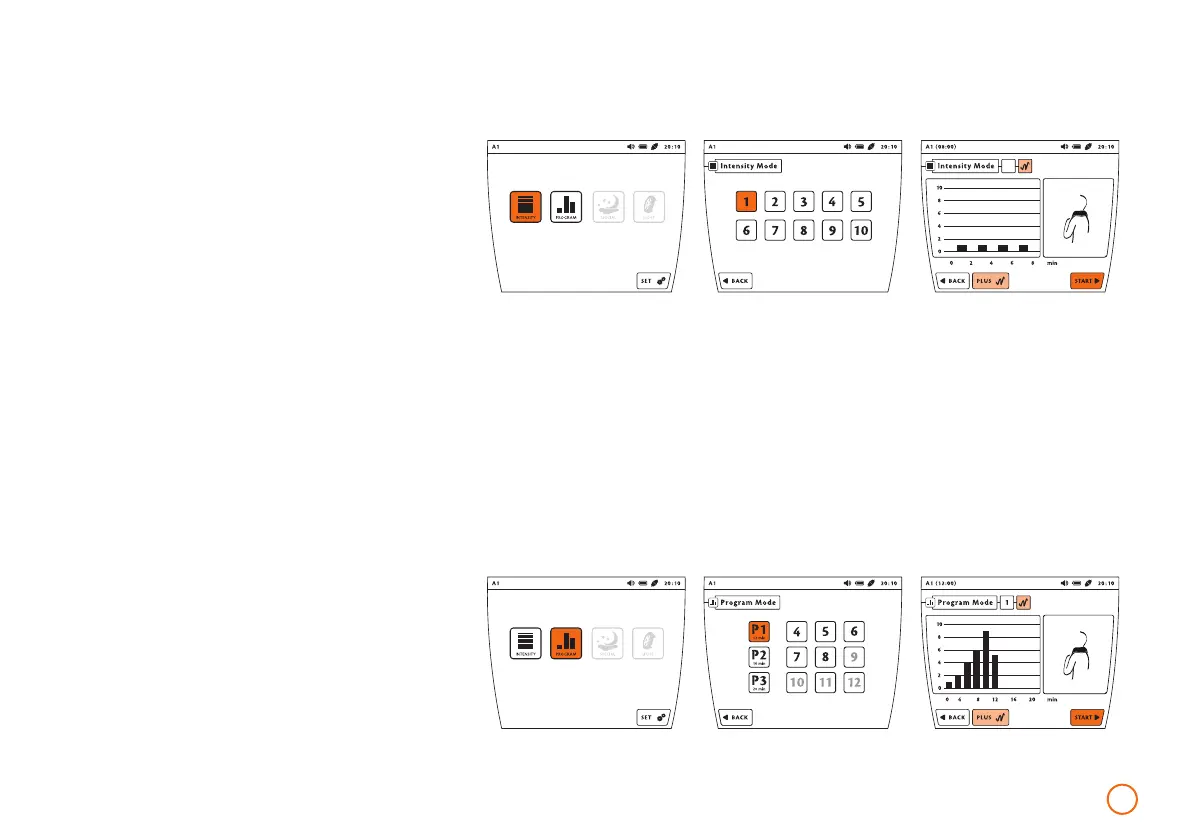
Example – short application with intensity 1
(using the application B.PAD via port A1)
1
B.PAD
Program selection
•
Press the button [PROGRAM]; if a memory
card is inserted, press the button
[PROGRAM] again.
•
Select the desired program by pressing the
button of one of the predefined programs
P1 – P3 and as needed, the available
programs 4 – 12.
•
Activate or deactivate the plus signal by
pressing the button [PLUS].
•
After making the selection, start the
choosen program with [START].
B.PAD
Example – Program P1
(with the application module B.PAD via port A1)
1960-2002-BEDIENANL-B.BOX-USA-FDA-2020-US-en-v13-Akku Rev20_4.indd 271960-2002-BEDIENANL-B.BOX-USA-FDA-2020-US-en-v13-Akku Rev20_4.indd 27 04.11.2020 08:47:2904.11.2020 08:47:29



 To Next Page