32
1
2
B.SCAN
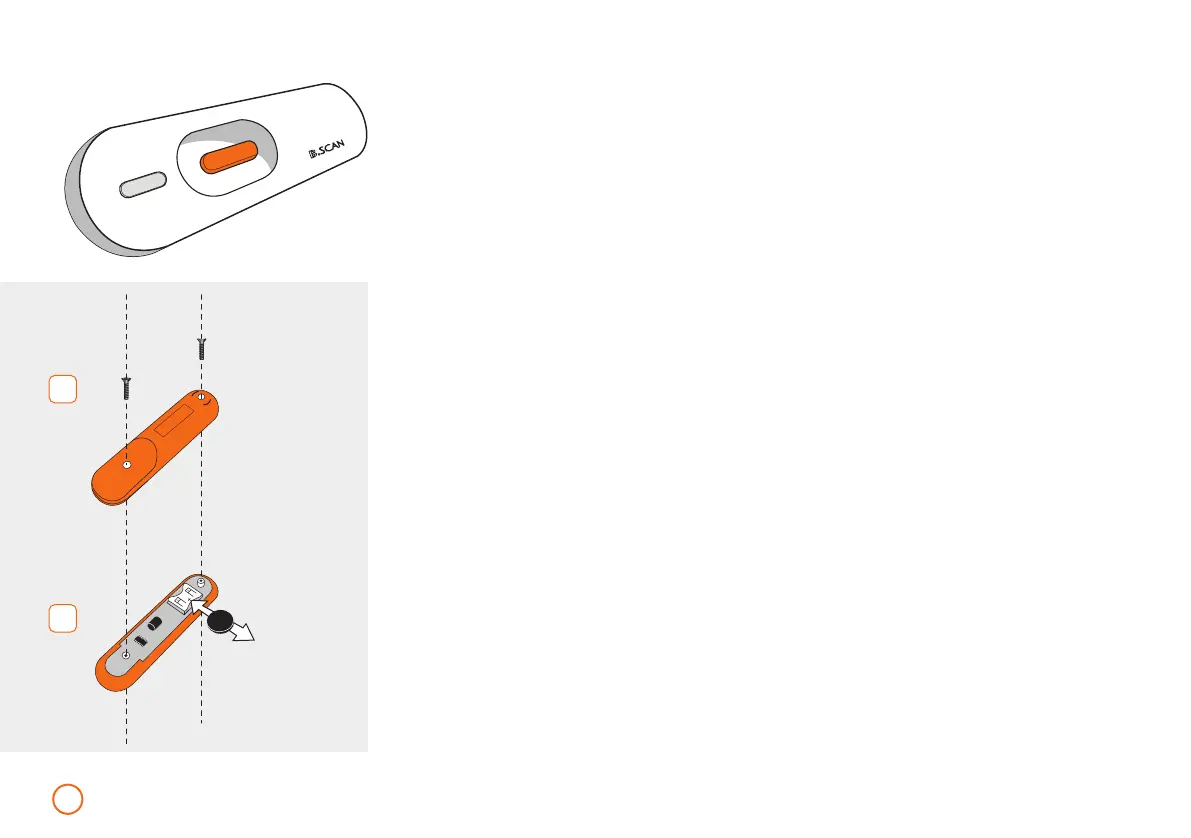
Changing the B.SCAN battery
•
Remove both screws (see Fig. 1).
•
Now carefully remove the back panel.
•
Now slide the old battery sideways (in the direction of the arrow)
away from its holder (see Fig. 2).
•
Now slide the new battery (type CR 2032) into the holder.
Please note the “+ pole” battery symbol (see Fig. 2).
•
Now place the back panel back on the device and screw it back together.
The B.SCAN is integrated in your B.BOX and is designed to check your
BEMER product along with safety precautions for their proper operation.
The B.SCAN makes the specific BEMER Signal configuration audible.
The device is switched on by pressing the button once; pressing and
holding the button down (for several seconds) will switch off the
device. If no signal is detected, the B.SCAN
automatically switches off after 10 seconds.
1960-2002-BEDIENANL-B.BOX-USA-FDA-2020-US-en-v13-Akku Rev20_4.indd 321960-2002-BEDIENANL-B.BOX-USA-FDA-2020-US-en-v13-Akku Rev20_4.indd 32 04.11.2020 08:47:3004.11.2020 08:47:30



 To Next Page