14
INSTALLING & REPLACING BATTERY BOX
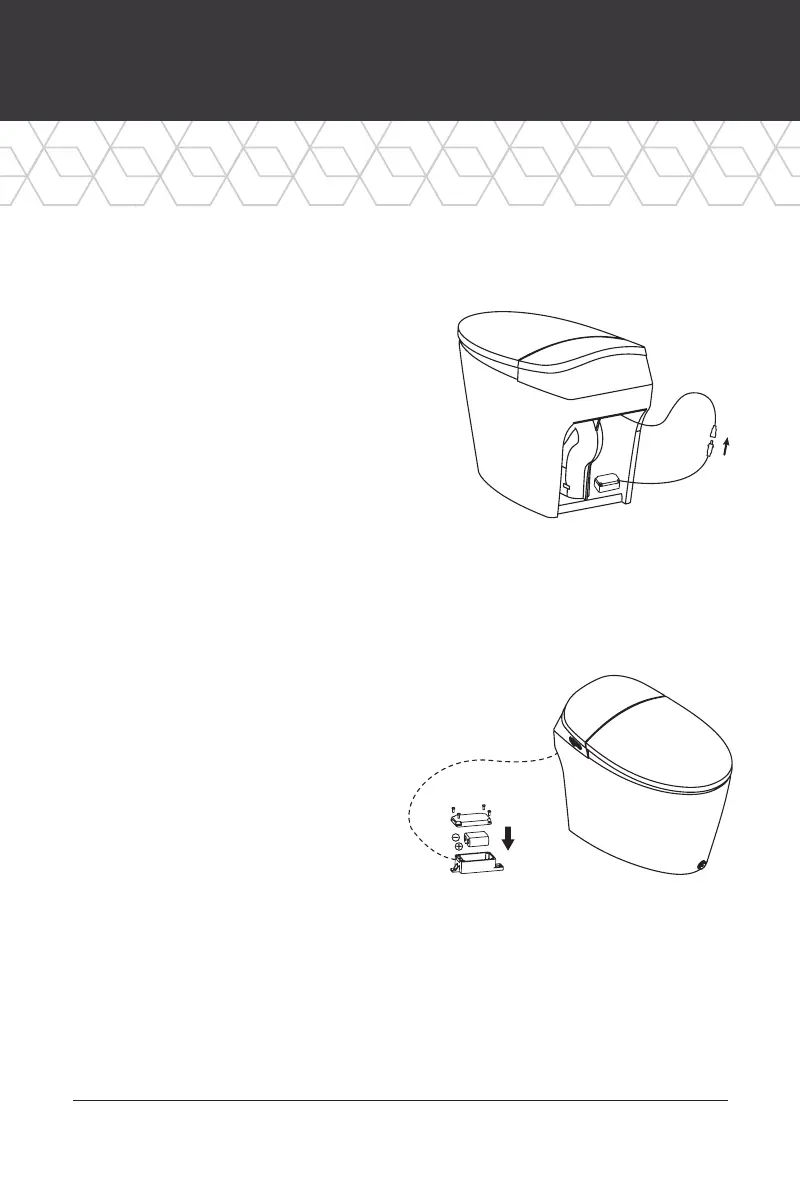
Installing The Battery Box
1. Remove the extension cable from the
back of the bowl (The cable is attached
inside the back of the toilet. Tug it
gently to let it free.)
2. Plug the cable into the battery box.
Then, secure the water-proof nuts.
Place the battery box in its proper
position shown on the right. The
batteries and cables are divided into
positive and negative poles. Do not
forcefully connect them. Doing so
may damage the product. If you
have any questions, please call
Bemis at 920.467.4621.
Replacing The Battery Box
1. Loosen the battery box screws
and remove the cover. Remove
the battery and safely discard it.
2. Load the new CR-P2 battery and
re-secure the screws.
3. Place the battery box back
into its place.
The battery should be kept out of
children’s reach. Please ensure that the
battery’s polarity is correctly matched. If
they are incorrect it may lead to chemical
leaks or explosions. The battery box is
water proof so please make sure all the
screws are tightly secured to ensure that
the box is perfectly sealed.









 To Next Page