Operation TD-550/560 Oil in Water Analyzer
10 TD-550/560 Oil in Water Analyzer
Operation Manual
PN 106737
REV H
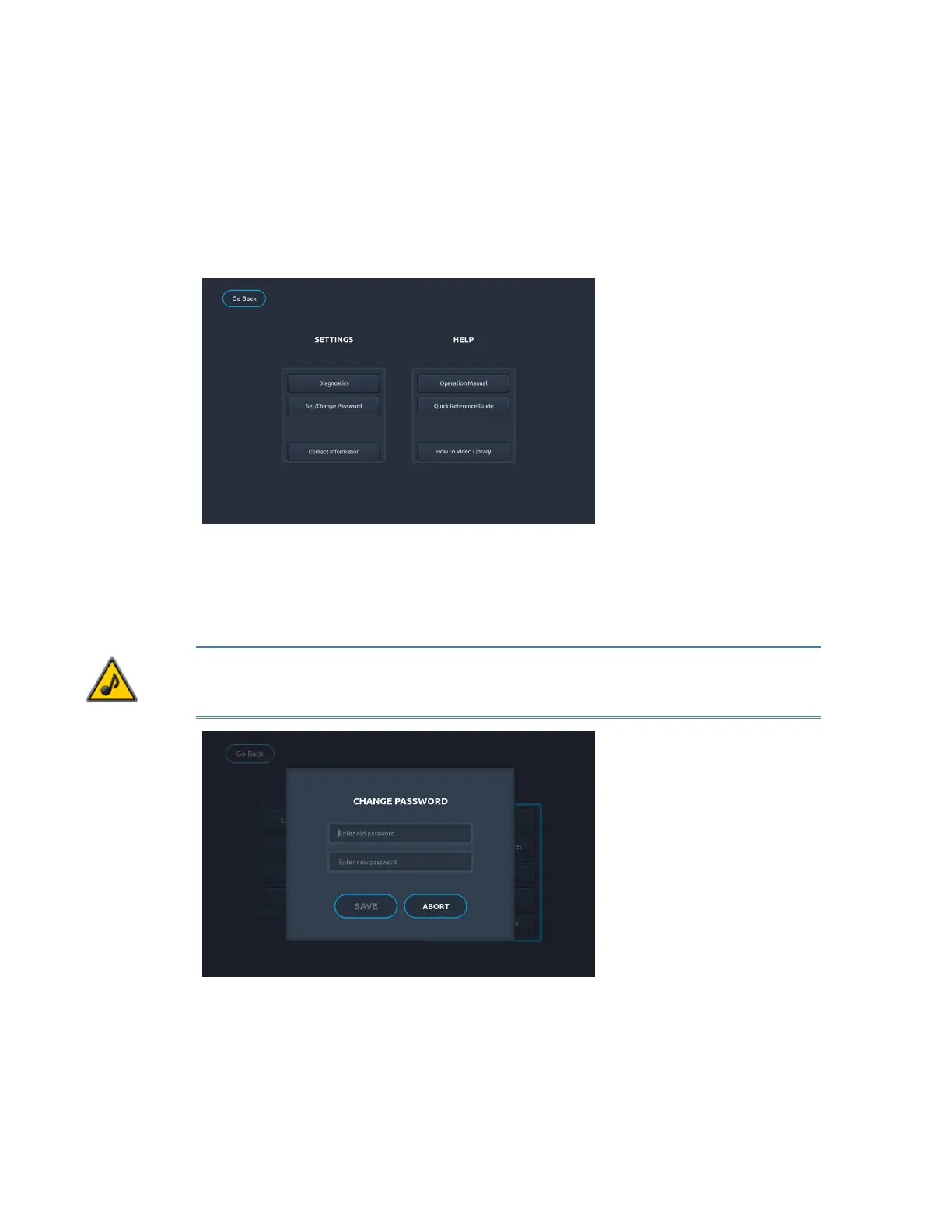
Help & Settings Screen
The Help & Settings screen includes links to help resources such as the full TD-550/560 Operation
Manual, the Quick Reference Guide, which includes instructions for solvent and no-solvent calibration
and analysis, and the How to Video Library, which includes tutorials on calibration, analysis and
standards preparation.
The Diagnostics screen is described in Section 6 Troubleshooting. The Set/Change Password screen is
described in the following section.
Set/Change password
No default password is used for the TD-550/560, so leave the password section empty when rst
accessing the analyzer. You can set your own password if desired. To set a password of your
preference, tap Set/Change password on the Help & Settings screen and enter new credentials.
NOTE: If you lose your password, you must contact the factory to regain access to the monitor.
Benchmark International suggests that you manually record the password in a safe location if a
password is used.


 To Next Page