TD-550/560 Oil in Water Analyzer Operation
PN 106737
REV H
TD-550/560 Oil in Water Analyzer
Operation Manual
9
Reading History Screen
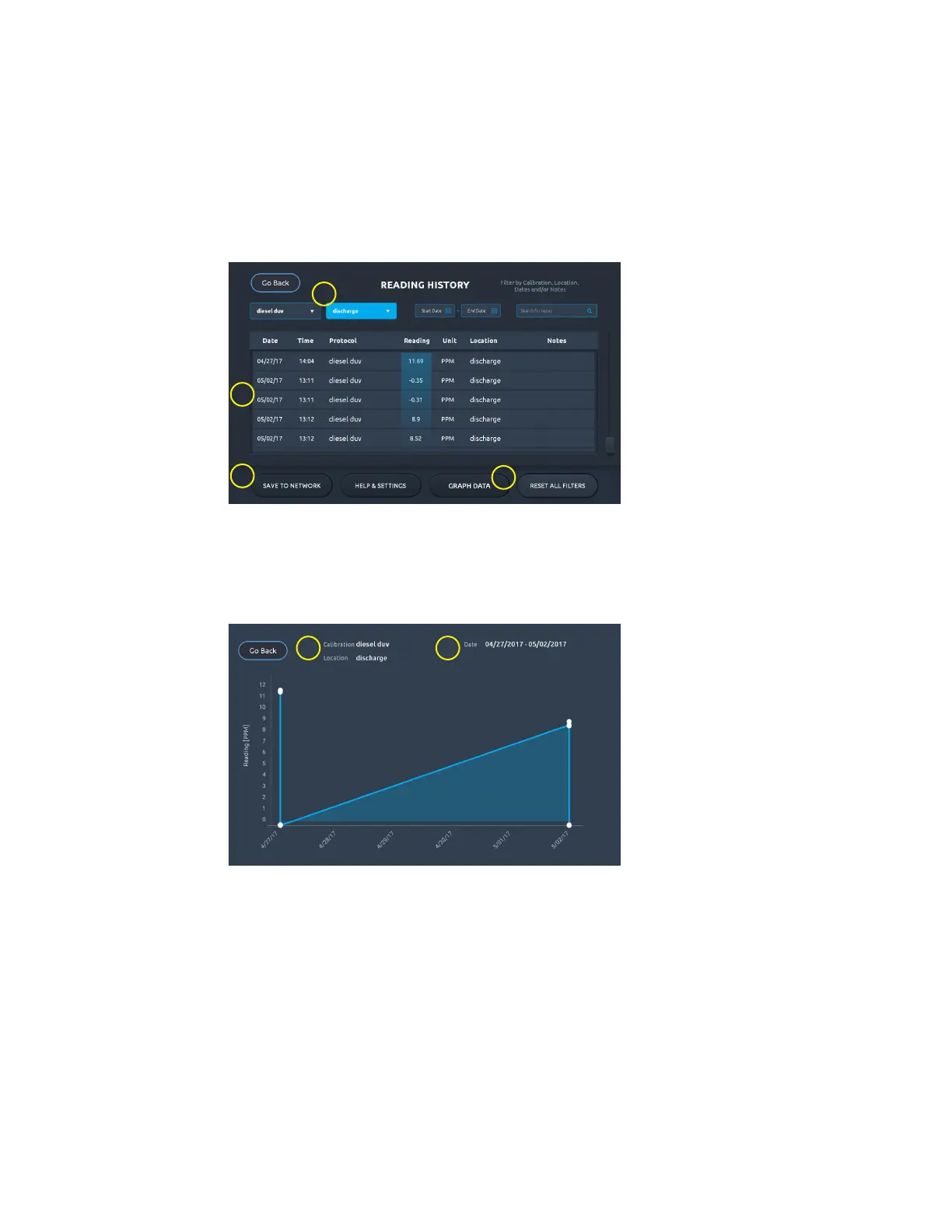
Each sample analysis is recorded in the Reading History screen. Besides the sample concentration
value (Reading), the date and time as well as the calibration and measurement units used are recorded.
Any notes or location associated with the reading will also be included in the reading history.
Use this screen to search or lter the readings by calibration name, location, or date. Filtered data can
then be saved to a connected network as a CSV le or displayed as a graph.
2
1
3
4
1. Filters
2. Readings list
3. Save to Network button
4. Graph Data button
Graph Data Screen
After you have ltered the data in the Reading History screen, you can tap the Graph Data button to
display a visual representation of the data.
1
2
1. Data lters chosen
2. Sample reading date range


 To Next Page