Operation TD-550/560 Oil in Water Analyzer
8 TD-550/560 Oil in Water Analyzer
Operation Manual
PN 106737
REV H
Home Screen
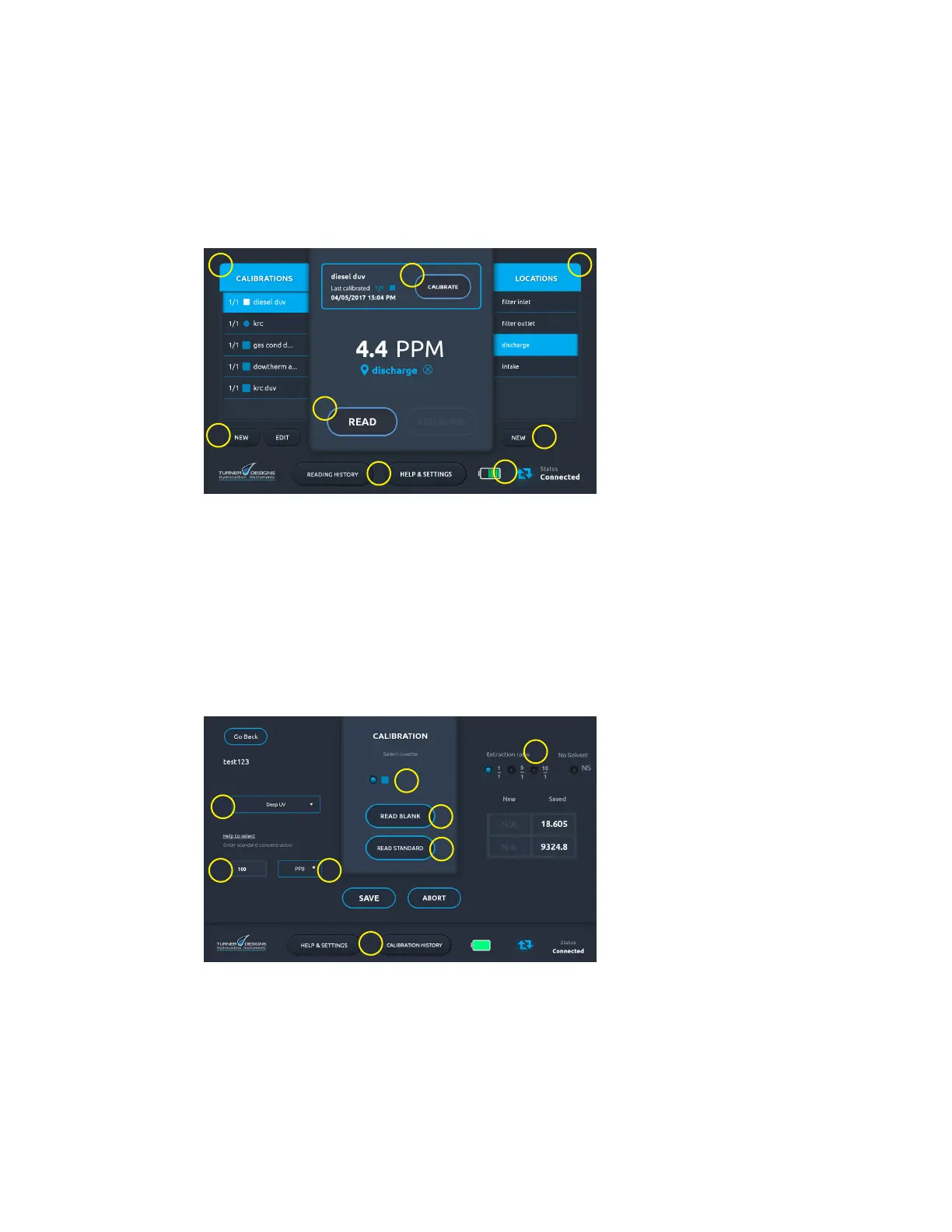
The Home screen is central to the analyzer’s operation. From this screen you can create and save
calibrations for your target hydrocarbons, create and save locations to associate with calibrations, or
make a new sample reading. Other functionality includes navigation buttons to the Reading History
screen and Help & Settings screen. Connection and battery status icons are displayed in the bottom-
right corner of the screen.
1
2
3
4
5
6
7
7
1. Calibrations list
2. Locations list
3. Calibrate button
4. Read button
5. Navigation buttons
6. Battery and connection
status icons
7. New (calibration and
location) button
Calibration Screen
Use the Calibration screen when creating calibrations. Choose the measurement channel,
concentration, c uvette type, and extraction ratio for your calibration on this screen. The software
chooses cuvette type and extraction ratio when you select a measurement channel. You can change the
defaults manually.
It is important to complete the calibration with both solutions within 5 minutes. The tablet’s screen times
out after 5 minutes, and 1the calibration will not be properly recorded. If you nd that the ve minute
time out period is too short, you can extend the display time out period in the tablet settings. Do not
change to a time period shorter than ve minutes.
2
6
8
7
1
3
4
5
1. Measurement Channel list
2. Concentration eld
3. Units list
4. Cuvette types
5. Extraction ratios
6. Read Blank button
7. Read Standard button
8. Navigation buttons


 To Next Page