4
ASSEMBLY
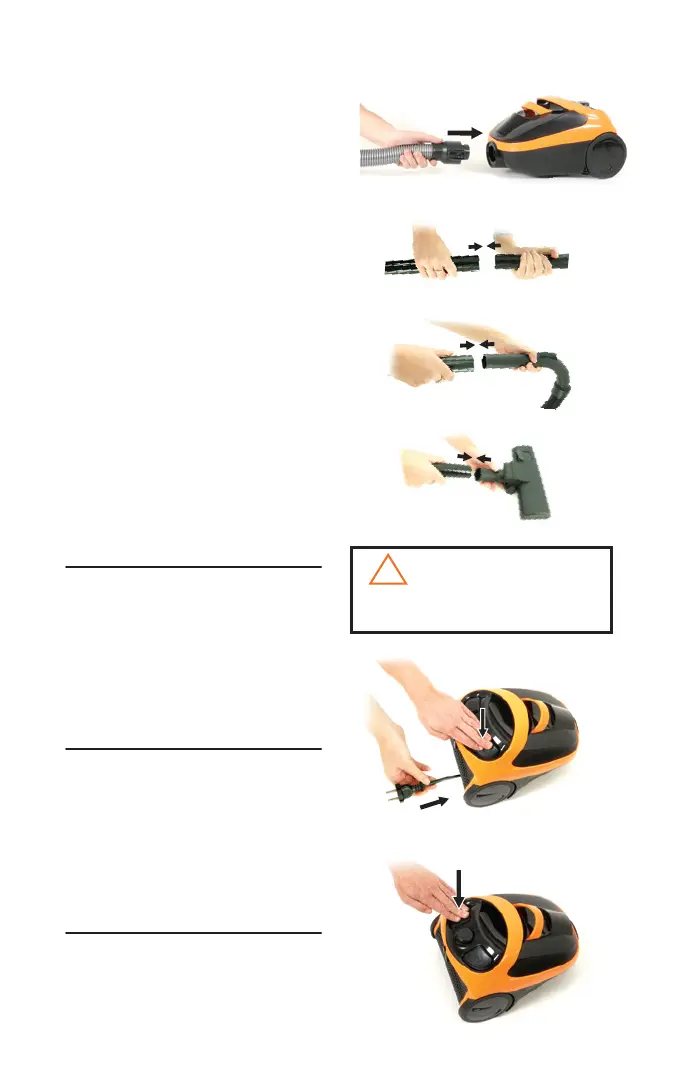
A. Connect the hose (6) to the vacuum by
inserting the hose connector (9) into the
suction inlet (10). You will hear a ‘click’
when it is securely in place
B. Attach the extension wands (3) together
by inserting one into the other. Twist
slightly to tighten the connection
C. Connect the hose handle to the
end of the extension wand and twist
slightly to tighten
D. Connect the oor nozzle (1) to the
other end of the extension wand and
twist slightly to tighten
E. Once assembled, you can store your
vacuum by inserting the storage clip
(located on the back of the oor nozzle)
into the storage slot (18) on the rear of
the vacuum
OPERATIONS
POWER CORD
The power cord (19) is located at the rear of
the vacuum. Gently pull out the power cord.
Stop pulling the cord when the yellow line is
visible. There is also a red line which
indicates the end of the usable cord. Do not
pull the power cord out beyond the red line.
AUTO-CORD REWIND
Your vacuum is equipped with an automatic
cord rewind. When cleaning is nished,
press the power button (11) OFF and grasp
the plug to disconnect from the electrical
outlet. Hold the plug and press the auto-cord
rewind button (13) to rewind the cord
automatically.
POWER BUTTON
Turn the power ON or OFF by pressing
lightly downward on the power button (11).
A.
B.
C.
D.
The power cord retracts very quickly.
Take care to avoid injury.
!
CAUTION:
Auto cord
rewind
Power
Button



 To Next Page