English
Using the Camera 21
3.8 Playback
• When the camera is off, press and hold for at least one second to enter the Playback
mode.
• In the Capture mode, press to enter the Playback mode.
• In the Playback mode, press or the Shutter to switch to the Capture mode.
• While pausing video playback, you can press the shutter to capture the video frame as a
still image in the VGA format.
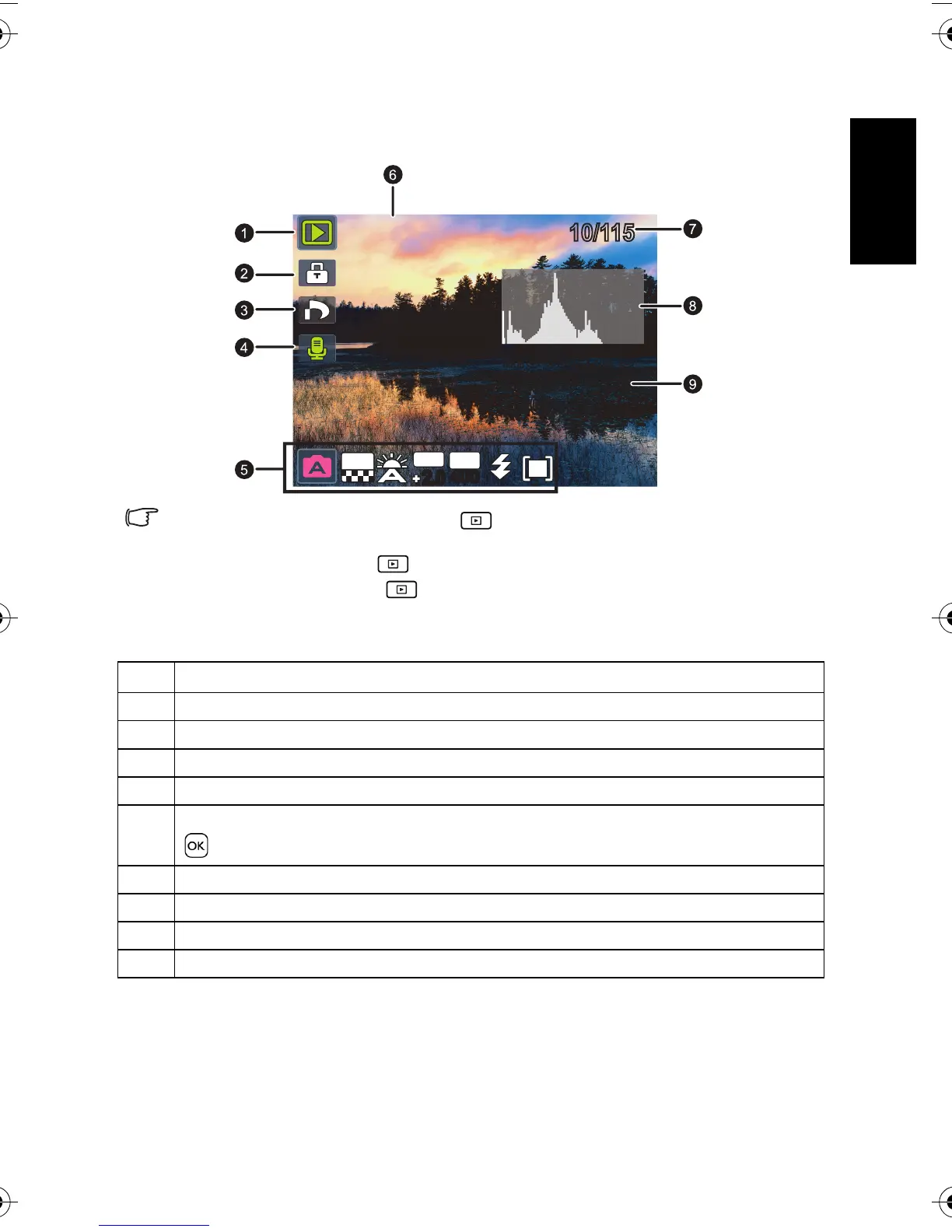
Icon Description
1 Indicates that the camera is in the Playback mode.
2 Indicates that the file is protected and cannot be deleted.
3 Indicates the file is marked for printing.
4 Indicates this file has a voice memo or the file is an audio file.
5 Displays the shooting parameters when you took the picture or playback controls. Press
to toggle between different displayed information.
6 Date and time when the file was created.
7 File number
8Histogram
9 File name, file size, shutter speed, and f-number.
10/115
10/11501.15.200901.15.200901.15.2009
IMG 0064.JPGIMG 0064.JPG
1.25MB
1.25MB
1/200
1/200 F2.8F2.8
08:0508:0508:05
10M
EV
2.02.0
ISO
400
400
DSC_C1020_UM CD EN.book Page 21 Monday, March 2, 2009 12:00 PM


 To Next Page