Connection20
Connection
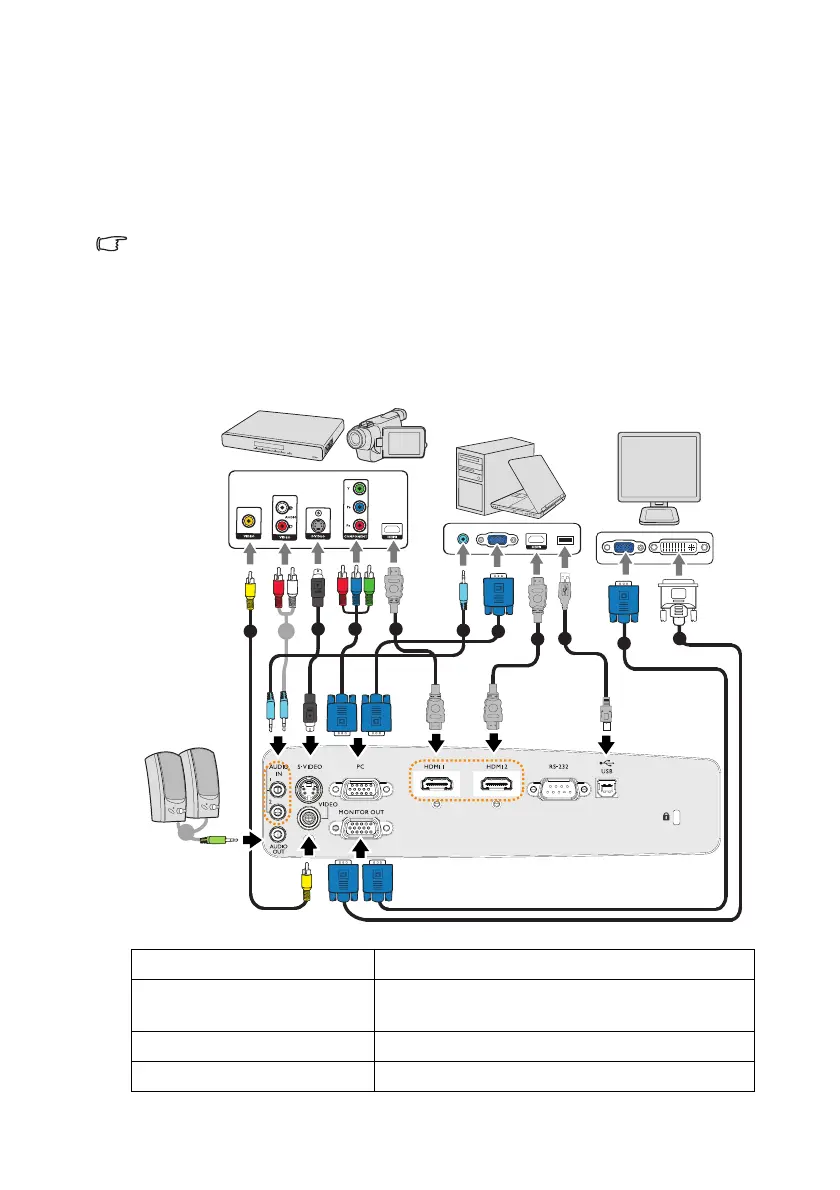
When connecting a signal source to the projector, be sure to:
1. Turn all equipment off before making any connections.
2. Use the correct signal cables for each source.
3. Ensure the cables are firmly inserted.
• In the connections shown below, some cables may not be included with
the projector (see "Shipping contents" on page 8). They are
commercially available from electronics stores.
• For detailed connection methods, see pages 21-25.
• For the combination of an active audio in source, see the marks in the
illustration.
1. Video cable 2. Audio Cable
3. S-Video cable 4. Component Video to VGA (DSub) adapter
cable
5. HDMI cable 6. VGA cable
7. USB Cable 8. VGA to DVI-A cable
1
3 4 5
2
2
2
6
5
7
6
8



 To Next Page