Parts of the display and their functions14
Parts of the display and their functions
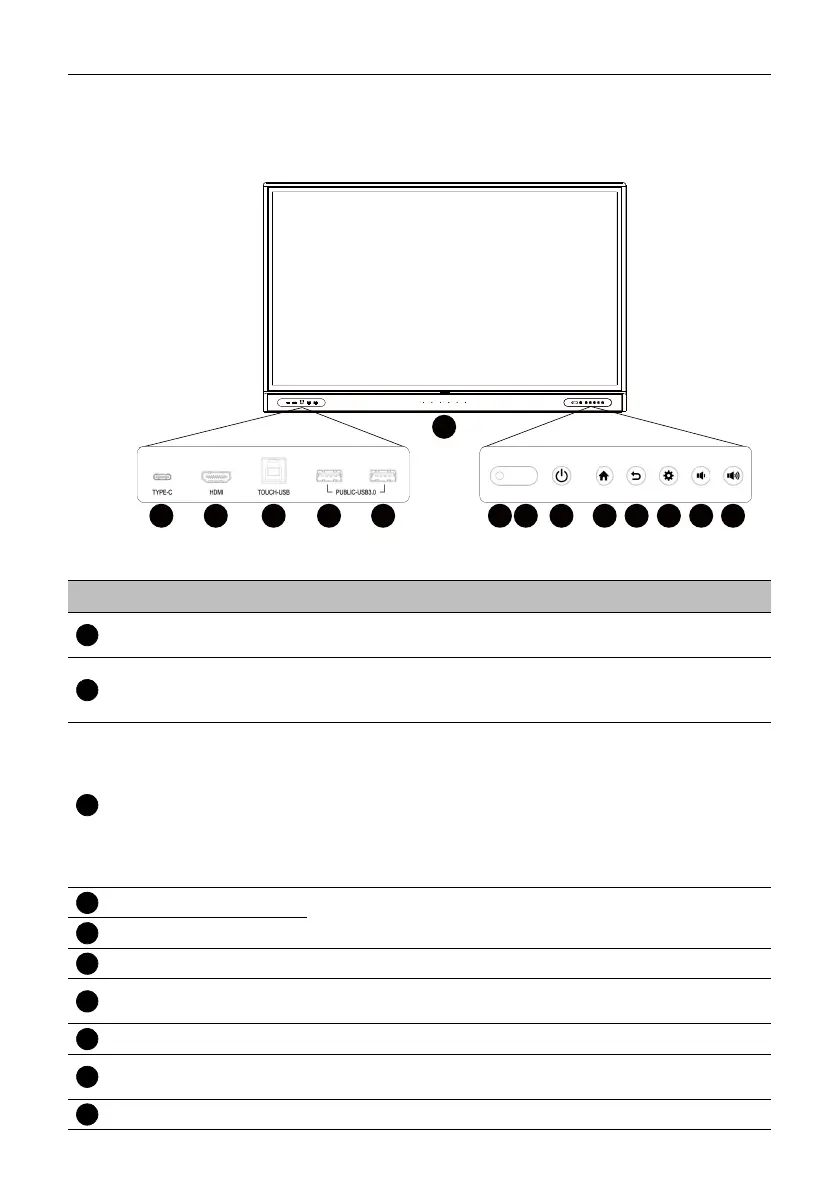
Front panel
TYPE-C
HDMI
TOUCH-USB
PUBLIC-USB3.0
1 2 3 4 5 7 8 9 10
6
11 12 13 14
No. Name Description
TYPE-C
USB Type-C. Connect with display, audio, touch, and/or
charge devices. Does not support data transfer.
HDMI
High-definition multimedia interface signal input. Connect to a
PC with an HDMI output, a set-top-box, or other video
devices. Capable of supporting touch function.
TOUCH-USB
Supports touch signal input from an external computer. When
connecting the external computer, besides connecting the
external computer’s video and audio signals via their
respective ports, the external computer's USB port needs to
be connected to the corresponding touch port. Once the
driver is installed, the external computer can be controlled via
touch gestures on the display (the touch function is enabled
for the HDMI channels by default).
USB 3.0
Connect USB devices such as keyboards, mice, and USB flash
drives.
USB 3.0
Array Microphones Receives and transmits sound from near the display.
Ambient Light
Sensor
Detects the ambient light around the display.
IR Signal Receiver Receive IR signals. Do not obstruct the receiver.
Power
Tap to enter sleep mode. Press and hold for 4 seconds or
more to power off.
Home Press to return to the main screen.



 To Next Page