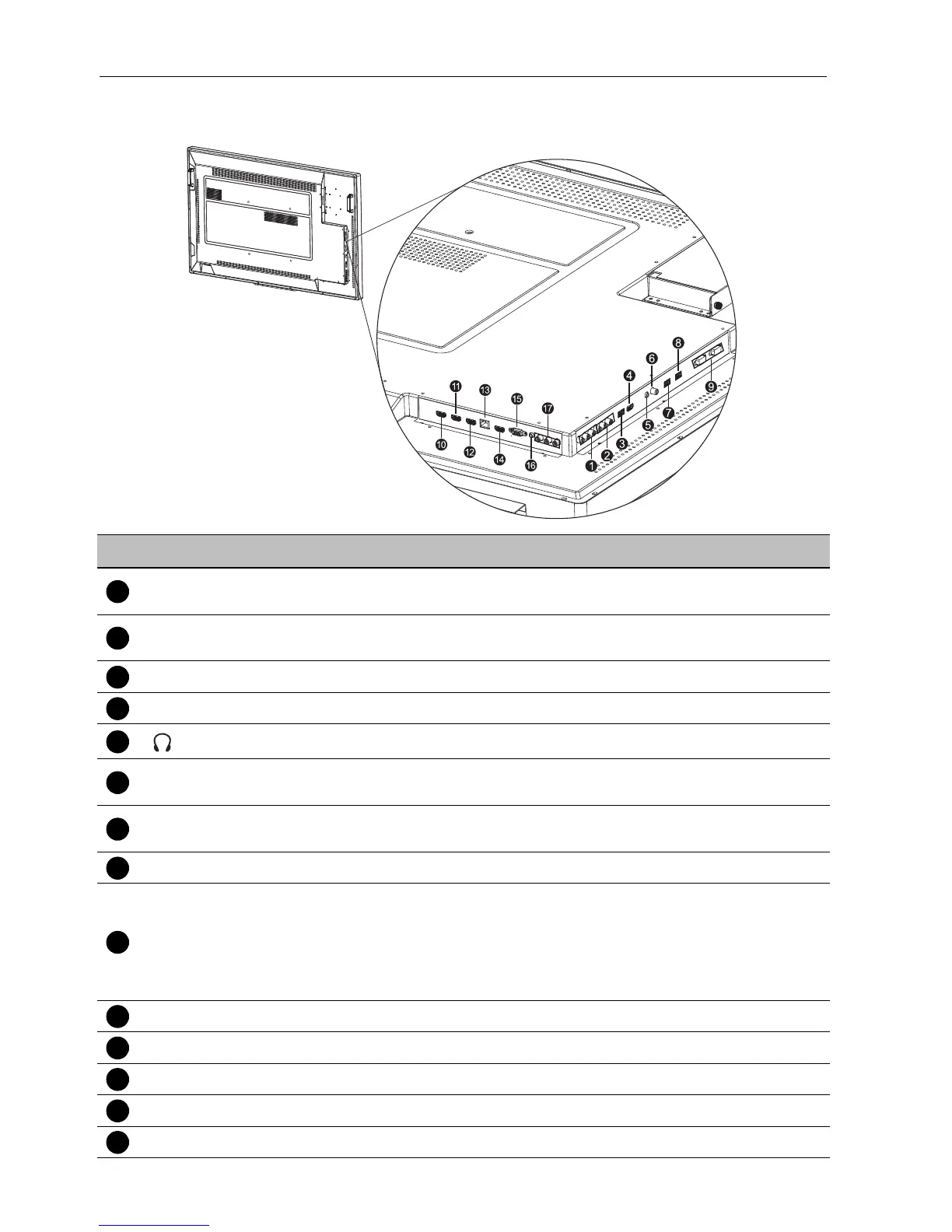
Parts of the display and their functions10
Input/output terminals
No. Name Description
AV OUT(L/R)
Outputs composite video signals from the AV IN input to another
display with an RCA connector.
AV IN(L/R)
Receives composite video signals from an external device (such as
a VCR or DVD player).
M USB 2 Accesses multimedia files on USB drives directly.
HDMI 5(MHL) Receives HDMI signals from an external device.
Connects to a headphone or an earphone.
COAXIAL
Connects to a coaxial cable to function as a radio frequency
trasmission line.
TOUCH USB-2
Connects the USB cable from the display to a computer to use the
touch module.
OPS USB Connects to a USB drive directly in OPS.
RS232(IN/OUT)
Used for external control.
• RS232 IN: Receives control signals from a computer or another
display.
• RS232 OUT: Outputs control signals from the RS232 IN input to
another display.
HDMI 2 Receives HDMI signals from an external device.
HDMI 3 Receives HDMI signals from an external device.
HDMI OUT Connects to the display devices with a HDMI 3 input.
LAN Connects to the network using the Ethernet cable.
HDMI 4 Receives HDMI signals from an external device.



 To Next Page