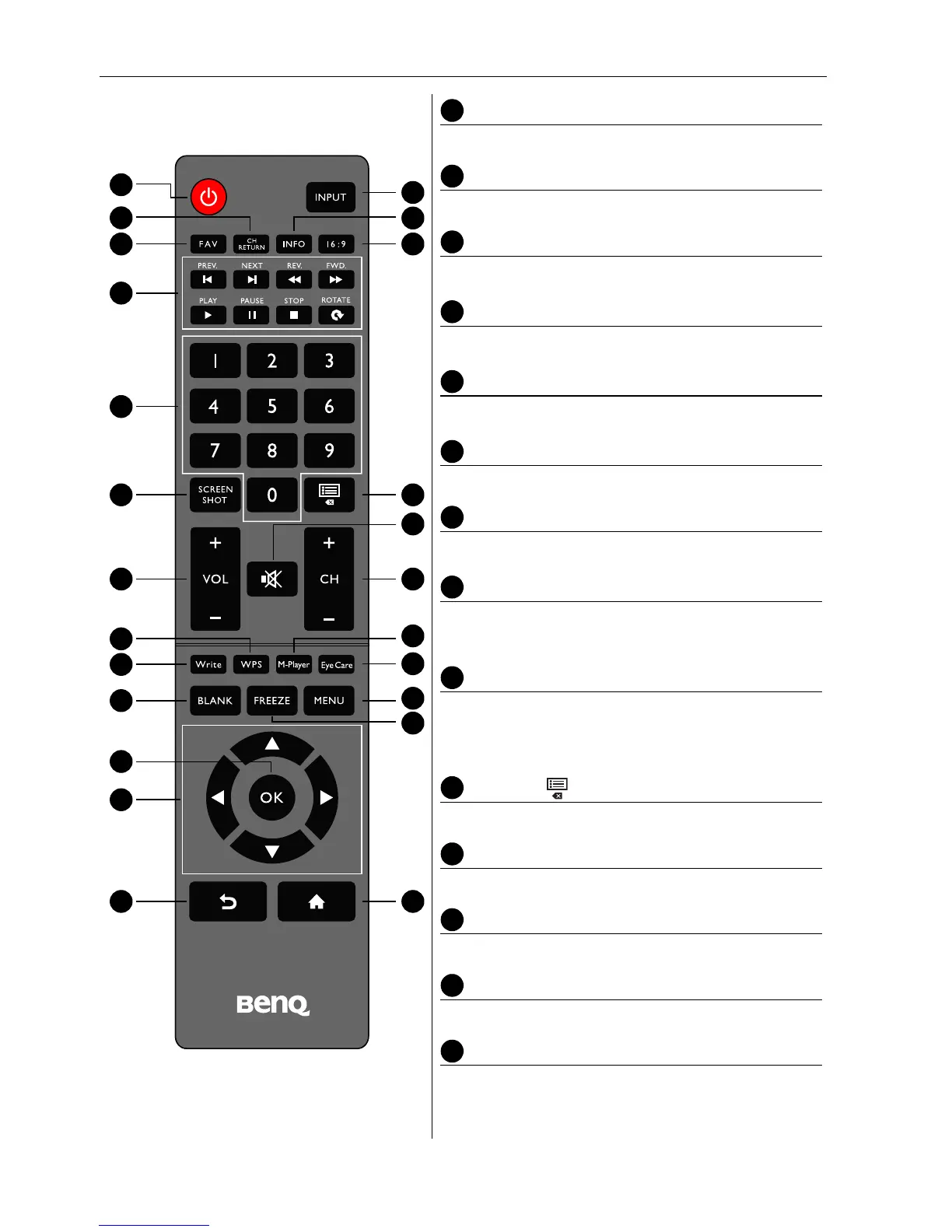
Parts of the display and their functions12
Remote control
POWER
Turns the display on or off.
INPUT
Selects an input source.
CH RETURN
Returns to the previous program channel.
INFO
Shows the current input source and resolution.
FAV
Shows the favorite program channel.
16:9
Changes the aspect ratio of the display image.
MULTI-MEDIA buttons
Used to control the media playback.
Numeric buttons (0-9)
Performs as numeric buttons when the OSD menu
is on.
SCREEN SHOT
Captures a screenshot and automatically save it to
a USB drive. Make sure to plug the USB disk drive
first before capturing the screenshot.
CHLIST ( )
Deletes a character / displays program list.
MUTE
Turns on or off the mute function.
VOL- / VOL+
Turns down/up the volume.
CH+ / CH-
Selects the program channel.
WPS
Switches the system into Android OS, then opens
the WPS office app.



 To Next Page