26 Connection
Connecting a DVI source device
The projector provides a DVI-I input socket that allows you to connect it to a DVI source
device like a DVD player, or a VGA output device like a notebook or desktop computer.
There are three types of DVI connectors: DVI-A, DVI-D, and DVI-I. The DVI-I socket is an
integrated connector which supports both formats: DVI-A, and DVI-D.
DVI-A format is used to carry a DVI signal to an analog (VGA) display, or vice-versa.
Although some signal quality is lost from the signal conversion, it still transmits higher
picture quality than a standard VGA connection.
DVI-D format is used to directly carry a digital signal to a digital display without signal
conversion. The pure digital connection provides faster and higher picture quality than an
analog connection, due to the nature of the digital format.
DVI-A and DVI-D formats are non-interchangeable. You cannot connect a DVI-A format
connector to DVI-D equipment and visa-versa. Make sure you know which kind of format
your equipment is fitted with before you purchase any cables. Or you can purchase a DVI-I
cable which will be more useful in any type of DVI connection situation.
Examine your source device to determine if it has an unused DVI or VGA (D-Sub) output
socket available:
• If so, you can continue with this procedure.
• If not, you will need to reassess which method you can use to connect to the device.
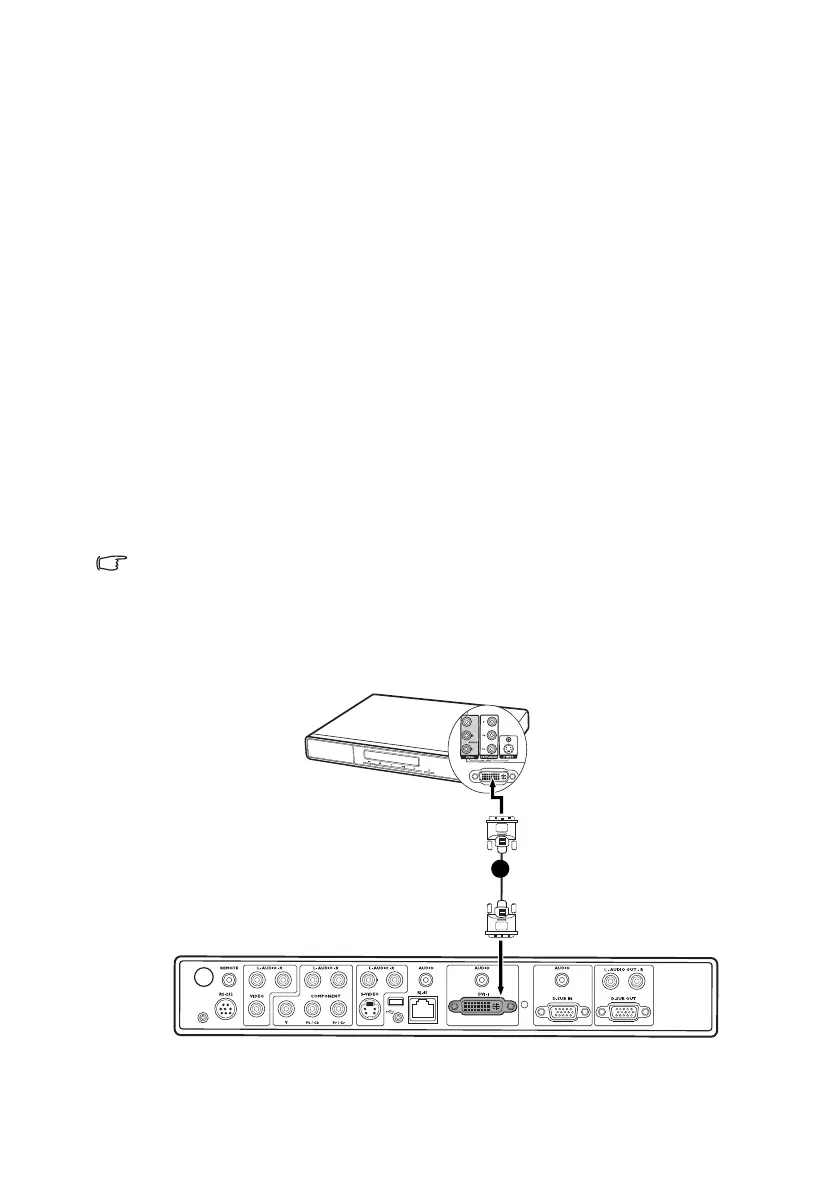
To connect the projector to a DVI source device or a computer:
For information on connecting a DVI source device to a computer through a VGA to DVI-A
cable, see "Connecting a computer" on page 23.
1. Take the DVI (DVI-D or DVI-I) cable and connect one end to the DVI output socket
of the DVI source device.
2. Connect the other end of the cable to the DVI-I signal input socket on the projector.
The final connection path should be like that shown in the following diagram:
i. DVI-D or DVI-I
cable
AV device
i


 To Next Page