44 Maintenance
• Setting Auto Power Off
This function allows the projector to turn off automatically if no input signal is detected after a
set period of time to prevent unnecessary waste of light source life.
To set Auto Power Off, go to the Advanced menu - System > Operation Settings > Power
On/Off Settings > Auto Power Off, and press OK, / to set a period of time.
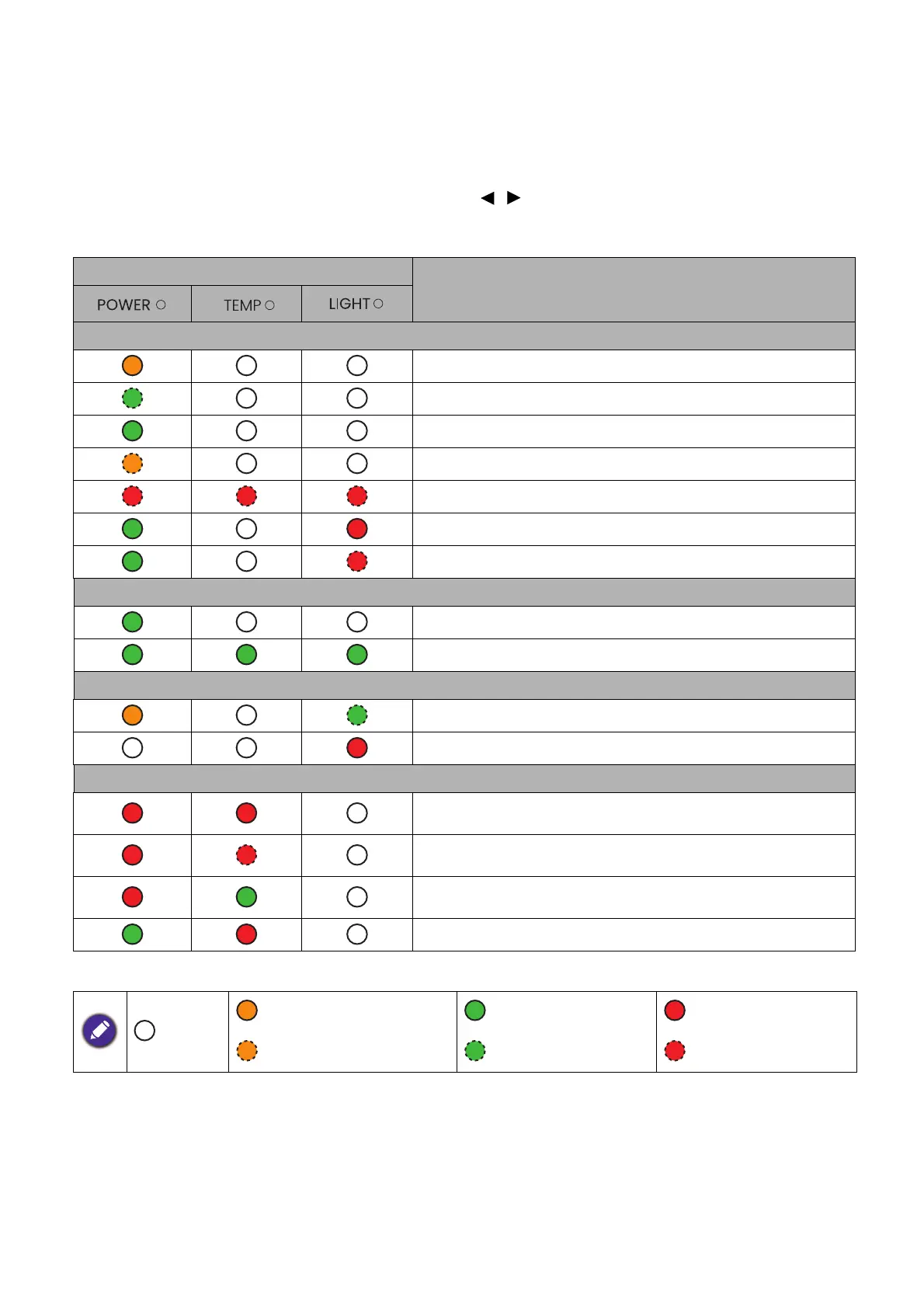
Indicators
Light
Status & Description
Power events
Stand-by mode
Powering up
Normal operation
Normal power-down cooling
Downloading
Color wheel start/spin fail
Phosphor wheel start/spin fail
Burn-in events
Burn-in on
Burn-in off
Light events
Light life exhausted
Light error in normal operation
Thermal events
Fan 1 error (the actual fan speed is outside the desired
speed)
Fan 2 error (the actual fan speed is outside the desired
speed)
Fan 3 error (the actual fan speed is outside the desired
speed)
Temperature 1 error (over limited temperature)
: Off
: Orange On : Green On : Red On
: Orange Flashing : Green Flashing : Red Flashing



 To Next Page