water.
4. Keep the ice maker connected to the water supply. Fill the water tank with the
sanitizing solution.
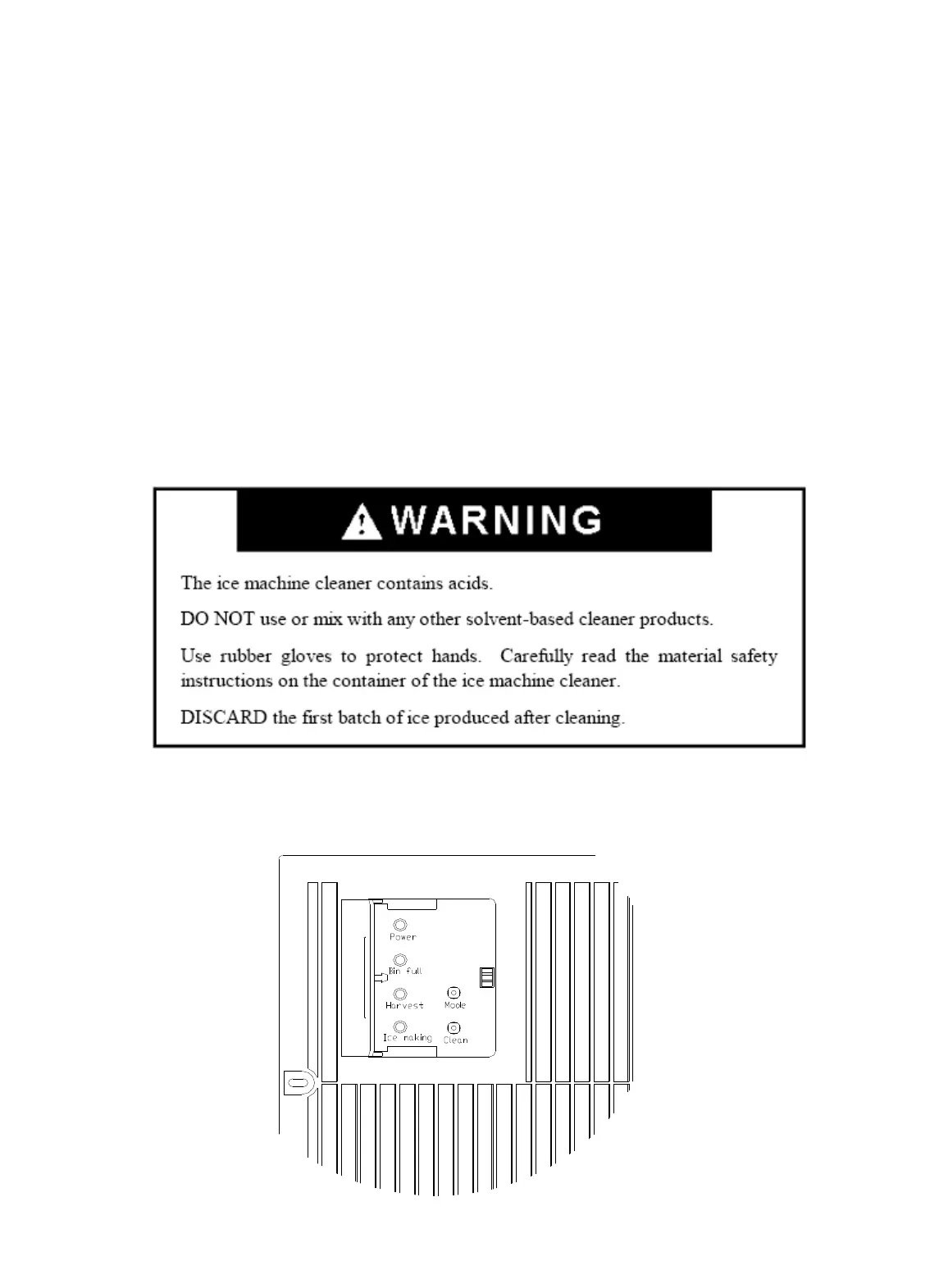
5. Turn the power switch ON. Within 3 minutes, press the CLEAN button. The machine
will run the Automatic Clean mode. The yellow Ice Harvest and the red Bin Full
LEDs will blink.
6. The cleaning cycle will continue for 30 minutes unless you press the power switch
(you can press the power switch to stop the cleaning cycle any time during the 30
minutes). After cleaning, the yellow Ice Harvest and the green Ice Making LEDs go
on steady and the machine returns to Stand-by mode.
7. The dirty water must be drained out completely. Perform steps 2 and 3 in the Interior
Cleaning section.
8. Repeat steps 4 to 7 above three times with fresh water to rinse the ice-making system
completely. NOTE: Do not add any cleaning or sanitizing solution to the water
trough during the rinses.
9. If you want to make ice cubes after cleaning, turn off the power switch, drain off the
waste water, then turn on the power switch. The next ice-making cycle will begin.
10. Discard the first batch of ice.
Control Panel (located at left side of front bottom louver panel)


 To Next Page