Run Cables from Truck Batteries
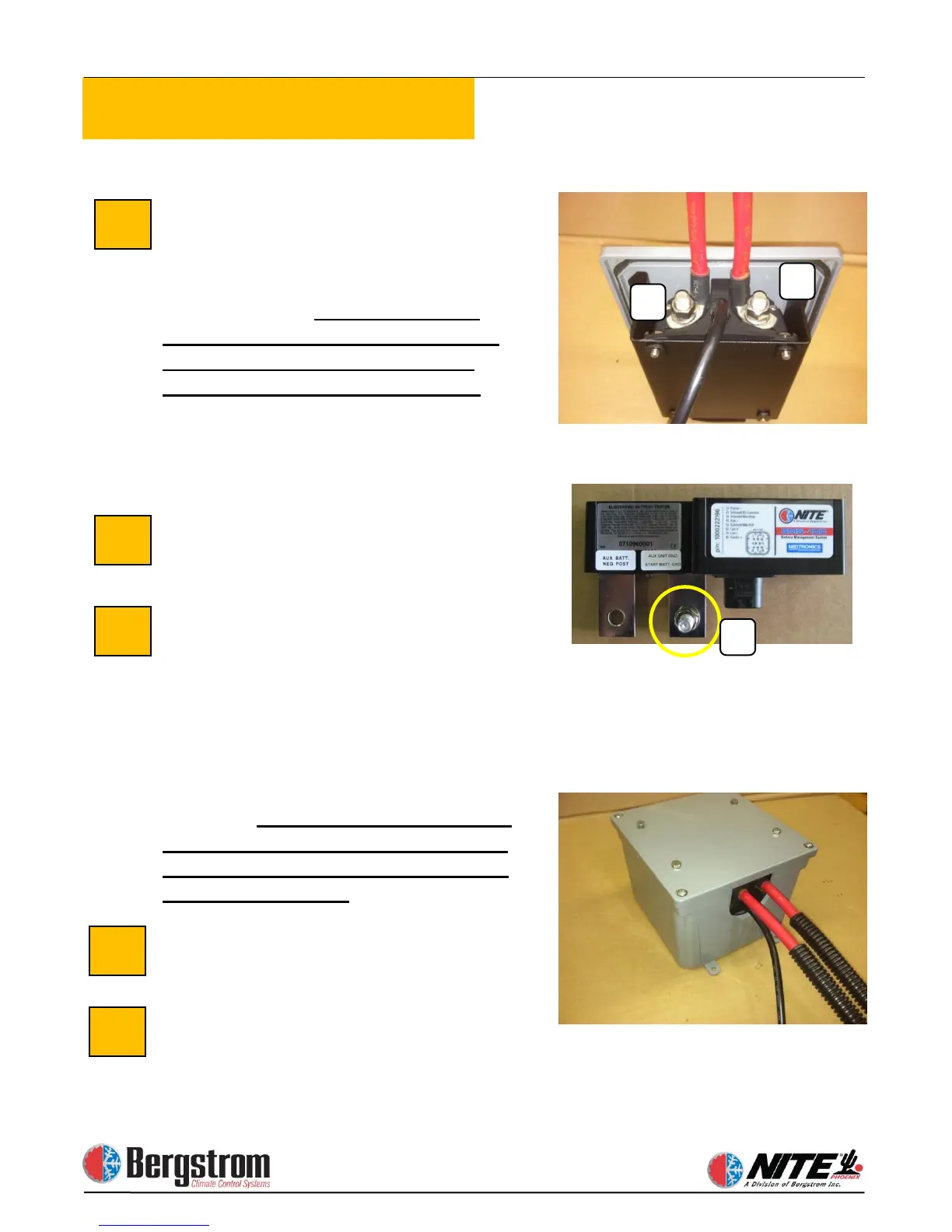
Loom 2 full length battery cables, 1 red
and 1 black. The red (pos) cable will
connect the truck starting batteries
positive post to the (start) post (A) of the
battery separator.
You must use the
provided 90 degree battery terminal
end at the Terra Power separator
rotated to the center of the switch.
Torque specs for separator terminals
88(recommended) to 132(maximum) inch
lbs.
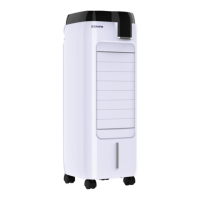
The black (neg) will connect the truck
(neg) to the threaded stud (C) of the
BMS.
Connect
NITE Batteries to Battery
Using red battery cable,
measure and cut to proper length. Crimp
ring terminals and heat shrink. Connect
one end to the most appropriate positive
(+) terminal of the NITE Batteries.
Connect the other end to the AUX
terminal (B) of the battery separator. See
top photo.
You must use the provided
90 degree battery terminal end at the
Terra Power separator rotated to the
center of the switch
.
Install the separator assembly
Once you have torque the battery cable
connections, install the cover assembly on
the enclosure.


 To Next Page