Page 10
BLUETOOTH DIRECTION FINDING
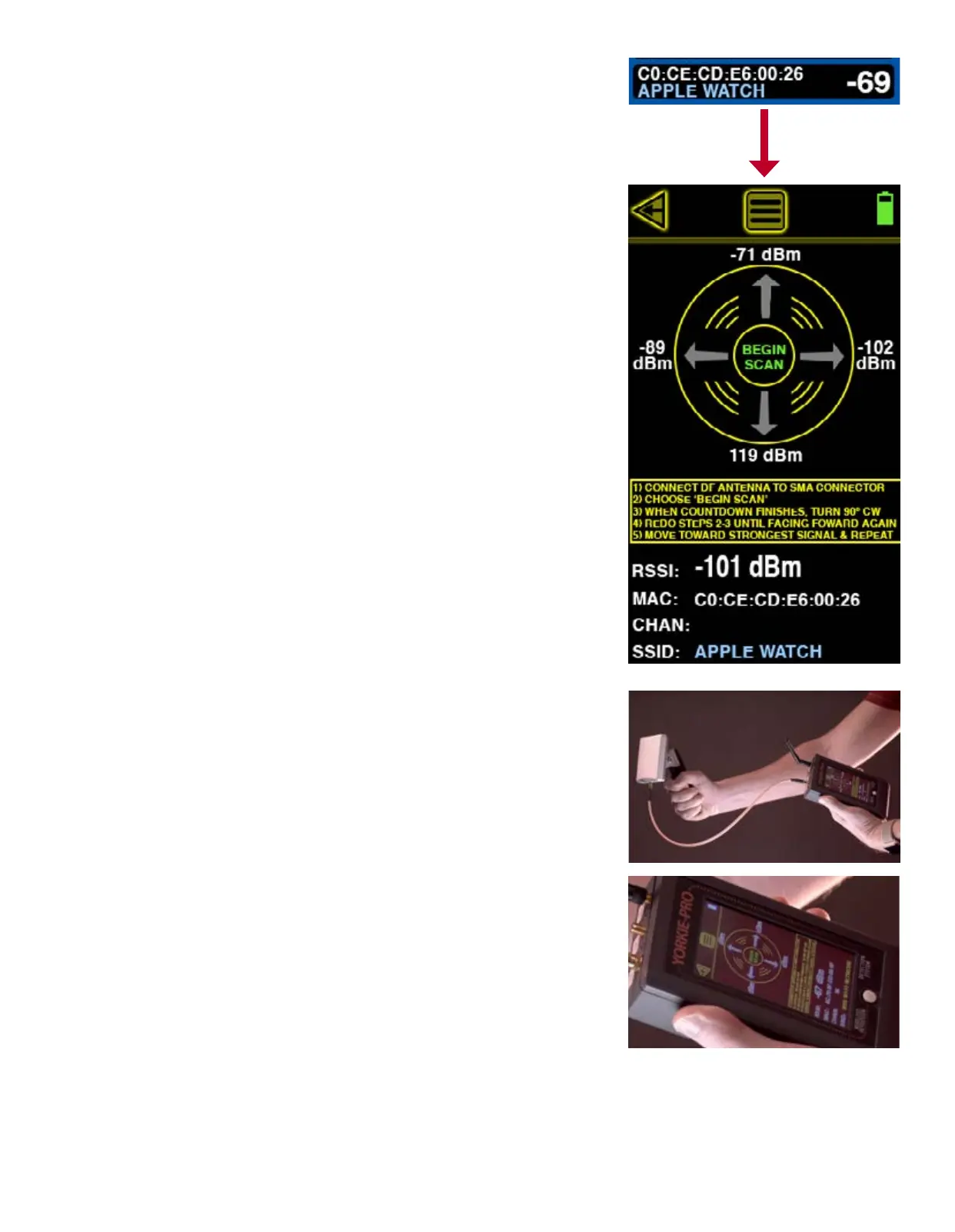
Once you have identied a BT or BLE device of interest, you can begin to locate it by choosing it
from the BLUETOOTH MEASUREMENTS list screen. That takes you to the BLUETOOTH DIRECTION
FINDING screen seen here. This screen scans only the device selected from the previous screen
and delivers real time and recently saved measurements allowing users to determine directional-
ity of the scanned device.
In addition to BT or BLE RSSI measurements in dBm, the BLUETOOTH DIRECTION FINDING screen
also displays the MAC address and device ID.
Replace the omni-directional antenna with the large, 2.4/5.8 GHz DF antenna by connecting to
the SMA connector on the left side atop the Yorkie-Pro unit. BEGIN SCAN will continue to blink
until you touch it. The Yorkie-Pro will now begin scanning. Point the direction nding antenna
away from the unit and yourself and keep it parallel to the ground. After a few seconds of scan-
ning, a number will appear atop the circle. Now you can turn 90 degrees and repeat the same
procedure until you are facing back in the original direction you started scanning.
Now that you have 4 different measurements (one for each direction) showing, you can deter-
mine the general direction of the device you are trying to locate. For instance, the screen shown
here to the right indicates that the device is most likely located between the two highest measure-
ments (between -89 dBm and -71 dBm) which means your new heading would be somewhere
between 10 and 11 o’clock or northwest (assuming you began your rst measurement facing
north). RF reections and BT or BLE device interference can sometimes change results mid-scan
so you can choose to repeat all of the same steps again to doublecheck your results or you can
move in the direction that this screen has indicated. It is recommended that you do not walk
much further than 25-50 feet at rst because once you get close to the device, the measurements
tend to look similar to one another due to the overall sensitivity of the direction nding antenna.
Effective direction nding is best accomplished through patience and small incremental steps.
You might consider practicing on known devices before attempting to locate an unknown BT or
BLE device.


 To Next Page