
 To Next Page
J
Jennifer SmithAug 15, 2025
What to do if my berlinger SmartSystem SITE L shows 'LOW BATTERY'?
- JJohnny JonesAug 16, 2025
If your Berlinger Data Logger displays 'LOW BATTERY,' connect it to a power source to charge the battery.

What to do if my berlinger SmartSystem SITE L shows 'LOW BATTERY'?
If your Berlinger Data Logger displays 'LOW BATTERY,' connect it to a power source to charge the battery.
How to fix a blank display on berlinger SmartSystem SITE L?
If your Berlinger Data Logger's display is blank, connect the device to a USB charger to charge the battery.
What to do if my Berlinger Data Loggers shows 'MANUAL SYNC'?
If your Berlinger Data Logger displays 'MANUAL SYNC', load the configuration. You can do this by quickly pressing the multifunctional button 3 times. Alternatively, check if a configuration is available for your device in the Berlinger SmartView software (version 6.0 and higher). If communication with the SmartView Cloud isn't possible, manual configuration loading is required.
What does 'PLUG IN' mean on berlinger SmartSystem SITE L Data Loggers and how to fix it?
If your Berlinger Data Logger displays 'PLUG IN', connect an external sensor or check if the sensor is correctly connected.
What does 'SENSOR ERROR' mean on berlinger SmartSystem SITE L and how to fix it?
If your Berlinger Data Logger displays 'SENSOR ERROR', replace the external sensor.
How to start berlinger SmartSystem SITE L Data Loggers when display shows LONG PRESS?
If the display of your Berlinger Data Logger indicates 'Device cannot be started Display shows LONG PRESS', press the multifunctional button for at least 5 seconds.
What does Manual SYNC mean on Berlinger Data Loggers and how to resolve it?
If your Berlinger Data Logger displays 'Manual SYNC', a manual upload with USB or Bluetooth is needed. Upload the data manually to Berlinger SmartView software (version 6.0 and higher). Note that upload via Bluetooth will be available in a later version.
What to do if my Berlinger Data Loggers shows 'BATTERY EXPIRED'?
If your Berlinger Data Logger displays 'BATTERY EXPIRED', replace the device.
Why does my berlinger SmartSystem SITE L Data Loggers display 'LOW -.-°C'?
If your Berlinger Data Logger displays 'LOW -.-°C', it means the measured temperature is outside the specified temperature range of the SmartMonitor SITE L device.
Guide for quick setup when device configuration is pre-loaded.
Guide for quick setup when device configuration needs to be loaded first.
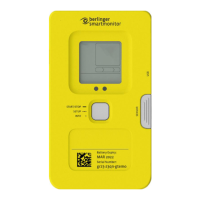
Details on the information presented on the 7-digit display.
Procedure for initiating the device's recording and monitoring operations.
Procedure for stopping the device's recording and monitoring functions.
Configuration and process for starting the device with a pre-set delay.
Configuration and process for starting the device according to a scheduled time.
Steps to prepare the device before use, including display and housing checks.
Steps for setting up the device, including configuration and reset options.
Procedure for starting the device's recording.
Process of recording data and transmitting it via Wi-Fi.
Procedure for stopping the device's recording process.
Step-by-step guide for connecting an external sensor to the device.
Details on connecting multiple sensors using the Multi Sensor Adapter.
Regulatory information for North America, including FCC and ISED compliance.
 General
| Brand | berlinger |
|---|---|
| Model | SmartSystem SITE L |
| Category | Data Loggers |
| Language | English |