Draft version 01 Operatots Manual / SmartMonitor SITE L page 7 of 26
3 Device view and description
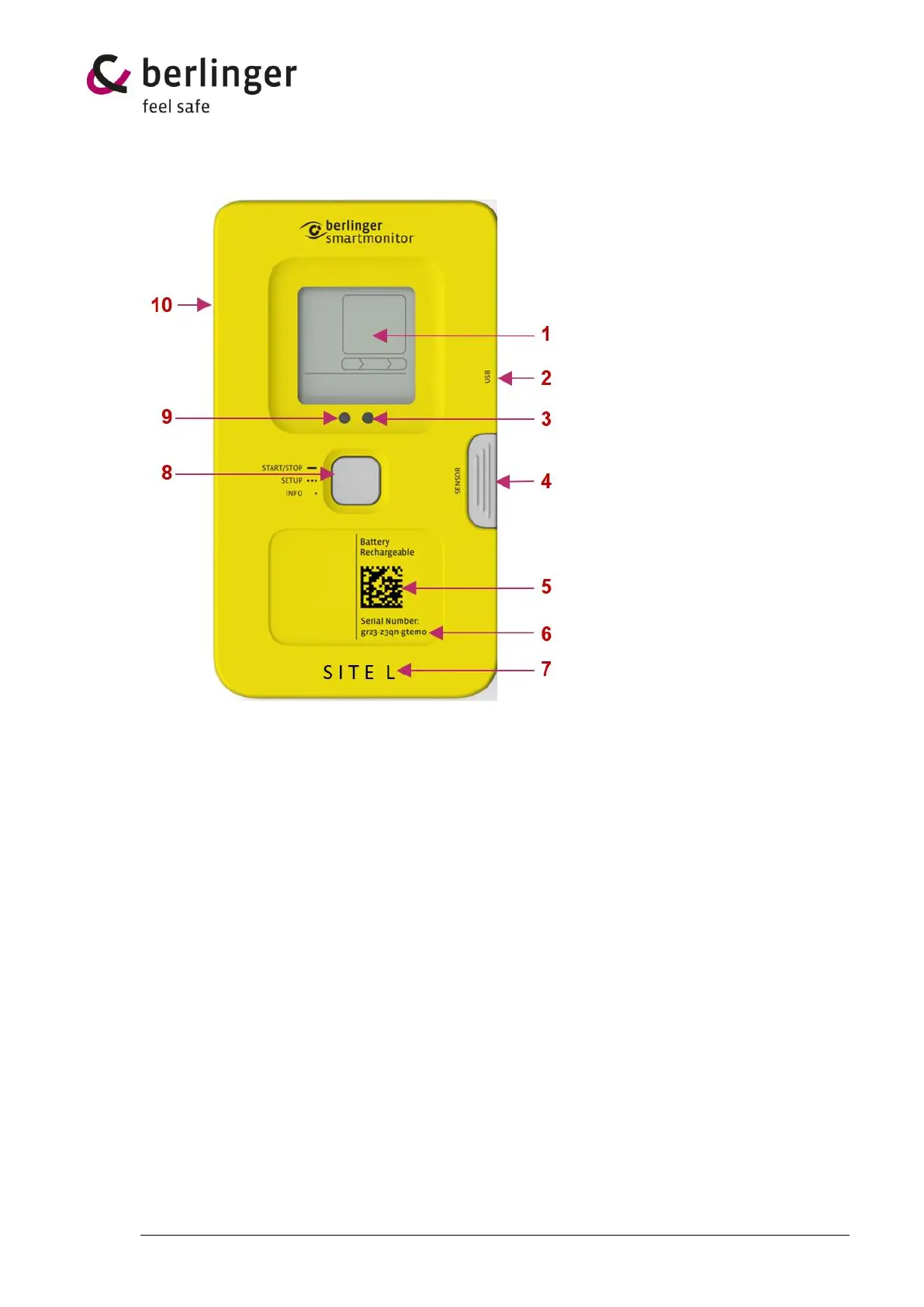
No. Name Description
1 Display Multi-information display
2 USB-connector To charge the battery or download the data manually
3 Confirmation/Status LED LED (small lamp) indicates if use of multifunctional
button was successful or not
4 Cover for ext. sensor Protect plug for external sensor
5 QR Code Contains the serial number for M2M
(Machine to Machine)
6 Serial number Serial number of the device
7 Device Type Indicates which type of device you have
8 Multifunctional button 1 x long press → Start the device
1 x short press → Info
3 x short press → loading profile
9 Light sensor Measure the light sensitivity
10 Humidity and atmos- Measure humidity and atmospheric pressure
pheric pressure sensor


 To Next Page