Draft version 01 Operatots Manual / SmartMonitor SITE L page 23 of 26
16 Troubleshooting
Connect the device to USB
charger to charge the battery.
Device cannot be started
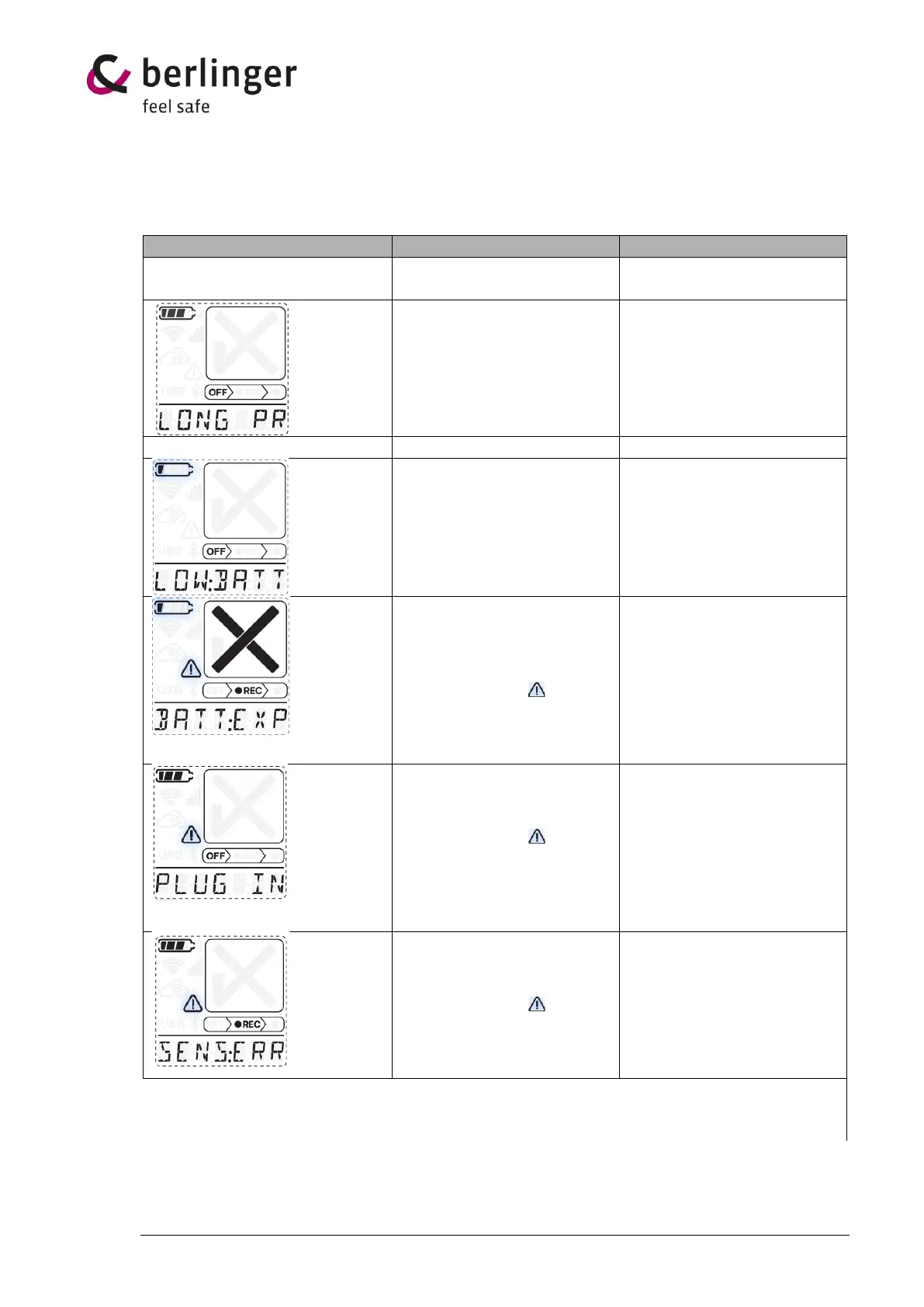
Display shows LONG PRESS
Press the multifunctional
button at least 5 second.
LOW BATTERY
LOW:BATT will be shown on
the 7-segnent display and
battery symbol is blinking
Connect the device to power
to charge the battery.
BATTERY EXPIRED
BAT:EXPIRED will be shown
on the 7-segment display and
the battery symbol is blinking.
Exclamation mark is
blinking.
Use of device is no longer
possible due to safety reason.
PLUG IN
PLUG IN will be shown on the
7-segment display and the
exclamation mark is
blinking.
Device is configured for an
external sensor but no
external sensor is detected.
Connect an external sensor or
check if sensor is correctly
connected.
SENSOR ERROR
SENS:ERR will be shown on
the 7-segment display and the
exclamation mark is
blinking.
Connected sensor is
defective.


 To Next Page