Draft version 01 Operatots Manual / SmartMonitor SITE L page 14 of 26
11.2 Stop
SmartMonitor SITE L device can only be stopped via Berlinger SmartView software (version 6.0 and
later).
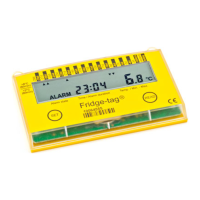
As soon as the stop command has been entered via SmartView, the device will be stopped during the
next synchronization between SmartView and SITE L and the information DONE will be displayed on
the 7-segment display on the device.
12 Start delay
For SmartMonitor SITE L device you have the possibility to configure in Berlinger SmartView software
(version 6.0 and higher) with a start delay or with a scheduled start.
12.1 Start SmartMonitor SITE L with start delay
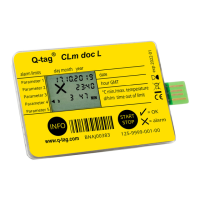
If a start delay is configured a counter in minutes:seconds will start counting down to 00:00, after
that, the device starts and goes to the Record modus.


 To Next Page