Draft version 01 Operatots Manual / SmartMonitor SITE L page 12 of 26
10 Configuration
The configuration for the SmartMonitor SITE L device can be defined via the Berlinger SmartView
software (version 6.0 and later).
SmartMonitor SITE L can be ordered pre-configured with a customer desired configuration or with a
standard configuration.
If a new configuration is to be loaded, it is configured in the Berlinger SmartView software (version
6.0 and higher) and then assigned to the device.
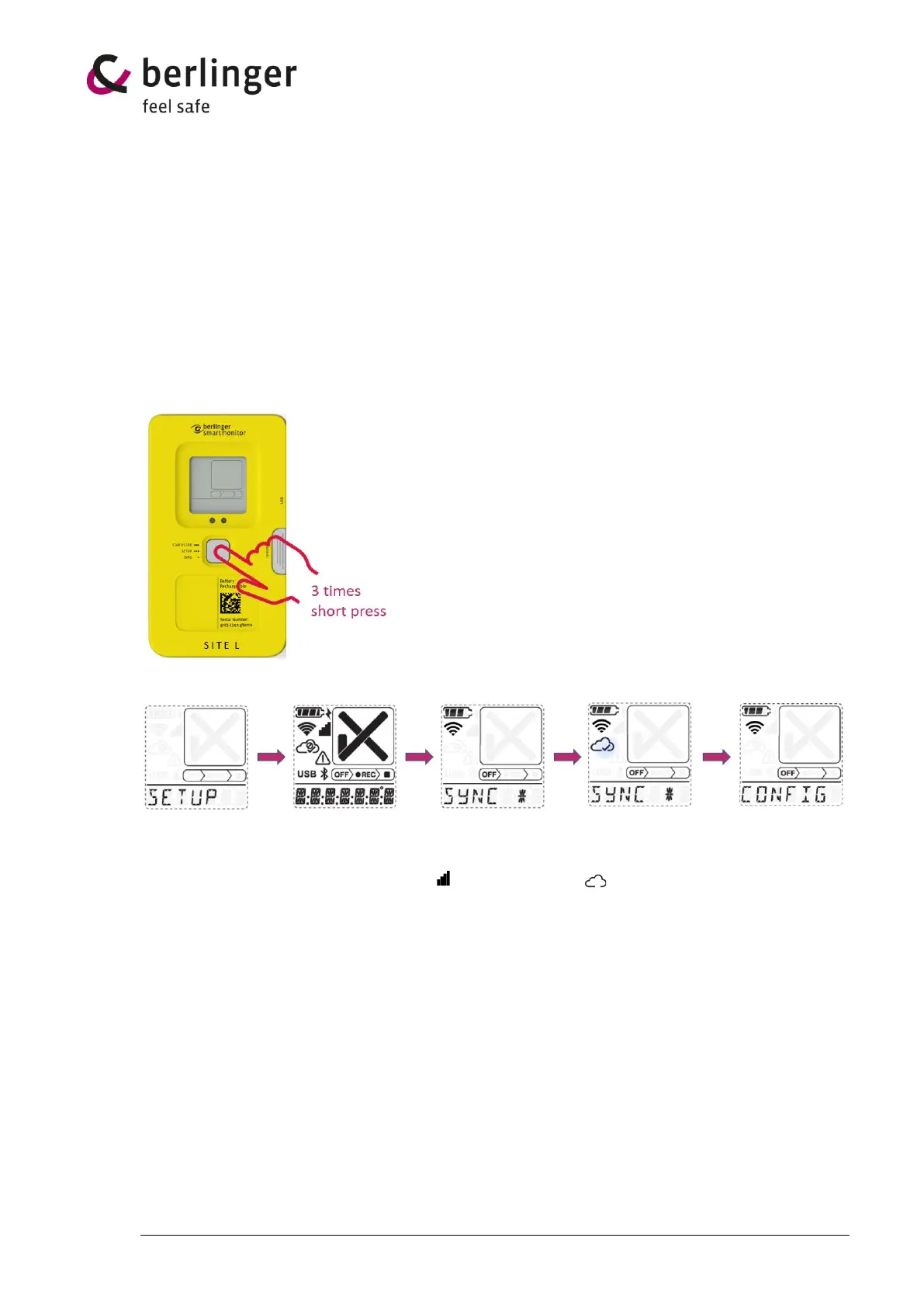
To load a defined and assigned configuration, the multifunctional button on the SmartMonitor SITE L
device must be pressed 3 times in quick succession.
The display starts showing after press quickly 3 times following screen
Start screen Test screen Connection to Downloading Device is ready
Berlinger cloud configuration to start
Cellular symbol Cloud symbol
is blinking is blinking


 To Next Page