8
Connecting The Battery
Important
Attached to the battery are two rubber stoppers. These are to be inserted into the
black and orange labeled receptacles. When these receptacles are not in use, keep
the rubber plugs inserted into the receptacles to protect your battery from mois-
ture.
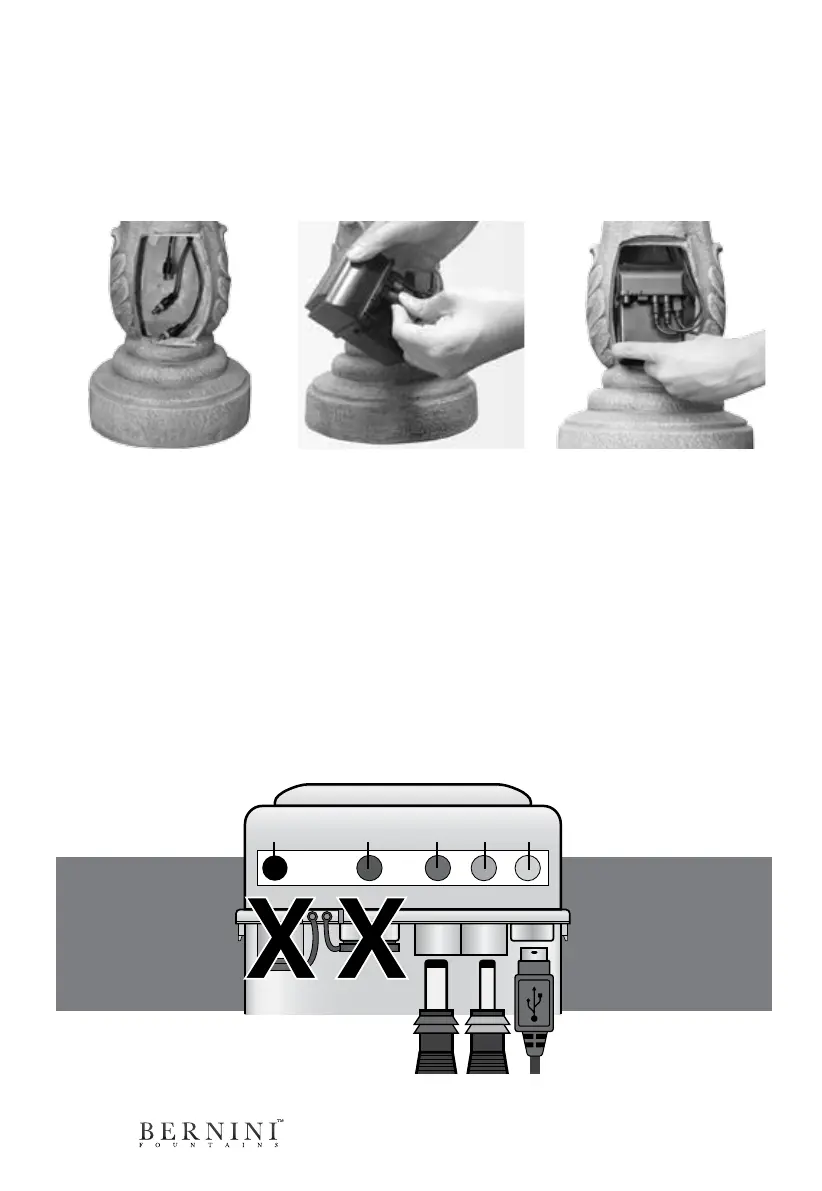
Step 2: Connect the color
coded cords to their corre-
sponding receptacles labeled
on the battery.
Use the diagram below for
more help on connecting the
battery
Step 3: Place the battery
inside of the compartment as
shown in the picture.
DO NOT PLACE BATTERY
UPSIDE DOWN INSIDE OF
ITS COMPARTMENT.
Step 1: In the open battery
compartment you will see
three cords that you must
connect to the battery to use
your fountain.
If you do not see the three
cables inside the battery
compartment, you may
need to reach up into the
base and gently pull them
down until they are hanging
inside the battery compart-
ment.
Black Orange Green Red Blue
For initial bat-
tery installation,
you do not need
the black and
orange recepta-
cles.
When connecting
USB cord, make
sure the USB logo
is facing toward
you.
Red BlueGreen



 To Next Page