11
Fill Your Fountain
Fill the fountain bowl until water pours over the spouts. Then ll the large bowl until the
water is about 1 inch (2.5 centimeters) from the top of the bowl.
Operating Your Fountain
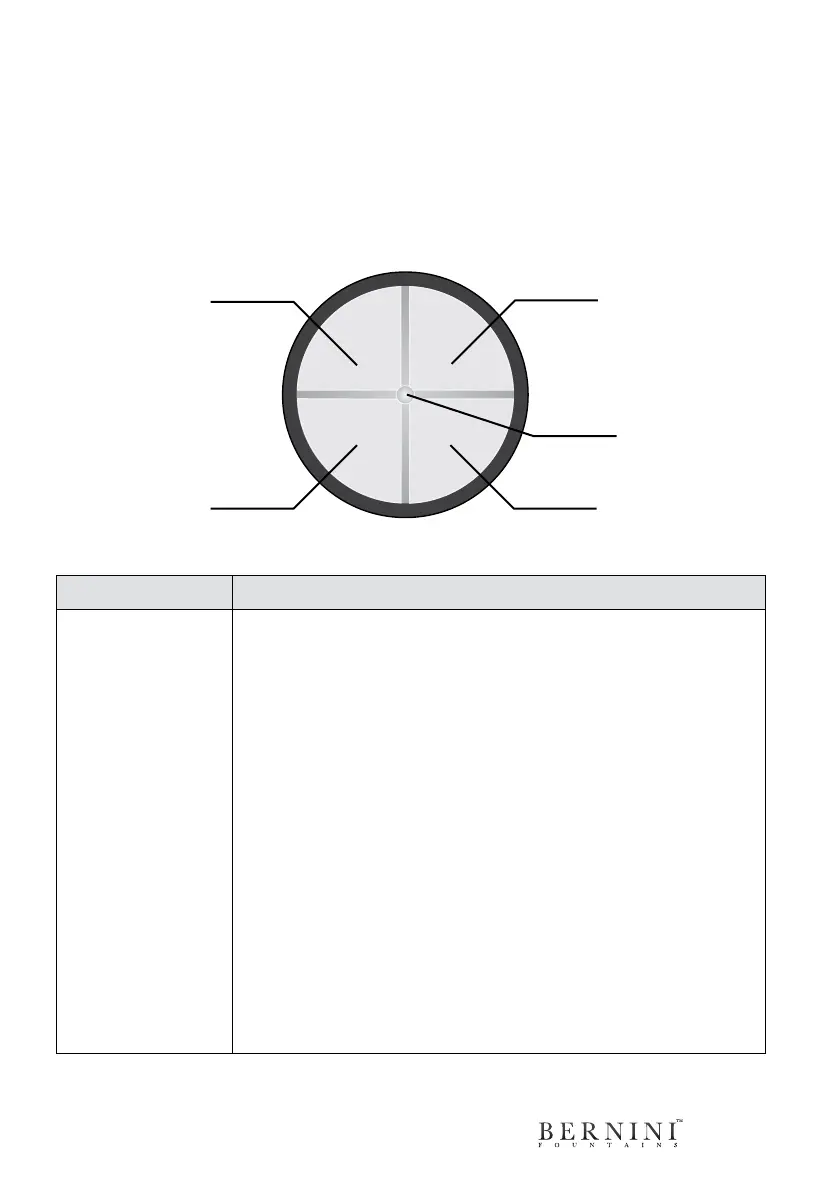
The on-board control panel is located towards the top of the base, just below the large
bowl. See the diagram below to see how the all-new on-board controls work for your
Bernini Fountain.
A B
C D
Manual On-O
1-4 Hour Timer
Status Light
1-4 Hour Daily
Timer (Repeats
Every Day)
LED Lights
On/O
BUTTON DESCRIPTION
A (1-4 Hour Timer)
Runs the fountain for 1-4 hours with automatic shut o.
One hour operation: press the A button once for your fountain to
turn on and it will automatically shut-off after one hour of opera-
tion.
Two hour operation: press the A button twice and your fountain
will automatically shut-off after two hours of operation.
Three hour operation: press the A button three times and your
fountain will automatically shut-off after three hours of operation.
Four hour operation: press the A button four times and your
fountain will automatically shut-off after four hours of operation.
How To Use This Function:
1. Press the A button one, two, three or four times to turn your
fountain on for the desired automatic run time.
2. The Status Light will blink once for each hour you have selected
to conrm your fountain’s 1-4 Hour Timer, up to four hours.
3. At the end of the desired interval, your fountain will automatically
turn off.



 To Next Page