22
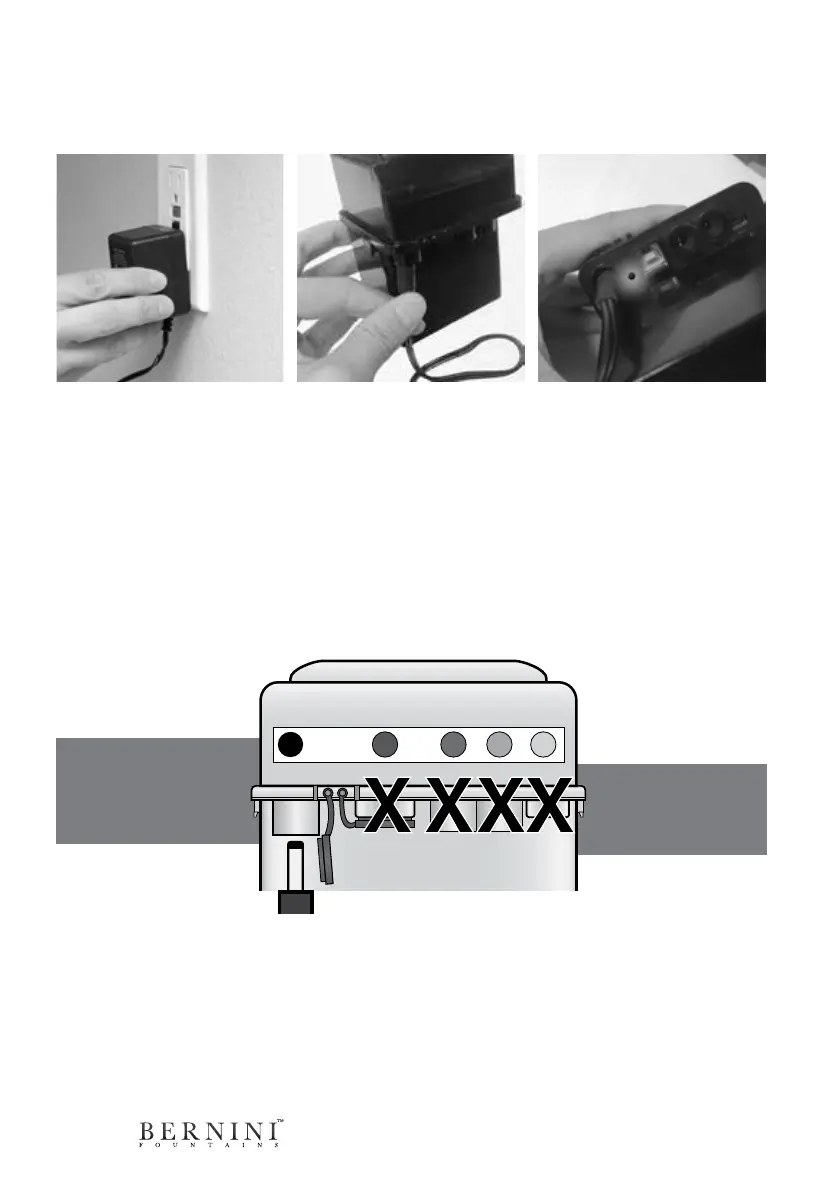
Unplug cords
from battery be-
fore charging.
Connect the black
cord of the charger
to the black labeled
receptacle.
Recharging The Battery
After about 40 hours of run time, it may be time to charge the battery for your Bernini
Fountain.
NOTE: Begin by disconnect-
ing and then removing the
battery from the base of your
fountain.
Step 1: Plug the battery
charger into an electrical wall
outlet.
Step 2: Remove the rubber
protective stopper inside of
the charging receptacle.
Then plug the cord running
from the battery charger to
the black labeled receptacle
on the rechargeable battery.
While the battery is charging,
the light next to the charger
receptacle will blink.
Step 3: Charge the battery for
12-14 hours. When the battery
is fully charged, the light will stop
blinking and the light will be solid.
At this point, you can remove
the battery from the charger
and plug the battery into your
fountain.
IMPORTANT
Attached to the battery are two rubber stoppers. These are to be inserted into the black and orange la-
beled receptacles. When these receptacles are not in use, keep the rubber plugs inserted into the recepta-
cles to protect your battery from moisture.
DO NOT CHARGE ON COUNTER TOPS, CARPETS OR OTHER FINISHED SURFACES. IT IS RECOMMEND-
ED THAT THE BATTERY BE PLACED ON A CONCRETE SURFACE WHILE CHARGING.
The orange receptacle is not needed for the initial setup of your Bernini Fountain. this is used for the
optional Solar Panel accessory.



 To Next Page