22/30 Operation
Switching enhancement mode on/o
The enhancement mode optimises the sound through an additional DAC/amp.
9 Xelento wireless is switched on.
► Briefly press the on/o button ( ) to activate or deactivate the
enhancement mode for paicularly high sound fidelity.
The function is switched on when the headphones are delivered.
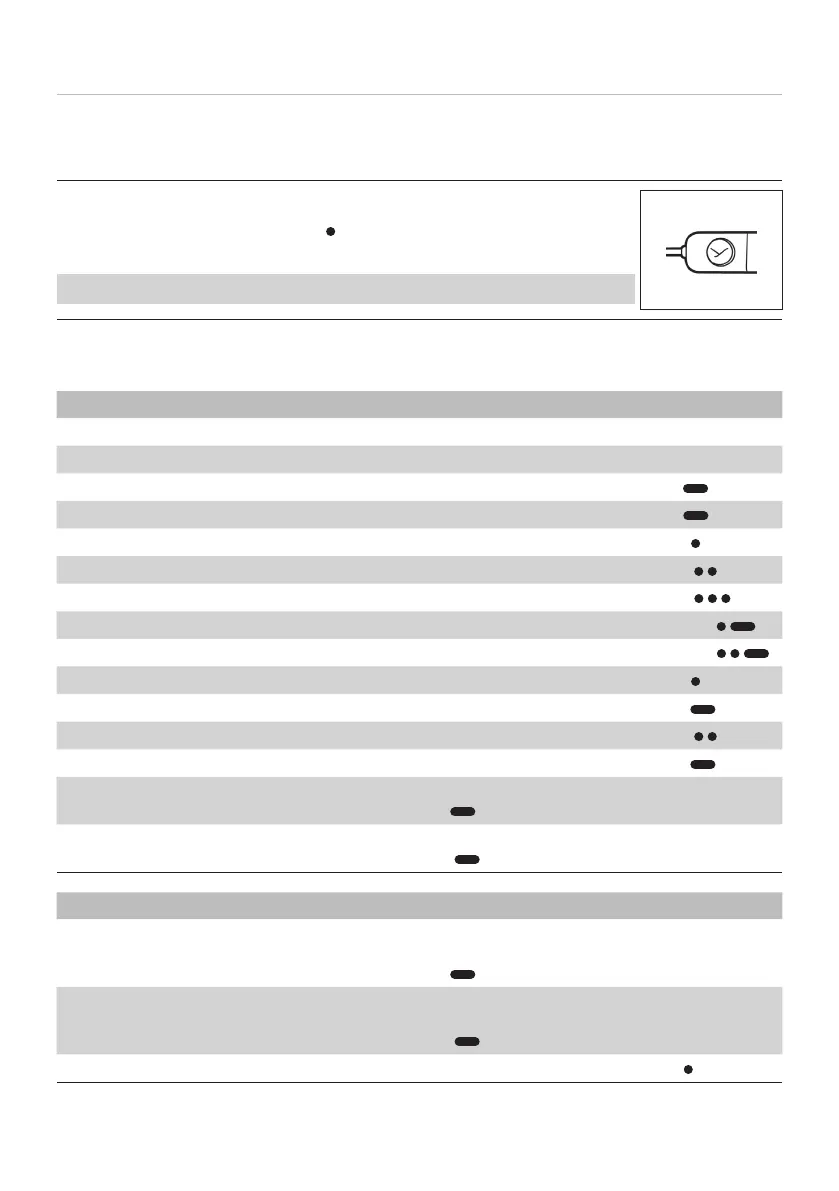
Overview of operating functions on the Bluetooth® receiver
OPERATING FUNCTIONS OPERATION
Increase volume ► Press volume-up button
Decrease volume ► Press volume-down button
Switch on ► Press on/o button for 2sec (
)
Switch o ► Press on/o button for 4sec (
)
Sta / op media playback ► Briefly press middle button 1x ( )
Jump to next track ► Briefly press middle button 2x (
)
Jump to previous track ► Briefly press middle button 3x (
)
Fa forward ► Press middle button 2x and hold ( )
Rewind ► Press middle button 3x and hold (
)
Accept / end a call ► Briefly press middle button 1x (
)
Reject an incoming call ► Press middle button for 2 sec (
)
Toggle (switch between two calls) ► Briefly press middle button 2x ( )
Calling up a viual assiant ► Press middle button for 2 sec (
)
Switch to pairing mode ► Press and hold on/o button for 6sec (
)
Delete pairing li ► Press and hold on/o button for > 10sec
(
)
SETTINGS OPERATION
Switch voice messages on or o ► Press and hold middle button and
volume-up button together for 2sec (
)
Reset to factory settings ► Press and hold volume-up button and
volume-down button together for 4sec
(
)
Switch on/o enhancement mode ► Briefly press on/o button 1x ( )















 To Next Page