17/30Operation
English
OPERATION
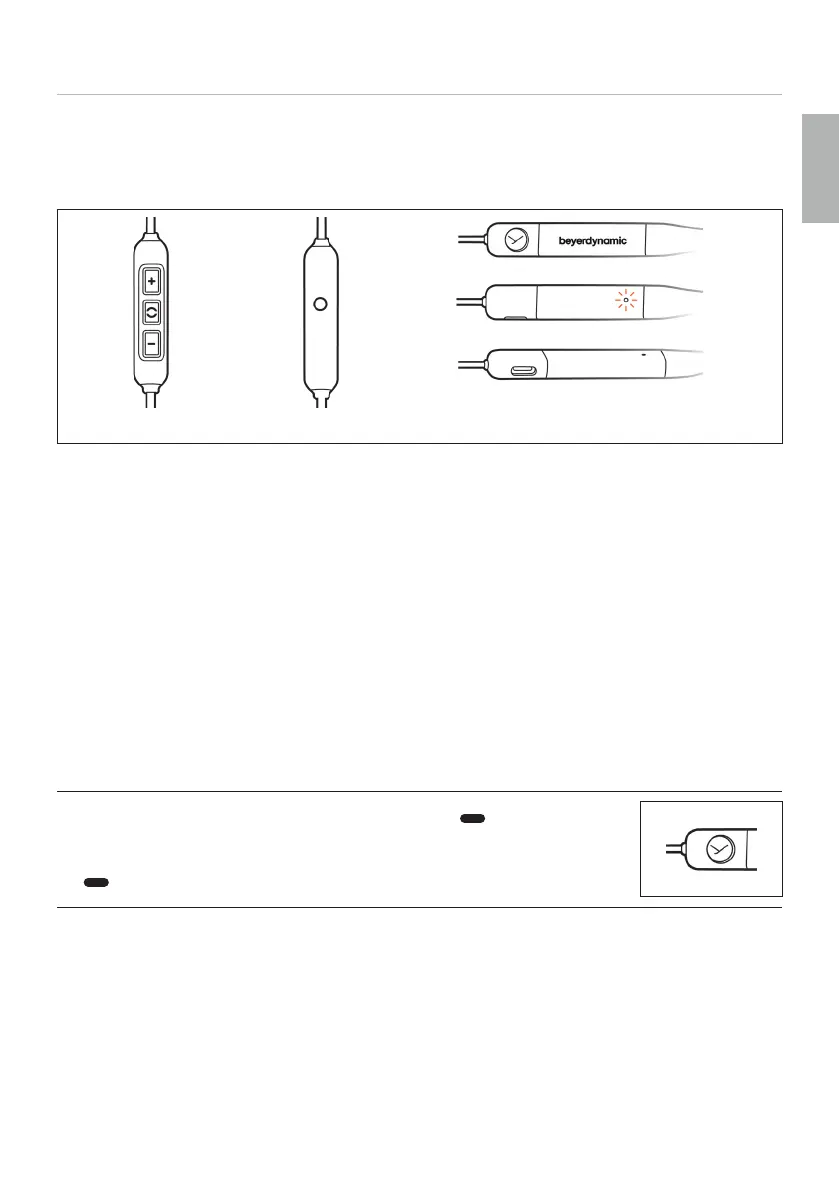
Control elements
Remote control Carrying handle
1 Increase volume (volume-up button)
2 Multifunction button (middle button)
3 Decrease volume (volume-down button)
4 Microphone
5 On/o button
6 Status LED
7 USB po
Operating inructions
Please note that not every smaphone or tablet suppos all remote control functions.
The media playback functions described depend on the paicular playback device and
its soware and may not all be available. Xelento wireless only sends control signals that
are compliant with the Bluetooth® andard.
Please contact the relevant manufacturer for fuher details.
Switching on and o
► Press and hold the on/o button for 2seconds ( ) to switch on your
Xelento wireless.
► Press and hold the on/o button for 4seconds
( ), to switch o your Xelento wireless.
Connecting to a device via Bluetooth®
Before you can use the in-ear headphones for the fir time, you mu pair them with your
mobile phone or another Bluetooth®-enabled device. The pairing procedure may dier
depending on the playback device.
► Please refer to the corresponding operating inructions of the playback device.















 To Next Page