24/30 Operation
The sound is harsh and the bass reproduction too low.
Insuicient seal on the eaips. ► Try out alternative le and right eaips
until sound is ideal.
The wireless range is too low, or the connection is disrupted.
There is inteerence with other devices. ► Keep away from WLAN routers and
microwave ovens.
► Do not and between playback device
and Xelento wireless.
Answers to the mo common problems and queions can be found at the following
online address: suppo.beyerdynamic.com
Operation in remote mode with jack connecting cable
Remote control
The enclosed connecting cable with the jack plug (cable for remote operation) contains a
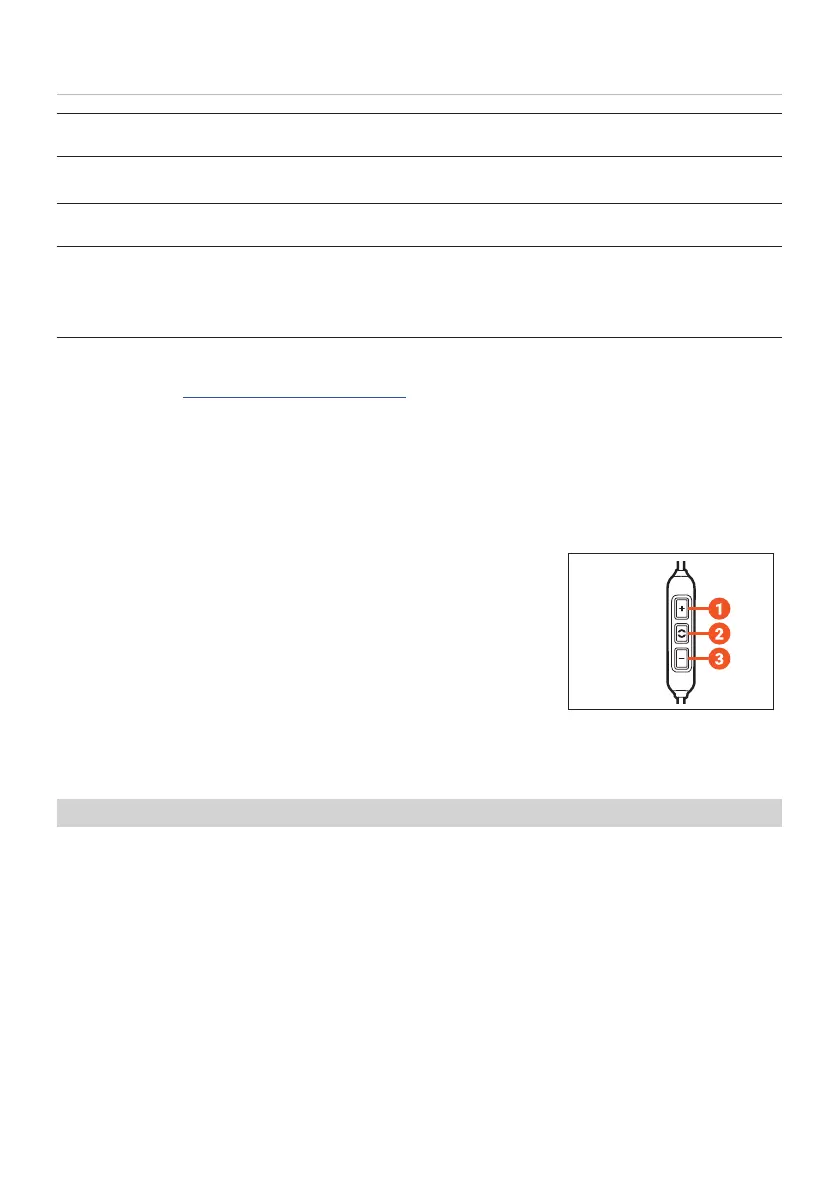
remote control with three buttons and a microphone.
Buttons on the remote control
1. Increase volume (volume-up button)
2. Multifunction button (middle button)
3. Decrease volume (volume-down button)
Compatibility with playback devices
On compatible smaphones and tablets, you can use this remote control to control calls,
media playback and volume.
Please note that not every playback device suppos all remote control functions.
► Please contact the relevant manufacturer for fuher details.
► Refer to the operating inructions of the device to which the product is to be
connected.















 To Next Page