ENGLISH
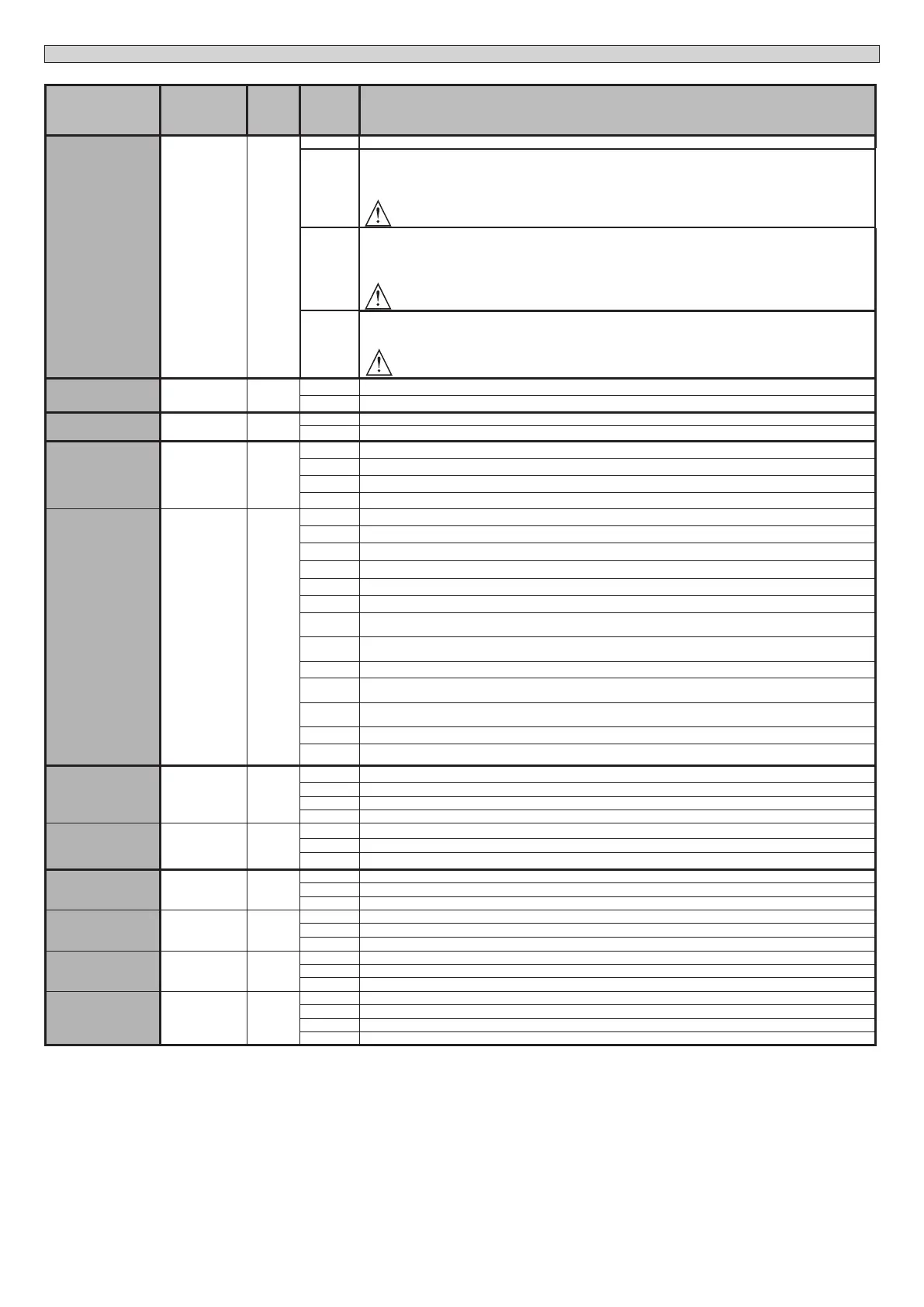
Logic Denition
Default
Cross
out
setting
used
Optional extras
HOLD-TO-RUN
Deadman 0
0 Pulse operation.
1
Deadman mode.
Input 61 is congured as OPEN UP.
Input 62 is congured as CLOSE UP.
Operation continues as long as the OPEN UP or CLOSE UP keys are held down.
WARNING: safety devices are not enabled.
2
Emergency Deadman mode. Usually pulse operation.
If the board fails the safety device tests (photocell or safety edge, Er0x) 3 times in a row, Deadman mode is
enabled which will stay active for 1 minute after the OPEN UP - CLOSE UP keys are released.
Input 61 is congured as OPEN U P.
Input 62 is congured as CLOSE UP.
WARNING: with the device set to Emergency Deadman mode, safety devices are not enabled.
3
Dead-man function during closing.
The input 61 is congured as OPEN UP.
The input 62 is congured as CLOSE UP.
The opening manoeuvre occurs automatically, the closing manoeuvre continues until the control button (CLOSE) is pressed.
WARNING: safety devices are not active during the opening.
IBL OPEN
Block pulses du-
ring opening
0
0 Pulse from inputs congured as Start E, Start I, Ped has eect during opening.
1 Pulse from inputs congured as Start E, Start I, Ped has no eect during opening.
OPEN IN OTHER
DIRECT.
Open in other
direction
0
0 Standard operating mode (See Fig.C1).
1 Opens in other direction to standard operating mode (See Fig. C1)
SAFE 1
Conguration
of safety input
SAFE 1.
72
6
0 Input congured as Phot (photocell).
1 Input congured as Phot test (tested photocell).
2 Input congured as Phot op (photocell active during opening only).
3 Input congured as Phot op test (tested photocell active during opening only).
SAFE 2
Conguration
of safety input
SAFE 2.
73
4
4 Input congured as Phot cl (photocell active during closing only).
5 Input congured as Phot cl test (tested photocell active during closing only).
6 Input congured as Bar, safety edge.
7 Input congured as Bar, tested safety edge.
8 Input congured as Bar 8k2. (Inactive on SAFE 2).
9 Input congured as Bar OP, safety edge with inversion active only while opening. If while closing, the movement stops.
10
Input congured as Bar OP TEST, safety edge tested with inversion active only while opening. If while closing, the
movement stops.
11
Input congured as Bar OP 8k2, safety edge with inversion active only while opening. If while closing, the movement
stops. (Inactive on SAFE 2).
12 Input congured as Bar CL, safety edge with inversion active only while closing. If while opening, the movement stops.
13
Input congured as Bar CL TEST, safety edge tested with inversion active only while closing. If while opening, the
movement stops.
14
Input congured as Bar CL 8k2, safety edge with inversion active only while closing. If while opening, the movement
stops. (Inactive on SAFE 2).
15 Not used
16 Input congured as STAR 8k2. (Inactive on SAFE 2).
IC 1
Conguration
of command
input IC 1.
61
0
0 Input congured as Start E.
1 Input congured as Start I.
2 Input congured as Open.
3 Input congured as Close.
IC 2
Conguration
of command
input IC 2.
62
4
4 Input congured as Ped.
5 Input congured as Timer.
6 Input congured as Timer Pedestrian.
1ch
Conguration
of the 1st radio
channel com-
mand
0
0 Radio control congured as START E.
1 Radio control congured as Start I.
2 Radio control congured as Open.
2ch
Conguration
of the 2nd
radio channel
command
4
3 Radio control congured as Close
4 Radio control congured as Ped
5 Radio control congured as STOP
3 ch
Conguration
of the 3rd
radio channel
command
9
6 Not used
7 Not used
8 Not used
4 ch
Conguration
of the 4th
radio channel
command
12
9 Radio control congured as AUX3 **
10 Radio control congured as EXPO1 **
11 Radio control congured as EXPO2 **
12 Radio control congured as COURTESY LIGHT
ARGO BT A 20-35 - 23
D814038 0AA00_03




 To Next Page