ENGLISH
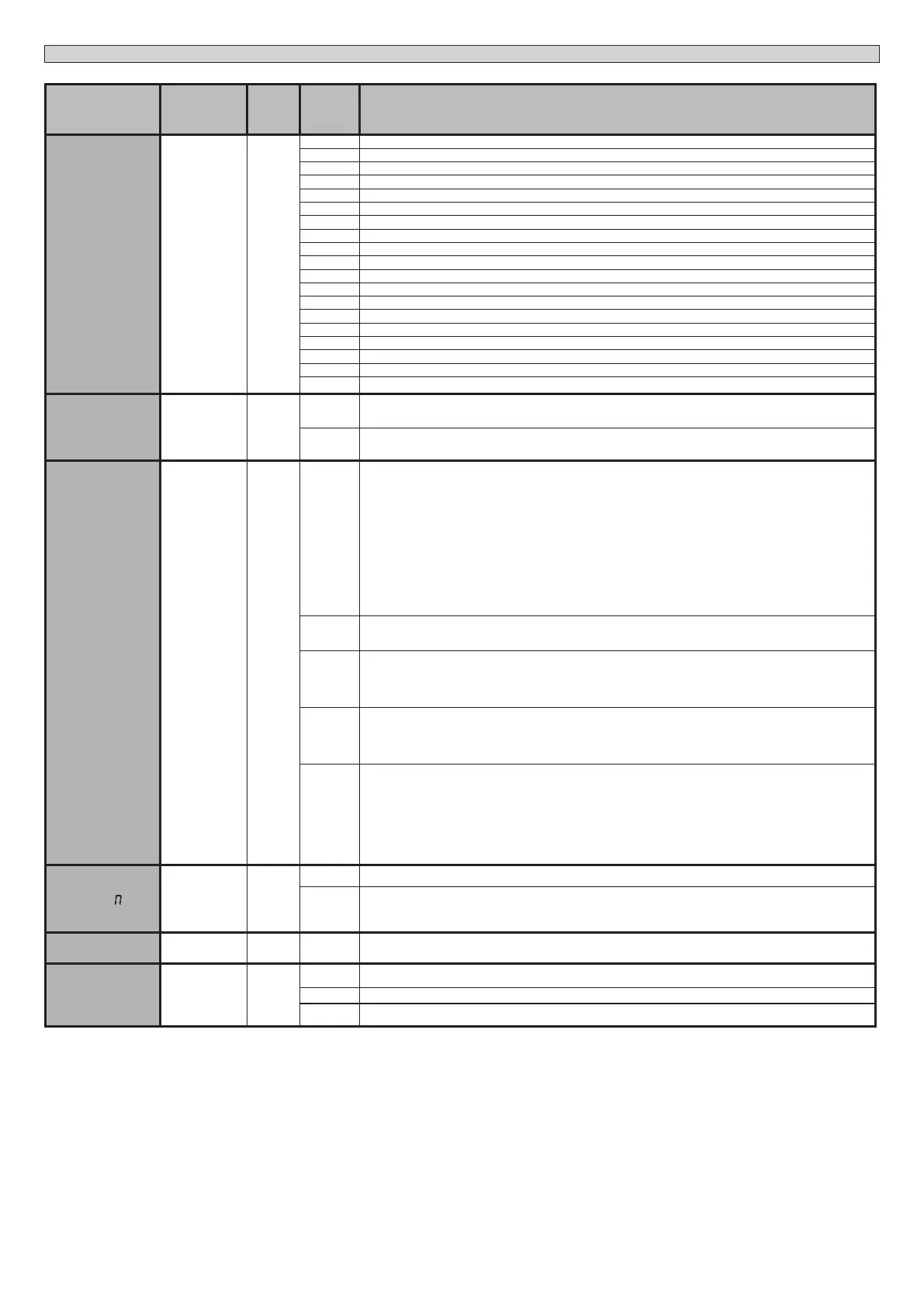
Logic Denition
Default
Cross
out
setting
used
Optional extras
AUX 3
Congura-
tion of AUX 3
output.
26-37
17
0 Output congured as monostable Radio Channel.
1 Output congured as SCA (gate open light).
2 Output congured as Courtesy Light command.
3 Not used
4 Not used
5 Not used
6 Not used
7 Not used
8 Not used
9 Output congured as Maintenance
10 Not used
11 Not used
12 Not used
13 Output congured as closed Gate Status
14 Output congured as Bistable Radio Channel
15 Output congured as timed Radio Channel
16 Output congured as open Gate Status
17 Output congured as Output 1 PROGRAMMABLE IN HEIGHT
18 Output congured as Output 2 PROGRAMMABLE IN HEIGHT.
FIXED CODE
Fixed code 0
0
Receiver is congured for operation in rolling-code mode.
Fixed-Code Clones are not accepted.
1
Receiver is congured for operation in xed-code mode.
Fixed-Code Clones are accepted.
Protection
level
Setting the
protection level
0
0
A - The password is not required to access the programming menus
B - Enables wireless memorizing of transmitters.
Operations in this mode are carried out near the control panel and do not require access:
- Press in sequence the hidden key and normal key (T1-T2-T3-T4) of a transmitter that has already been memori-
zed in standard mode via the radio menu.
- Press within 10 sec. the hidden key and normal key (T1-T2-T3-T4) of a transmitter to be memorized.
The receiver exits programming mode after 10 sec.: you can use this time to enter other new transmitters by
repeating the previous step.
C - Enables wireless automatic addition of clones.
Enables clones generated with the universal programmer and programmed Replays to be added to the recei-
ver’s memory.
D - Enables wireless automatic addition of replays.
Enables programmed Replays to be added to the receiver’s memory.
E - The board’s parameters can be edited via the U-link network
1
A - You are prompted to enter the password to access the programming menus
The default password is 1234.
No change in behaviour of functions B - C - D - E from 0 logic setting
2
A - You are prompted to enter the password to access the programming menus
The default password is 1234.
B - Wireless memorizing of transmitters is disabled.
C - Wireless automatic addition of clones is disabled. No change in behaviour of functions D - E from 0 logic
setting
3
A - You are prompted to enter the password to access the programming menus
The default password is 1234.
B - Wireless memorizing of transmitters is disabled.
D - Wireless automatic addition of Replays is disabled.
No change in behaviour of functions C - E from 0 logic setting
4
A - You are prompted to enter the password to access the programming menus
The default password is 1234.
B - Wireless memorizing of transmitters is disabled.
C - Wireless automatic addition of clones is disabled.
D - Wireless automatic addition of Replays is disabled.
E - The option of editing the board’s parameters via the U-link network is disabled.
Transmitters are memorized only using the relevant Radio menu.
IMPORTANT: This high level of security stops unwanted clones from gaining access and also stops radio interfe-
rence, if any.
SERIAL ODE
Serial mode
(Identies how
board is con-
gured in a BFT
network
connection).
0
0 Standard SLAVE: board receives and communicates commands/diagnostics/etc.
1 Standard MASTER: board sends activation commands (START, OPEN, CLOSE, PED, STOP) to other boards.
ADDRESS
Address 0 [ ___ ]
Identies board address from 0 to 119 in a local BFT network connection.
(see U-LINK OPTIONAL MODULES section)
revers.obst
Reversing
obstacle
0
0
During closure, after an obstacle is detected, the movement gets reversed for 2 seconds.
During opening, after an obstacle is detected, the manoeuvre gets interrupted and the automation is blocked.
1 Both while closing as well as opening, after an obstacle is detected, the movement gets reversed for 2 seconds.
2
After detecting an obstacle during closure, it re-opens completely.
After detecting an obstacle during opening, the manoeuvre gets interrupted and blocks the automation.
24-ARGO BT A 20-35
D814038 0AA00_03




 To Next Page