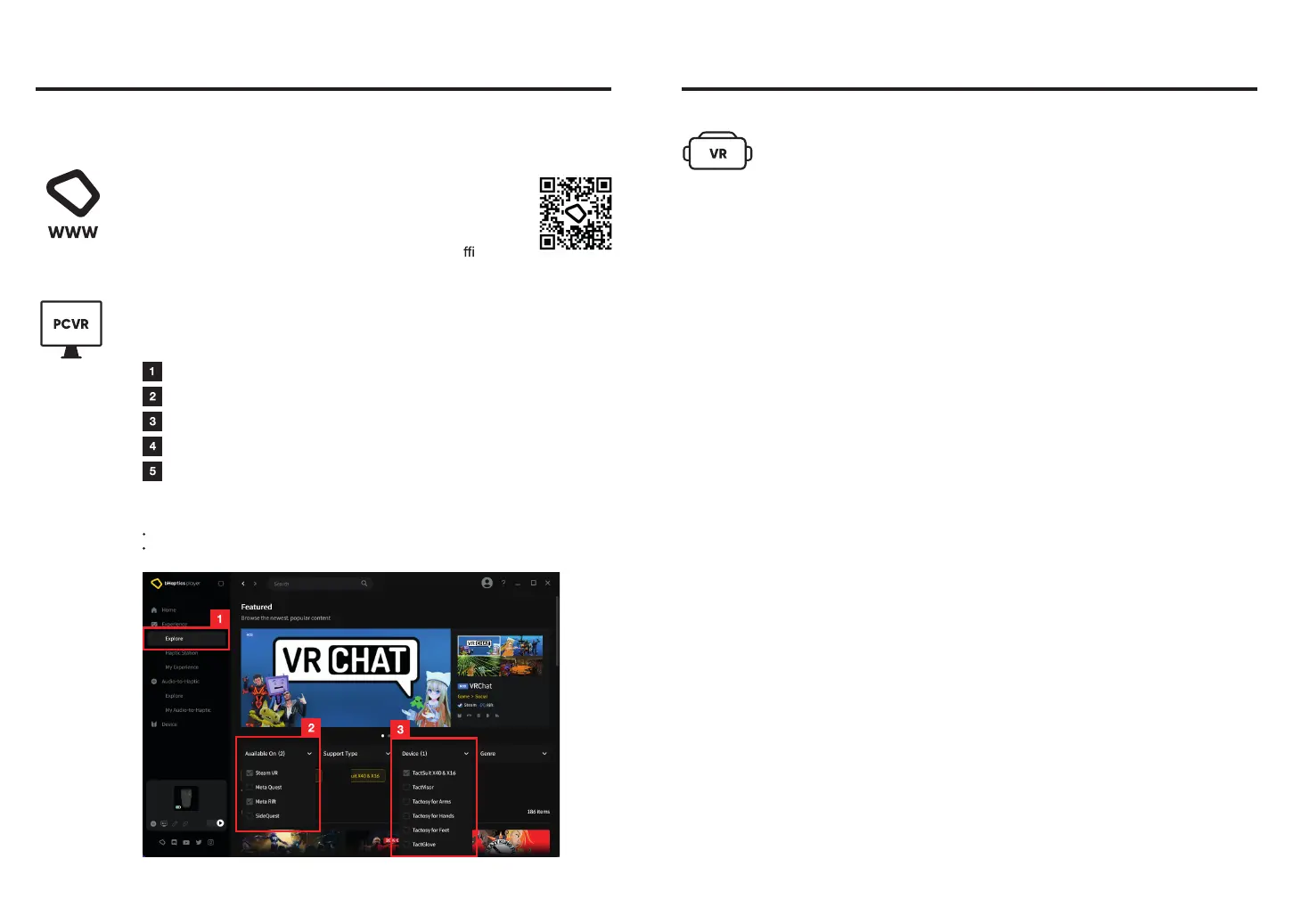
Explore Natively Supported Games (Experience > Explore)
Open the "Available On" filter and select Steam VR and/or Meta Rift.
Open the "Device" filter and select "TactSuit X40 & X16."
Check out the list of games available for PC VR and TactSuit.
Connect your TactSuit and enjoy playing games on Steam or
Meta Rift.
Explore Natively Supported Games (Experience > Explore)
PC - bHaptics Player
You may need to enable 'Haptics' or 'bHaptics' option in the game settings.
Some games may require modding and installing additional programs.
Note:
You can check the most up-to-date list of natively
supported games and detailed information such as
supported platforms and bHaptics device on the o cial
bHaptics website. (https://www.bhaptics.com/experiences)
Web - bHaptics Website
Enjoy a gaming experience like never before by playing natively supported content
that delivers optimized haptic feedback for each in-game event.
Play Natively Supported Games
16
Game List
Standalone VR (Meta Quest Headsets)
1. Launch a natively supported Quest title. TactSuit will be automatically
connected when it is turned on.
2. Enable Haptics/bHaptics in the game settings and enjoy optimized
haptic feedback.
3. Enjoy the optimized haptic feedback with the game!
17



 To Next Page