INSTALLATION COMFORT CIRCLE
24
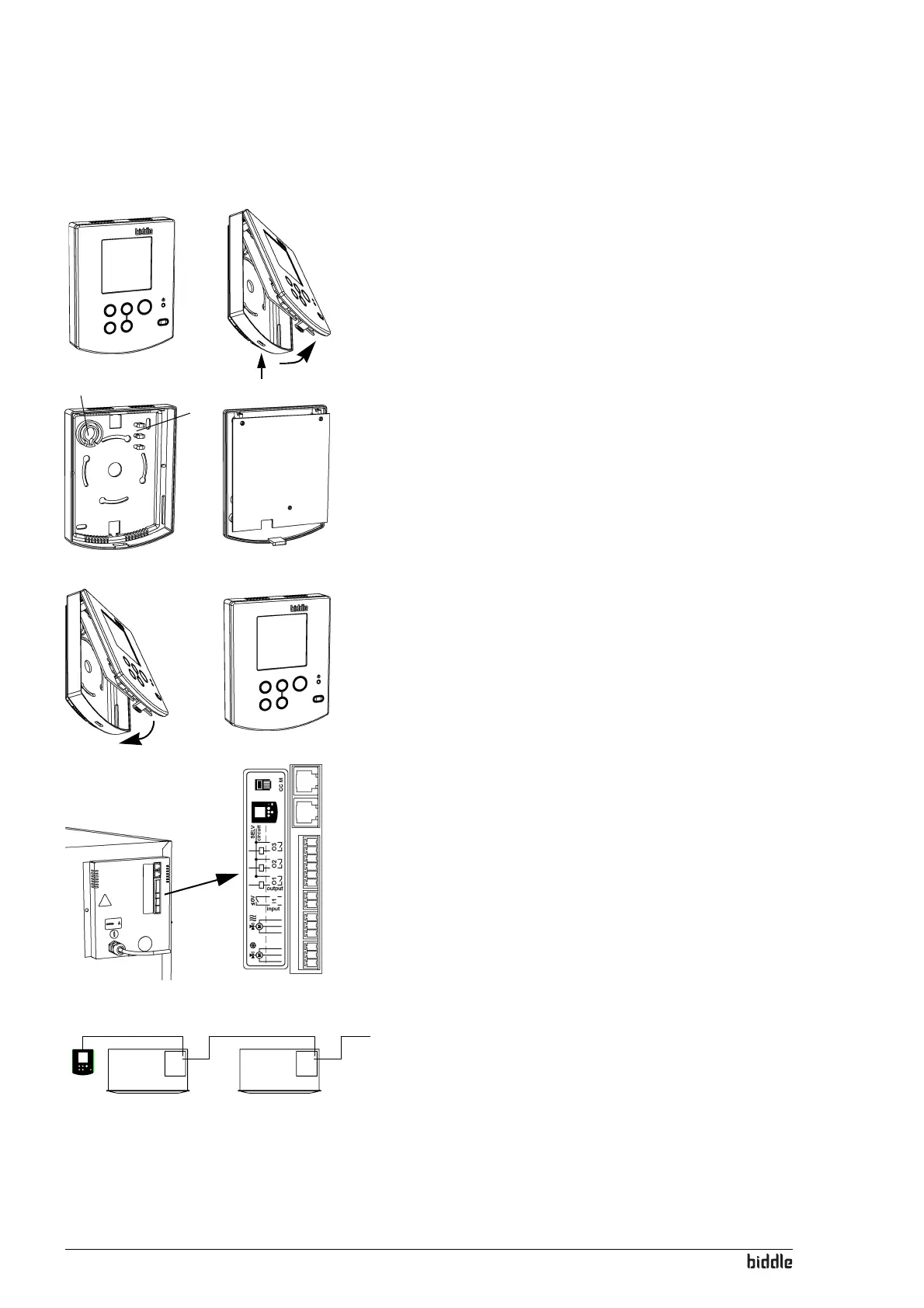
2.13.2 Mounting and connecting the controller
1. Lay the control cable.
2. If the external-control input in the controller is used (see
section
2.15.2):
Lay the necessary cabling. The cable core diameter is not
to exceed 0.75
mm² AWG 20.
3. Open the controller 1.
4. Lead the control cable and the external control cable (if
any) through the back plate.
5. Screw the back plate onto the socket or the wall.
6. Lead the cable/s through the pull reliefs.
- The upper left pull relief 2 is designed for the control
cable, and the upper right pull relief
3 for the external-
control cable.
- The cable must protrude some 9cm from the pull relief.
7. Couple the connector to the PCB 4.
8. Connect the external-control cable (if any) to the terminal
on the PCB 5.
9. Put the front onto the back plate.
2.13.3 Connecting the controller to the unit
The controller sockets 1 and 2 are located in the connec-
tor plate on the front side of the unit. The two sockets are
identical.
1. Connect the control cable to the free socket 1 or 2.
Multiple units operated from one controller
1. Interlink the units: connect the control cables to 1 and 2.
1
2
3
5
4
1
2



 To Next Page