5
2 INSTALLING YOUR PHONE
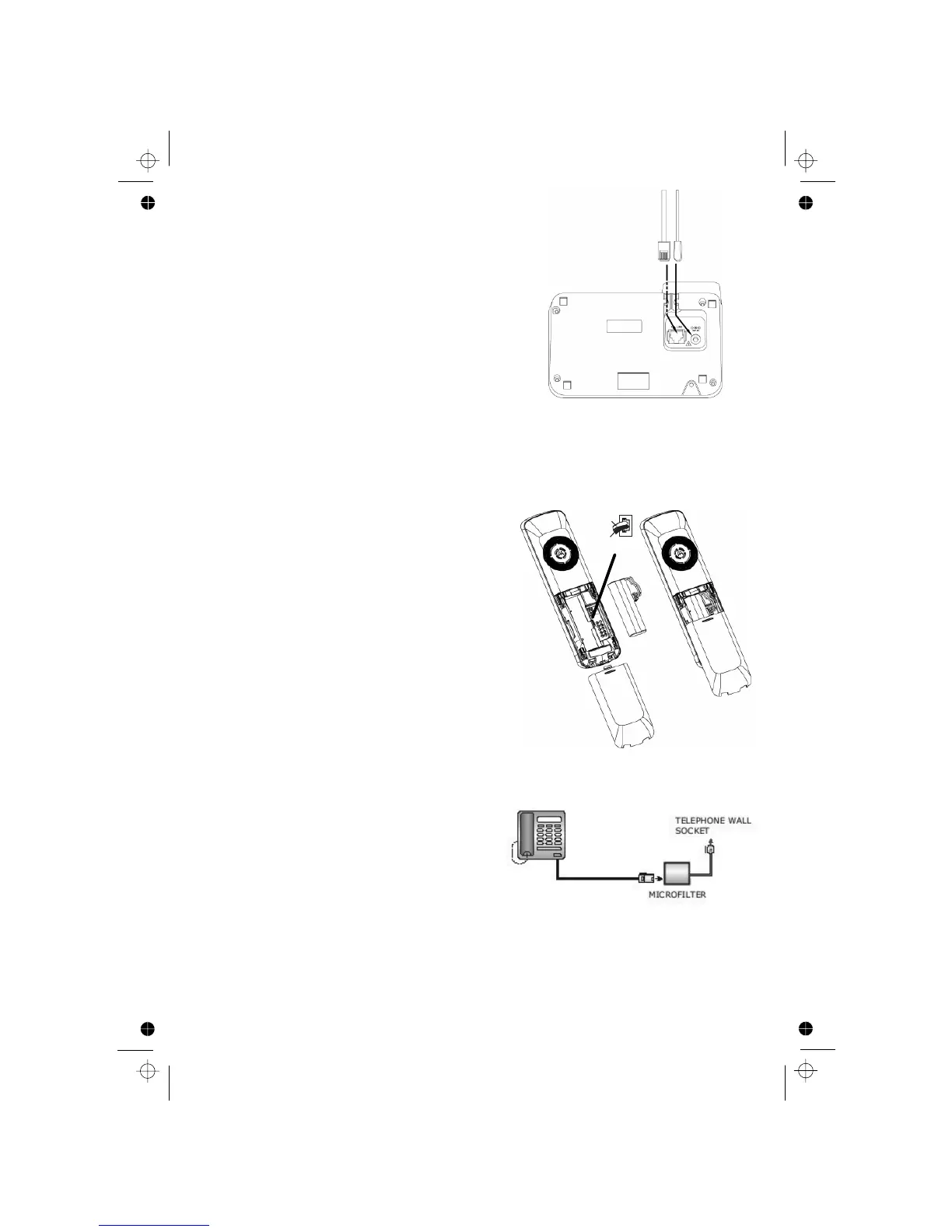
2.1 Connecting the base station
1) Plug the power supply
and line cord
into
2) Plug the power adapter into a 230Vac,
3) Always use the cables provided in the box
Warning
other power supplies may cause a hazard.
and the line cord into
the base station.
50Hz mains socket,
2.2 Installing and charging the batteries
3) Put the handset on the base and charge
If you have a
Broadband line
If you connect your telephone to a line with
insert a micro-filter between the telephone
and the telephone line, otherwise you may get
interference between the telephone and the broadband,
which could cause problems.
a broadband connection, you will need to
Warning: Install the base unit in a position where the mains adapter plug
will reach an
easily accessible mains socket. Never try to lengthen the
mains power cable.
Note: The base unit needs mains power for normal operation, not just for
charging the handset batteries.
Use only the NiMH rechargeable battery
2) Position the battery compartment cover
The handset will give a beep when it is
In a home with broadband, every telephone must have a micro-filter connected,
not just the one at the telephone point that your modem is connected to.
If you need more broadband micro-filters, contact your broadband supplier.
your telephone line socket.
1) Place the supplied battery pack into the
battery compartment with the connector
fully inserted as shown
type provided.
over the batteries and slide up to click
into place.
for 15 hours before using the handset for
on the base or charger.
the first time.
properly placed
RED
BLACK












 To Next Page