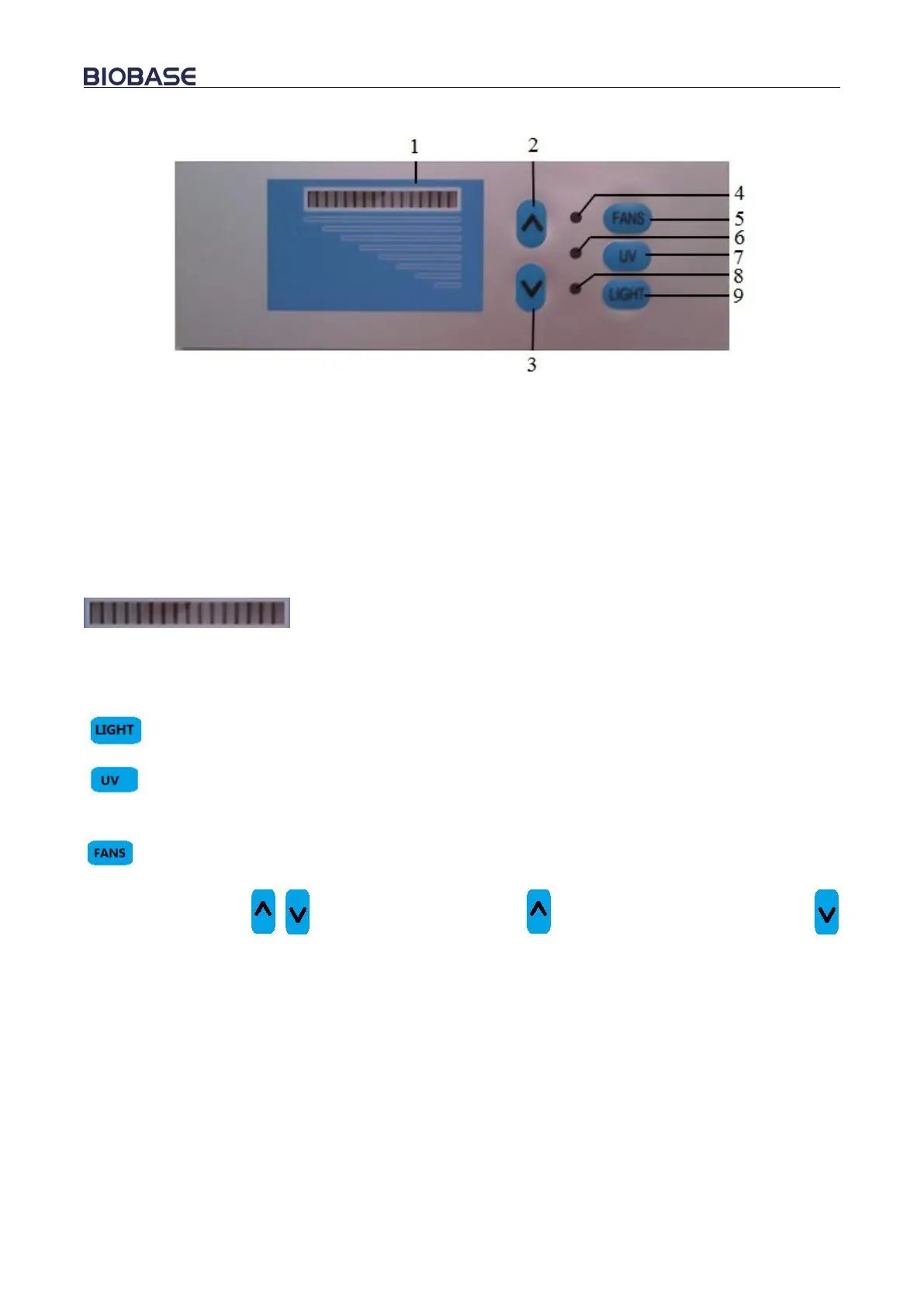
Picture 10
1.Gear Indicator 2.Increase Air Velocity
3.Decrease Air Velocity 4. Fan indicator
5.Fans 6.UV Indicator
7.UV 8.Light Indicator
9.Light
a) Gear indicator
To see air speed gears of the equipment through gears indicator.
b) Soft touch buttons
Main functions all could be executed either by touch pressing.
: To control lamp
: To control UV lamp. UV lamp, fans and LED lamp are interlocked. UV lamp will
automatically turn off when open the fans or LED lamp.
: To control blower during working
Air velocity control ( ): During working, button to increase air velocity; button
to decrease air velocity.
6) Fuse protector
The cabinet is equipped with main power fuse. For double-pane window, it is located beside the
power cord’s outlet. For single glass, they are both located at the back of the power cord’s outlet.
Fuse label is corresponding to the relevant specifications. Please refer to 3.5.1 and picture 3.2 when
changing fuse protector.
7) Control of front window
Front window is controlled by constant force spring. It can be stably stopped at any height during
allowed height. It still can be controlled and take out samples inside when power off.
8) Structure


 To Next Page