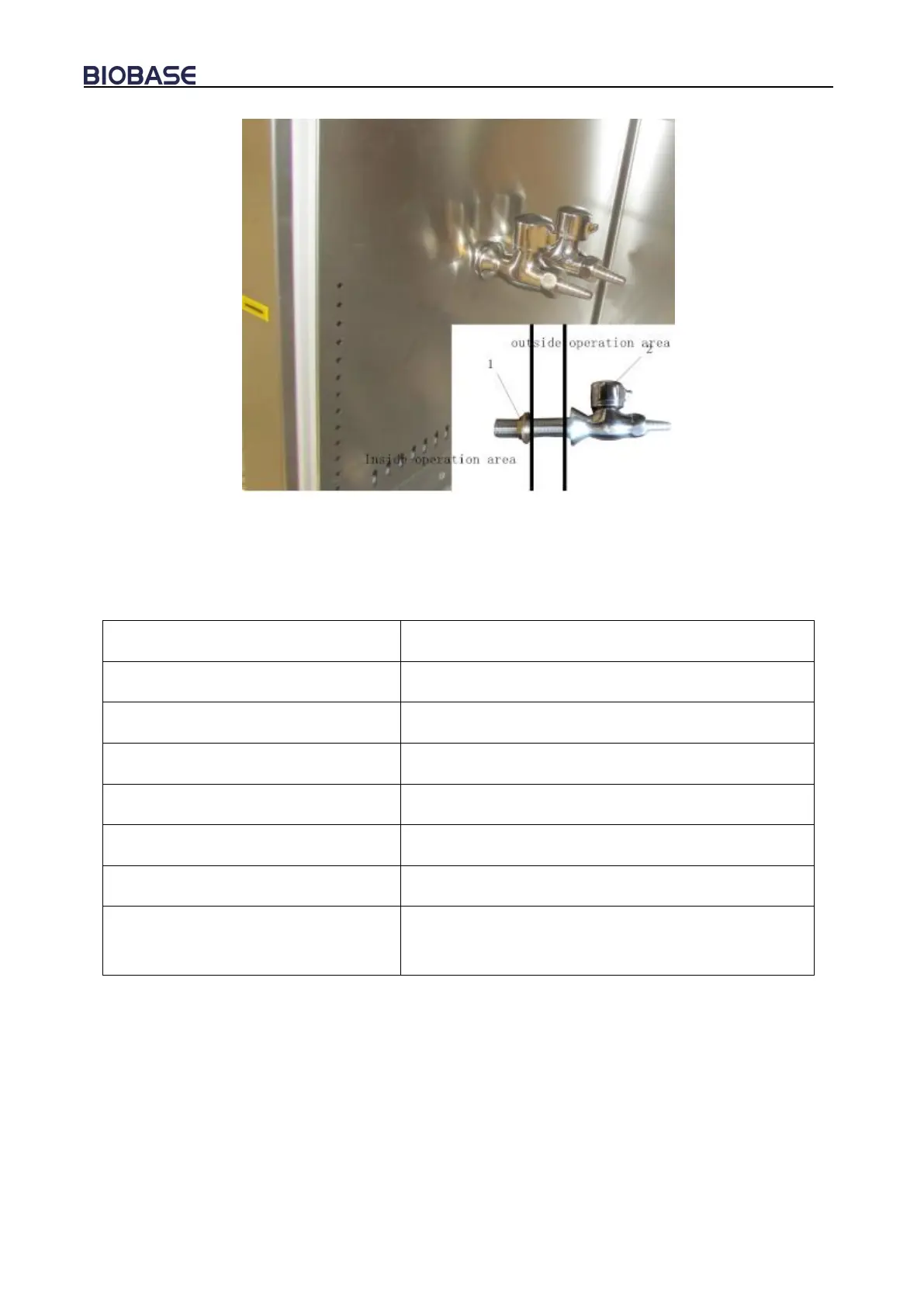
Picture 9
1. Tighten nut 2.The tap/gas tap
Pick up the water tap, gas tap and tightening nut, install as shown in Picture 9.
1.5 Checking after installation
Inflow 0.53m/s, downflow 0.33m/s
exhaust filter80-120Pa, downflow filter 80-120Pa
Lamp lights after pressing button
Lamp lights after pressing button
Press the socket key, multimeter testing output
supply voltage
1) Connect the Biosafety Cabinet dedicated power line to power outlet on the ground, electric
current is 9A, Biosafety Cabinet must be the only equipment on the circuit to ensure that does not
exist in any other equipment, see the electrical equipment requirements data in the cover.
2) Open the Fan key on Control Panel; fans will take some delay in order to achieve the required
speed. And in order to prevent too much current, the fans need a delay of about 10-15S in order to
achieve full speed before motor running. Similarly, the fans also need 10-15S delay to stop. Stable
voltage is provided by built-in voltage regulator circuit for the motor / blower, thus eliminate air
fluctuations.
Note: Please stop the fan before shut off power.


 To Next Page