12
12. Plug the PC power cord and Display Monitor power cord into the power strip. Set the power switch on the Power Strip
to the ON position.
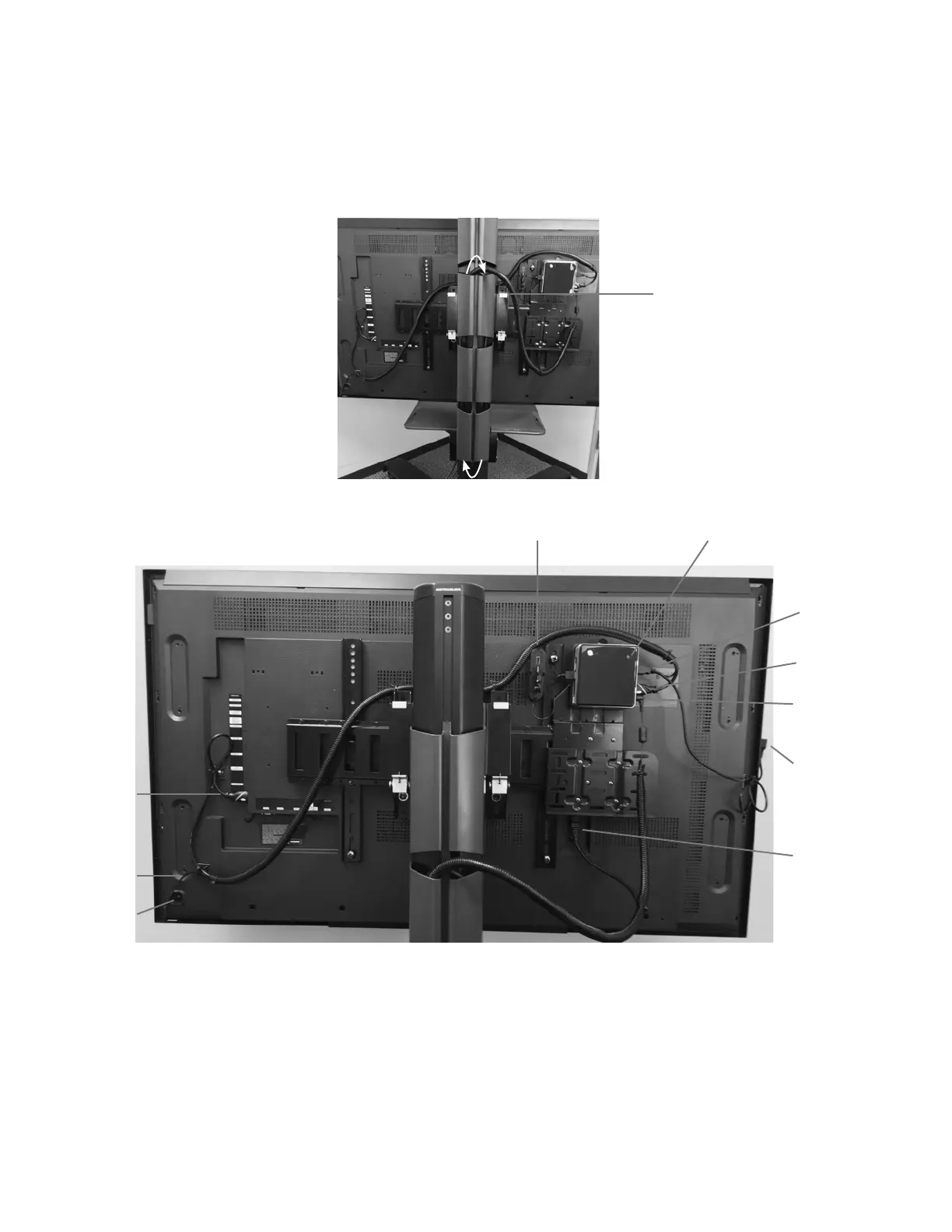
13. Raise and lower the position of the Display Monitor on the display stand to verify that the wire loom with cables can
move freely with the monitor. If the cables cannot move freely, then adjust the length of wire loom that was inserted
into the tower covers.
14. Wind the excess cable length of the PC power cord, and wrap it with the attached cable strap.
Note: Final cable management assembly may differ depending on Display Monitor size.
Figure 15: Wire Loom Inserted into Left Side of the Tower Covers
Figure 16: Example of BITS with Completed Cable Management
Moving the BITS Display Stand
After the BITS hardware has been installed, the system will need to be moved to the location designated for therapy sessions.
To move the portable display stand:
1. Carefully push the touchscreen display monitor down to the lowest position on the tower of the portable display stand.
See Figure 17.
Slack in Wire Loom
Touchscreen
USB Cable
Touchscreen
Panel Key
HDMI Cable
Touch Screen
USB
PC Power
Adapter and
Power Cable
Display Monitor
Power Cable
USB Extension
Port



 To Next Page